


google inside search

Google Images Related Searches Update

Google Related Search

Google have had the feature of related searches for quite some time now. One can remember seeing blue links at the top of image search results suggesting possible search terms the user would be interested in. This feature has been explained in the Google Inside search blog as ‘Helping you find what’s in the mind’s eye’.

Now to make this feature more visually appealing and to give more options for Google image search users, now they have added a hover feature. This hover feature will present before users a panel of images once we mouse over the related search terms.

For instance if you search for the term Soccer then you can see related terms at top like soccer ball, funny soccer, soccer player and soccer field. If you hover (mouse over) soccer player then you can see a panel displaying a set of images for that term


Google Related Search Hover

Tags: , ,

Monday, February 20th, 2012 google, google inside search No Comments

Google Reveals New Tweaks

The search engine giant is the decision maker for all businesses online. The search algorithm employed by them has always remained a secret. Now Google has revealed some of its latest tweaks in the insidesearch Google blog.

Google ranking is decided by over 500 factors and it’s actually almost impossible to find all of them with the latest updates and tweaks made by Google every year. Google has always maintained it though instead of creating a website for search engines, if we create one for the user we automatically get the top ranking.

Given these facts the latest tweaks would still arouse interest to the webmasters around the world. Here is a sneak peek at 3 points which will arouse interest to all

Snippets Optimized:

Now Google is focused presenting more informative snippets directly related to the page content instead of the content from headers and menus.

More user friendly application snippets

The search for software and applications will now yield better snippets with pricing and user reviews/comments

Official pages boosted

Google always likes to give a boost to authoritative sites for specific queries and this recent tweak mentions it will be giving an extra boost to the official sites further boosting its ranking.

Google always tries to have the last say and once the whole ten points were mentioned this is what Matt cutts had to say

“If you’re a site owner, before you go wild tuning your anchor text or thinking about your web presence for Icelandic users, please remember that this is only a sampling of the hundreds of changes we make to our search algorithms in a given year, and even these changes may not work precisely as you’d imagine. We’ve decided to publish these descriptions in part because these specific changes are less susceptible to gaming.”

So for the full inside scoop check it out in the Google inside search blog

Tags: , ,

Monday, November 14th, 2011 google, google inside search No Comments

How to raise your search ranking after panda update

1. The <Title> Tag – Your search rankings reflects in your title tag and being one of the important on page factor, the title tags should be used properly and there are some steps to be followed in placing your title tag. Placing your keyword to the left ranks better than placing it towards the right and make sure that your keyword makes sense and not exceeding more than 70 characters.

2. <H1><H2><H3> Tags – Header tags always have some value and it should be different from your title tag and should depict the text below them. Among the different header tags, the H1 tag has the most SEO value since it depicts the main title of the page.  is the  These header tags should be used for headlines to your content. They should be different than your <title> tag and should accurately depict the text written below them, but after the recent panda update it is not absolutely necessary. Following the H1 tags are H2 and H3 tags which are the sub headings of the page and based on the content of your page create few headings so that you can see some improved search rankings.

3. Alt Attribute & File Names –Image optimization is essential and make sure that you give alt attribute with relevant keywords so that the accessibility of your page improves and it gives a clear description of what the image is about. Also, naming your file with relevant keyword may sound strong in terms of optimization.

4. The Meta Description Tag – Though Google does not give value to the Meta keywords and Meta description, it can be useful to improve the click through ratio. You can have 150 characters as your Meta description including spaces and it tells the user what the page is about. Try to emphasize your keywords on the Meta description, so when users search, the keywords will be bolded and make you’re listing more attractive.

5. Keywords in the text – Your keywords need to be placed throughout the page in a way that it makes sense to readers and it is good to place your keywords once every 150 words. Avoid placing long tail keywords especially keywords with 4 or more words and make sure that you give the users a better reading experience by not stuffing your keywords by sacrificing keyword density.

6. Video Optimization – Have videos that are relevant to your website and include a link to your home page in the profile section. Upload a video in YouTube and get the embedded codes and place it in your website and give relevant title based on the keywords of the page. Place a link back to your page through description field of that video and optimize it perfectly by embedding the video above the fold so that it can be easily viewed without scrolling it.

7. Image Optimization – Most of us do not give importance to image optimization, but it is essential to give importance to image optimization. Apart from optimizing your file names attributes, reduce your file size too. Don’t make your website too long to load and if your website takes more than 1.5 seconds to load, then either try to consider switching hosts or reducing image file sizes. Don’t use copyrighted images since it’s not only illegal, it can also hurt the SEO value of your page.

8. Outbound Links – The outbound links have vital role in overall linking strategy and your website should have authoritative and relevant links. Getting links from .edu and .gov sites get you lots of traffic and having your link placed in these websites improve your search rankings and are very beneficial for SEO.

9. Internal Links – Internal links are generally the navigation elements in a document and the search engine give more importance to internal linking structure. Make your website easily navigable by search engine bots and users by linking your website to another section on the same web page

10. Grammar & content length – The recent panda update gave more importance to the content and the grammar and content length of the page matters and many websites have been penalized by search engines due to poor grammar. So make your page perfect with proper grammar and content length and avoid damaging the entire website rankings.

Thursday, September 8th, 2011 Blogging, google inside search No Comments

Google Sitelinks

What is google site links?

Sitelinks are created robotically, and are intended to offer search engine users with more valuable search results.

When it is orginated?

In the year 2005, Google go ahead by researching with an improved listing in their organic search results that can enhance a site’s visibility and reputation, and drive more traffic.

Sample snippet of google sitelinks
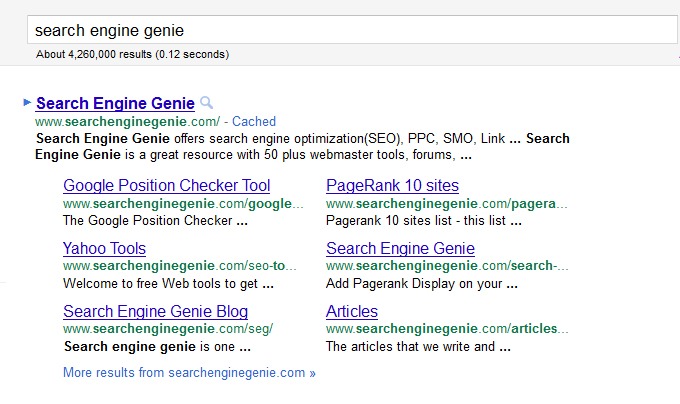
sitelinks

How to access sitelinks?

  • Log in with your webmaster tools account.
  • On the Webmaster Tools Home page, click the site you want.
  • Under Site configuration, click Sitelinks.
  • You will view the sitelinks listed by google.
  • One can block the links as per his/her wish. Google webmasters call this as “demote of links”.
  • We can’t add link of our own. Google sitelinks were automated ones.
  • How google site links benefit websites?

  • Increase a site’s visibility
  • Increase a site’s reputation
  • Provide more traffic
  • Help users navigate your site
  • Get a better understanding of what the site is about before they visit
  • Take a shortcut from Google to the topic that interests them
  • Tags:

    Google Inside Search Innovations

    Google has been the giant among search engines and they continue to develop themselves by innovating new ideas. The latest scoop they serve us is the Google inside search. The first enhancement will be a dream coming true for the visually impaired and the people who are tired of typing. Now you can speak search in Google, download Google chrome and go to Google.com. You will find a mic on the search bar, just click on it and find your search results without using your keyboard.

    voice search

    The second feature is the image search. Similar to the mic on the search bar you can see a camera when you visit http://images.google.com/ . Click on it and you will find the image search active, you can either paste the url of an image, upload an image or just drag and drop an image on the searchbar to get your image search results.

    search image

    Walk-through all Google inside search features in this link Google Inside search

    The third feature is instant pages feature which is enabled by prerendering technology. Prerendering is the technology where a site may be able to predict what the user would click preferably. If the user is on a site where e is reading a sports update and it goes on to the next page, then the user is most likely to click on it. Prerendering technology predicts it and loads the page instantly based on user activity. This is what Google are trying to get into action by predicting the search result the user is most likely to click based on analysis and traffic with the help of Google webmaster tools.

    Watch Google search with instant pages

    Tags: , , , , ,

    Monday, August 29th, 2011 google inside search No Comments