




Archive for April, 2011
Improve Your Adwords Performance With 5 Simple Ways
With the recent international launches of the Ad Innovations site, there are a few simple things you can do to quickly to improve the performance of your AdWords ads. The tips are as follows.
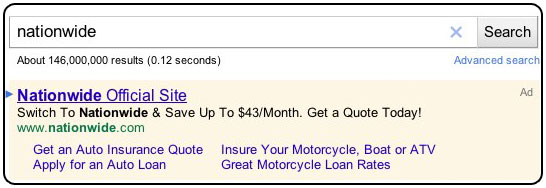
Enable Ad Sitelinks
Ad Sitelinks permit you to extend the value of your existing AdWords ads by providing additional links to specific, pertinent content deeper within your site. Rather than sending all users to the same landing page, Ad Sitelinks will show up to four additional destination URLs for users to choose from. On average, advertisers see a 30% raise in clickthrough rate (CTR) for the same ads with Ad Sitelinks.
Optimize your ad text for longer headlines
Google recently made a change to top ads that allow you to display more information where it’s most probable to be noticed–in the headline. By taking information from the first description line and moving it to the headline, we it is possible to improve advertiser performance. In fact, ads with longer headlines receive a 6% average increase in CTR compared to the same ads with a normal headline and description. To increase the chances that your ad will appear with the longer headline, make sure that description line 1 is an absolute phrase or sentence and ends in punctuation (e.g., a period or question mark).


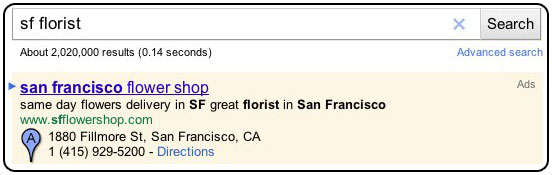
Link a Google Places account to a campaign to show location extensions
Location extensions permit you to widen your AdWords campaigns by dynamically attaching your business address to your ads. In addition to the description lines and URL that appear in your ad text, your ad can also exhibit your business name, address, and phone number. This helps endorse your business brand, products, and services and connections your business with a specific location of interest to the user.
By linking a Google Places account to your AdWords ads, you can fast and easily make sure all your location information is accessible when it’s most relevant.
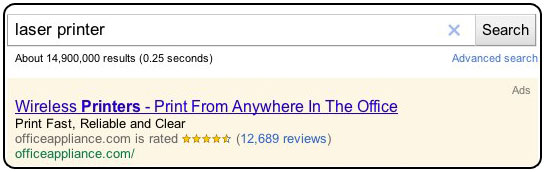
Get reviewed to show Seller Rating Extensions
Seller rating extensions make it easier for potential customers to recognize highly-rated merchants when they’re searching on Google.com by attaching your merchant star rating from Google Product Search to your AdWords ads. These star ratings, aggregated from review sites all around the web, let people to find merchants that are extremely recommended by online shoppers like them. On average, ads with Seller Ratings get a 17% higher CTR than the similar ads without ratings.
- Regularly ask your users for reviews (e.g., in confirmation emails after purchases)
- Make it simple for users to review you–include links to your site’s page on the third-party review sites used by Seller Rating Extensions.
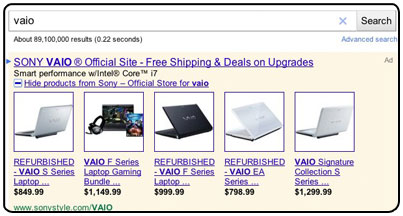
Link a Merchant Center account to a campaign to show product extensions
Product extensions are a way for you to supplement your existing AdWords ads with more relevant and exact information about your retail merchandise. Product extensions permit you to use your existing Google Merchant Center account to highlight your products directly in your search ads.
Google’s Latest Innovation In Advertising
Google has introduced new site its latest innovations in advertising. Ad Innovations is a professional website Google has set up to “work closely with advertisers on what comes next.” They propose to use the space to debut ad-tech ideas and solicit user feedback.
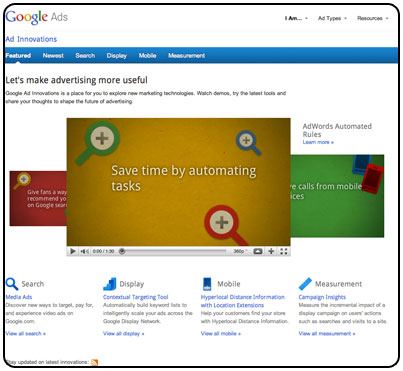
You can watch demos, try the newest tools, and share your feedback. The Ad Innovations is now live in six new countries: the United Kingdom, Germany, Spain, France, Italy, and Brazil.
And for those of you in the US, you’ll note that Ad Innovations has a new look! Google told that this updated new design will be live for all Ad Innovations in the next few months.
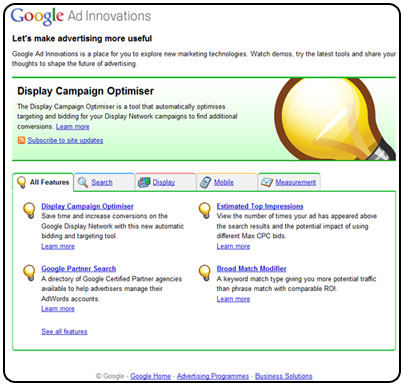
Whether you’re most interested in search, display, mobile, or performance measurement, this new site will be able to find a number of AdWords features to help you stay on top of the newest advertising developments.
Introducing +1 Buttons In Adwords
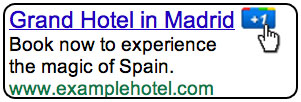
You can get no better recommendation than one from a friend. On the Internet, everyone can suggest content to friends using the Facebook “Like” button. Now Google also want to help you make recommendations with their new +1 button. However, Google’s button comes with a twist. It will be included within AdWords ads.
+1 is a simple idea. In order to understand how this new feature might work, let us look at an example.
When Brian signs into his Google account and see one of your ads or organic search results on Google, he can +1 it and recommend your page to the world.
The next time Brian’s friend Andrew is signed in and searching on Google and your page appears, he might see a personalized annotation letting her know that Brian +1’d it. So Brian’s +1 helps Andrew decide that your site is worth checking out.
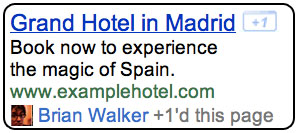
Google says that there is no strategy to use the +1 button as part of the calculation for Quality Score. However, a well-recommended ad should see a big boost in click-through-rate. You could therefore see an in-direct advantage on your Quality Score and the price you have to pay in order to bid on a particular keyword.
Currently, the +1 button is being rolled out only on Google.com. You do not have to make any changes to your account. The button will be incorporated in your ads when available. Other languages are being worked on and you can be expecting further releases to be announced soon.
Google Blimp Ads – An Innovative Adwords Approach
Google released a new ad delivery system that has the potential to transform the advertising world.
This is going to be the big chance for advertisers to increase up their sales. In near future you are going to see Google Ad Balloons in every city flying with advertisements screen on it.

With Blimp Ads, you can target your customers in exciting new ways. Specify the height and location of the blimp, as well as the time you want the ad to go on. You can even target special events like football games, outdoor concerts, meteor showers, and more!
For those of you who are wondering if you need a separate account for gBlimp ads, the good news is that you’re current Adwords account will work just fine for gBlimp and permit you to reach a completely new market.