




What Is JWT Authentication and How Does It Work?
Modern websites and applications often need a secure way to identify users after they log in. Whether it is a dashboard, ecommerce account, mobile app, or API, the system needs to know who the user is and what they are allowed to access.
One common method used for this purpose is JWT authentication.
JWT, short for JSON Web Token, is widely used in web applications because it provides a simple way to send verified user information between a client and a server.
What Is JWT Authentication?
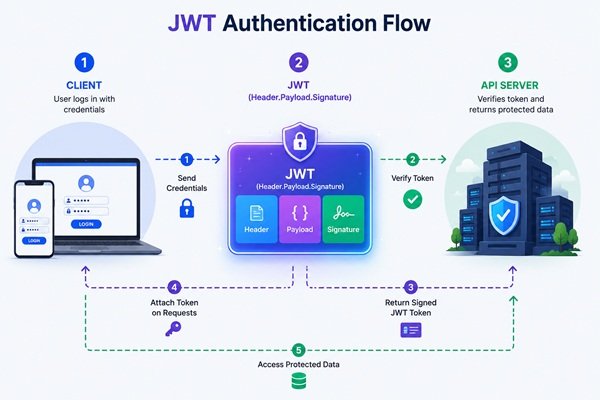
JWT authentication is a token-based method used to verify a user’s identity.
When a user successfully logs in, the server creates a token containing selected information about that user. The token is then sent back to the application.
For future requests, the application sends the token to the server. The server checks whether the token is valid before allowing access to protected resources.
This means the user does not need to enter their username and password every time they move between protected pages.
JWTs are especially common in APIs, single-page applications, mobile apps, and systems where the frontend and backend operate separately.
How Does JWT Authentication Work?
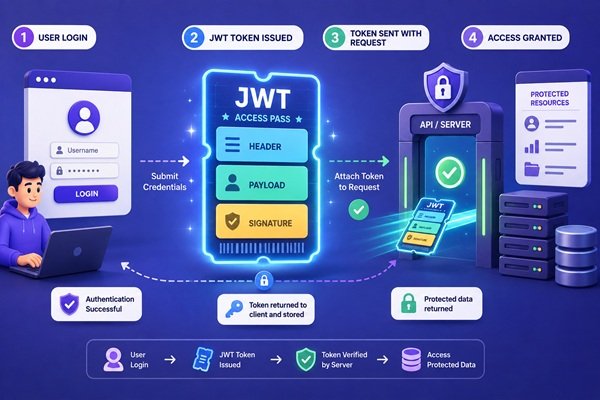
The process usually begins when a user enters their login details.
The server checks those credentials against the stored account information. If they are correct, the server generates a JWT and sends it back to the application.
The application stores the token and includes it when requesting protected information.
When the server receives the request, it verifies the token. If the token is valid and has not expired, the request can continue.
If the token is missing, invalid, or expired, access can be denied.
This creates a simple authentication flow where the token acts as proof that the user has already logged in successfully.

What Information Does a JWT Contain?
A JWT is generally made up of three parts: a header, a payload, and a signature.
The header contains information about how the token is created. The payload contains selected data, such as a user identifier, role, or expiration time.
The signature helps the server verify that the token has not been altered.
One important point is that JWT data is not automatically private just because it is inside a token. Sensitive information such as passwords should never be stored directly inside a JWT.
The token should contain only the information necessary for authentication and authorization.
Where Is JWT Commonly Used?
JWT authentication is frequently used when a website or application communicates with an API.
For example, a frontend application may use JWTs to access a user’s profile, account settings, orders, or dashboard information after login.
JWTs are also useful in mobile applications because they can provide a convenient way to maintain authentication between the app and a remote server.
They are often used in systems where multiple services need to recognize the same user.
However, JWT is not automatically the best choice for every application. The authentication method should always match the security requirements and architecture of the project.
JWT vs Session-Based Authentication
Traditional session-based authentication usually stores information about the logged-in user on the server. The browser receives a session identifier that allows the server to recognize the user during later requests.
JWT authentication works differently because much of the necessary authentication information can travel inside the token itself.
Session authentication can be easier to control when a user needs to be logged out immediately because the server manages the session directly.
JWTs can work well for APIs and distributed applications, but developers need to carefully manage expiration, token storage, refresh mechanisms, and revocation.
Neither method is automatically better in every situation. The right option depends on the application’s design, security needs, and scale.
Common JWT Security Mistakes
One of the biggest mistakes is storing sensitive information inside the token.
Developers should also avoid using tokens that remain valid for excessively long periods. Shorter expiration times can reduce the damage caused by a stolen token.
Token storage also needs careful attention. If a token is exposed through insecure browser storage or a vulnerable application, an attacker may be able to use it to impersonate the user.
Another mistake is assuming that a signed JWT automatically makes the entire authentication system secure.
JWT is only one part of application security. Secure connections, strong password handling, proper authorization, input validation, and careful token management are still essential.
Final Thoughts
JWT authentication provides a flexible way for modern applications to verify users and protect restricted resources.
It is especially useful for APIs, mobile applications, and frontend-backend architectures where authentication information needs to move between different systems.
However, JWT should not be treated as a shortcut to security.
Developers still need to think carefully about token expiration, storage, permissions, sensitive information, and how users are logged out or revoked.
When implemented correctly, JWT can be a practical and effective authentication method for modern web applications.
What Is Vibe Coding and Is It Safe for Real Projects?
AI is changing the way developers write software. Instead of manually writing every function, developers can now describe what they want and allow an AI coding assistant to generate, modify, debug, and even test large parts of an application.
This approach is often described as vibe coding.
The idea is simple: you explain what you want in natural language, let AI generate the code, test the result, and continue refining it through prompts. Modern coding agents can already work across multiple files, analyze errors, suggest terminal actions, and help build complete application features.
But while vibe coding can make development faster, using it for real projects without understanding or reviewing the generated code can create problems.
What Is Vibe Coding?
Vibe coding is an AI-assisted development style where developers focus more on describing the desired result than manually writing every line of code.
For example, instead of building a feature from scratch, a developer might ask an AI coding assistant to create a login system, redesign a page, connect an API, or fix an application error.
The developer then reviews the result and gives additional instructions until the application behaves as expected.
This makes experimentation and prototyping much faster, especially when developers already understand the technology they are working with.

Why Is Vibe Coding Becoming Popular?
AI coding tools have evolved beyond simple autocomplete.
Modern coding agents can understand project context, modify several files, identify errors, run development tasks, and suggest fixes. GitHub’s agent-mode tools, for example, are designed to translate developer instructions into changes across a project rather than simply suggesting individual lines of code.
This makes vibe coding attractive for prototypes, small tools, repetitive development tasks, and quickly testing new ideas.
It can also help experienced developers spend less time writing boilerplate code and more time thinking about product behavior and architecture.
Is Vibe Coding Safe for Real Projects?
It can be, but only when developers treat AI-generated code as code that still requires review.
AI-generated code can look correct while containing logical errors, incorrect assumptions, or security weaknesses. GitHub specifically advises developers to review and validate output generated by its coding agents rather than treating it as automatically correct.
The risk becomes greater when an application handles authentication, payments, personal information, databases, or other sensitive systems.
A project may appear to work perfectly from the user’s perspective while still containing problems hidden inside its implementation.
This is why vibe coding should not mean accepting every AI-generated change without understanding what has been added to the application.
Where Does Vibe Coding Work Best?
Vibe coding is particularly useful during early development.
Developers can use it to create prototypes, experiment with interface ideas, build internal tools, generate repetitive components, or explore how a feature might work before spending significant development time on it.
It can also be valuable for experienced programmers who can quickly recognize when generated code is poorly designed.
For production applications, however, the development process still needs proper testing, security checks, version control, code review, and monitoring.
Secure software development remains important regardless of whether the code was written manually or generated with AI. NIST’s Secure Software Development Framework emphasizes incorporating security practices throughout the software development lifecycle.

Can Vibe Coding Replace Developers?
Vibe coding changes the developer’s job more than it eliminates it.
AI can generate code quickly, but someone still needs to understand the business requirement, choose the right architecture, recognize incorrect output, test the application, protect sensitive information, and maintain the project over time.
As coding tools become more agentic, the valuable skill may increasingly be knowing how to guide AI effectively while still understanding the software it produces. GitHub’s recent developer tooling reflects this shift toward AI agents working alongside developers throughout the development process.
The strongest approach is therefore not AI instead of programming knowledge. It is programming knowledge combined with AI-assisted development.
Final Thoughts
Vibe coding can make software development faster, more experimental, and more accessible.
For prototypes and smaller projects, it can be extremely useful. For serious production applications, however, developers should never assume that generated code is safe simply because the application appears to work.
AI can write the code, but developers still need to review it, test it, secure it, and understand what it is doing.
Used carefully, vibe coding can become a powerful development workflow. Used blindly, it can turn a fast prototype into a very expensive debugging session.
How to Prevent SQL Injection in PHP and MySQL
Website security is something every developer needs to think about, especially when an application stores user information, login details, payment data, or other sensitive records.
One of the most common database-related security threats is SQL injection.
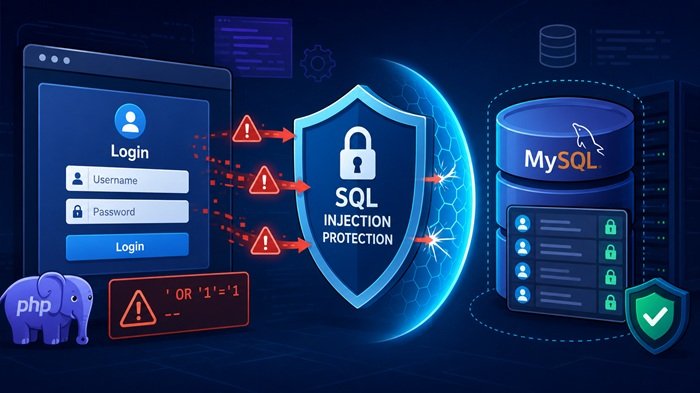
SQL injection happens when an attacker manipulates the information sent to a website and uses it to interfere with database queries. If the application is not properly secured, this can allow unauthorized access to information or even changes to the database.
For developers working with PHP and MySQL, understanding SQL injection is essential. The good news is that most SQL injection attacks can be prevented by following secure development practices from the beginning.
In this blog, we will look at how SQL injection works, why it is dangerous, and what developers can do to protect PHP and MySQL applications.
What Is SQL Injection?
- SQL injection is a type of security attack that targets applications connected to a database.
- Most websites collect information from users through forms, login pages, search boxes, filters, registration pages, and other input fields.
- That information may then be used to communicate with a MySQL database.
- The problem begins when an application treats user input as part of a database instruction without properly checking or separating it.
- An attacker may intentionally enter unexpected information designed to change the way the database interprets the request.
- Instead of processing the request normally, the database could perform an action the developer never intended.
- This is why user input should never be automatically trusted.
- Even something as simple as a login form can become a security weakness if the data is handled incorrectly.

Why SQL Injection Is Dangerous
The impact of SQL injection depends on how vulnerable the application is and what permissions the database connection has. In some cases, attackers may be able to view information that should remain private. This could include customer records, email addresses, account information, order details, or internal business data.
In more serious situations, an attacker may try to change or remove database information. A weakly protected application can also reveal technical details about the database structure, giving attackers a better understanding of how the system is organized.
This is what makes SQL injection particularly dangerous. A single poorly protected input area can potentially create a much larger security problem for the entire website.
How Developers Can Prevent SQL Injection
The most important step is to make sure user input is always handled as data and never allowed to influence the structure of a database request. Secure database handling methods should be used consistently throughout the application.
Input validation is also important. If a field is supposed to contain an email address, number, username, or another specific type of information, the application should check whether the submitted value matches the expected format before processing it.
Database permissions should also be kept as limited as possible. A website should only have access to the actions it actually needs. Giving a database account unnecessary administrative permissions increases the potential damage if a security issue occurs.
Protecting against SQL injection is rarely about one single setting. Strong protection usually comes from combining secure database handling, careful validation, sensible permissions, and proper error management.
Protecting Forms and User Input
Login pages are one of the most important areas to protect because they directly interact with user account information. Registration forms, search functions, contact pages, product filters, and admin forms also deserve the same level of attention.
Developers should remember that user input does not only come from visible forms. Information can also be submitted through URLs, cookies, API requests, and other parts of an application.
For that reason, security should be applied to every place where external information can reach the database. Treating all incoming data carefully creates a much stronger foundation than securing only the most obvious areas of a website.
Common SQL Injection Mistakes
One common mistake is relying too heavily on frontend validation. Browser-side checks can improve usability, but they should never be considered the main security layer because they can be bypassed.
Another mistake is assuming that hiding database details is enough to keep an application safe. Attackers do not need direct access to the source code to test how a site responds to unusual input.
Developers should also be careful about showing detailed database errors to visitors. Error messages that reveal table names, database names, or internal structures can provide useful information to someone attempting an attack.
Overly broad database permissions are another unnecessary risk. If an application only needs limited access, its database account should not be given more control than required.
Final Thoughts
SQL injection remains an important security concern for PHP and MySQL websites because so many applications depend on user input and database communication.
The best way to reduce the risk is to treat every piece of submitted information carefully and make sure the application handles it safely before it interacts with the database. Secure database practices, strong validation, limited permissions, and careful error handling all play an important role.
When these protections are built into a project from the start, developers can greatly reduce the chances of SQL injection and create a safer experience for both users and website owners.
How to Fix CORS Errors in JavaScript and APIs
If you have ever connected a JavaScript application to an API, you may have encountered an error mentioning CORS policy, Access-Control-Allow-Origin, or a blocked cross-origin request.
CORS errors are among the most common problems developers face when frontend applications communicate with APIs hosted on a different domain, subdomain, port, or protocol.
The good news is that a CORS error is usually not a JavaScript bug. It is a browser security restriction that can normally be fixed by configuring the API server correctly.
In this guide, we will explain what CORS is, why CORS errors occur, and how to fix CORS problems in JavaScript, PHP, Node.js, and Express APIs.

What Is CORS and Why Does It Matter?
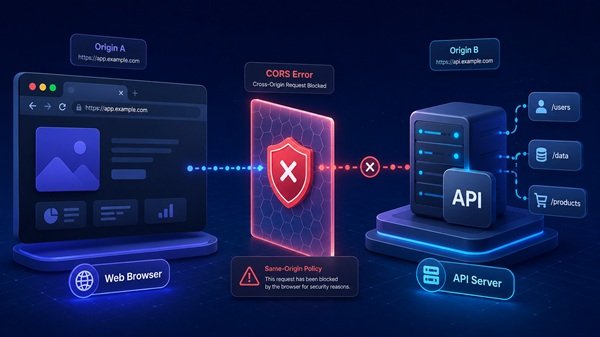
CORS stands for Cross-Origin Resource Sharing. It is a security feature used by web browsers to control how websites communicate with resources located on another domain, subdomain, protocol, or port.
For example, a website may be hosted on one domain while its API is hosted on another. From the browser’s perspective, these are two separate origins.
Before allowing the website to access data from that API, the browser checks whether the API server has given permission for the request.
If the server does not allow the requesting website, the browser blocks the response.
Although this can be frustrating during development, CORS plays an important role in protecting users from websites that attempt to access information from other services without permission.
Why Do CORS Errors Happen?
CORS errors normally appear when the frontend and backend are located on different origins and the server has not been configured to allow communication between them.
This often happens during development when the frontend and backend are running on different ports.
It can also happen when a website communicates with:
- An API hosted on a subdomain
- A third-party API
- A separate backend server
- A development server
- An external web service
Another common cause is incorrect server configuration.
The browser expects the API to return specific information explaining which websites are allowed to access it. If that information is missing or incorrect, the request can be blocked.
The important thing to remember is that a CORS error does not always mean there is something wrong with your JavaScript. In many cases, the real issue is on the API server.
How Can You Fix CORS Errors?
The first step is to identify which website is making the request and which server is receiving it.
The API server should then be configured to allow requests from the required website.
For public APIs, developers may sometimes allow access from many origins. However, private applications should normally specify which domains are trusted.
You should also check whether the API allows the HTTP methods your application needs. A simple request may work while another action fails because the server has not permitted that particular request type.
Headers also matter.
If your application uses authentication information, custom headers, or other additional request details, the server must be configured to accept them.
Instead of trying random changes on the frontend, it is usually better to inspect the server’s CORS configuration first.
What Are CORS Preflight Requests?
Sometimes a browser performs an additional check before sending the actual API request.
This is known as a preflight request.
The browser essentially asks the server whether the upcoming request is allowed. It checks things such as the request method, origin, and headers.
If the server responds correctly, the browser continues with the actual API request.
If the server does not respond properly, the browser stops the request.
This is why some developers find that simple API requests work while other requests fail.
When troubleshooting CORS, it is useful to open the browser’s developer tools and check the Network section. This can help you determine whether a preflight request is failing before the real request is even sent.
Common CORS Mistakes Developers Should Avoid
One of the most common mistakes is trying to solve CORS entirely from the frontend.
Because CORS permissions are generally controlled by the API server, changing JavaScript alone may not solve the problem.
Another mistake is allowing every website to access an API simply because it makes the error disappear.
While this may be acceptable for certain public resources, it can create unnecessary security risks for applications dealing with user accounts or private information.
Developers should also avoid ignoring authentication settings. Applications using cookies, login sessions, or authorization information may require additional CORS configuration.
Another frequent problem is mixing secure and insecure connections. A website running over HTTPS may have trouble communicating with an API using HTTP.
Checking these details early can make CORS troubleshooting much faster.
Final Thoughts
CORS errors may look intimidating, but they are usually easier to solve once you understand why the browser is blocking the request.
The main thing to remember is that CORS is a security mechanism, not simply a JavaScript error.
When a request fails, check the frontend origin, API configuration, allowed methods, authentication settings, and browser network information before making major changes to your application.
A properly configured API should clearly define which websites are allowed to access it.
Once the frontend and backend permissions match correctly, CORS errors usually disappear and the application can communicate with the API normally.
What Is WebGPU and Why Does It Matter for Modern Web Development?
Web development is no longer limited to simple websites and basic animations. Modern web applications now include 3D graphics, advanced visual effects, data visualization, browser-based AI, and even gaming experiences.
This is where WebGPU becomes important.

What Is WebGPU?
WebGPU is a modern web API that allows websites and web applications to use the device’s GPU (Graphics Processing Unit).
A GPU is designed to handle graphics and large numbers of calculations much faster than a normal CPU in many cases. WebGPU gives developers a better way to use that power directly in the browser.
In simple words, WebGPU helps web apps do heavier visual and computational work more efficiently.
How Is WebGPU Different From WebGL?
Many developers already know about WebGL, which made browser-based 3D graphics possible.
WebGPU is seen as the next step forward.
It offers a more modern design, better access to today’s GPU features, and support not only for graphics but also for general-purpose GPU computing. This means it can help with more than just visual rendering.
So, while WebGL mainly focused on graphics, WebGPU goes further by helping with both graphics and computation.
Why Does WebGPU Matter?
WebGPU matters because web applications are becoming more powerful and more demanding.
Developers now want to build applications such as:
- 3D product viewers
- browser games
- data visualization dashboards
- video and image processing tools
- CAD or design tools
- machine learning and AI applications
These types of applications need strong performance. WebGPU helps by making better use of the GPU, which can improve speed and efficiency.
How Does WebGPU Help Modern Web Development?
One of the biggest benefits of WebGPU is performance.
Because it is designed for modern hardware, it can reduce some of the limitations older browser graphics technologies had. This can make web applications smoother, faster, and more responsive.
WebGPU also matters because it supports compute workloads. This means developers can use it for tasks that are not only about drawing graphics, such as:
- AI inference in the browser
- scientific calculations
- image filtering
- physics simulations
- complex data processing
This opens the door to more advanced browser-based software.
Real-World Importance of WebGPU
WebGPU is important because it pushes the web closer to desktop-level experiences.
For example, a developer could build a web app that:
- renders rich 3D scenes
- runs interactive simulations
- performs fast AI tasks locally in the browser
- creates advanced visual dashboards with better performance
This makes the web a stronger platform for serious applications, not just content pages.
Is WebGPU Available Everywhere?
WebGPU support has grown a lot, and it is now available in major browsers on supported platforms. However, support can still depend on the browser, device, and operating system.
Because of that, developers should still test compatibility and use fallbacks when needed.
Should Web Developers Care About WebGPU?
Yes, especially if they work on modern interactive applications.
Not every website needs WebGPU. A simple company website or blog does not need GPU-powered rendering.
But if a project involves heavy graphics, 3D experiences, advanced visual effects, AI, or large-scale browser computations, WebGPU can be very valuable.
WebGPU is helping move the web toward a future where browsers can handle much more advanced applications. It gives developers a modern way to use GPU power for both graphics and computation, which makes it an important technology in modern web development.
For developers building the next generation of web apps, WebGPU is definitely worth understanding.
TypeScript 7: What’s New and Why Is It Faster?
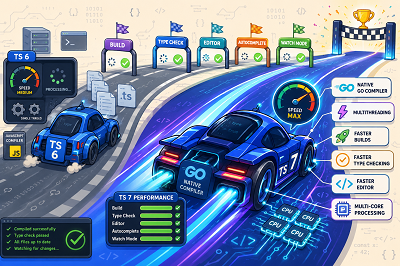
TypeScript 7 is one of the biggest changes in TypeScript’s history. Released in July 2026, it introduces a completely new compiler foundation designed to make TypeScript much faster, especially for large projects.
The biggest change is that TypeScript’s compiler has been moved from its previous JavaScript-based implementation to a native implementation written in Go.
Why Was TypeScript 7 Rebuilt?
TypeScript is widely used for large JavaScript applications because it helps developers find type-related errors before code is released.
However, as projects became larger, developers could spend more time waiting for type checking, builds, editor suggestions, and other development tools.
To improve performance, the TypeScript team rebuilt the compiler in Go while keeping its behavior as close as possible to the previous TypeScript compiler.
Why Is TypeScript 7 Faster?
TypeScript 7 benefits from native code performance and shared-memory multithreading.
Instead of handling every task one after another, the compiler can perform several operations in parallel. Parsing files, checking types, generating output, and building projects can make better use of modern multi-core processors.
Microsoft reports that full builds are typically around 8 to 12 times faster than TypeScript 6 in tested large projects. For example, the TypeScript team reported that the VS Code codebase went from around 125 seconds to about 11 seconds in one benchmark.
Faster Editor Experience
The improvements are not limited to compiling code.
TypeScript 7 also brings faster editor features such as auto-completion, error checking, find references, navigation, and code suggestions.
The new language server is based on the Language Server Protocol (LSP) and can use multiple threads to handle requests. This means developers working with large TypeScript projects may notice much faster responses while writing code.
Improved Watch Mode
Developers often use tsc --watch while coding so TypeScript automatically checks files whenever they change.
TypeScript 7 includes a rebuilt watch mode designed to provide more efficient and stable file monitoring across different operating systems.
This can make the development process feel faster because developers receive feedback soon after changing their code.
Does TypeScript Code Need to Change?
For most developers, the goal of TypeScript 7 is to maintain compatibility with TypeScript 6 while providing much better performance.
However, TypeScript 7 also adopts newer defaults and removes support for several older or deprecated options. Projects using older configurations may therefore need some changes before upgrading.
TypeScript 7.0 also does not yet provide the same stable programmatic API used by some development tools. Because of this, certain workflows involving technologies such as Vue, Astro, Svelte, MDX, and specialized Angular tooling may still need TypeScript 6 for some tasks.
Is TypeScript 7 Worth Using?
The biggest reason to move to TypeScript 7 is speed.
Faster builds, quicker type checking, improved editor performance, and better use of modern processors can make development smoother, especially for large applications and monorepos.
TypeScript 7 does not completely change how developers write TypeScript. Instead, it changes the engine underneath it, giving the familiar TypeScript experience a much faster foundation.TypeScript 7 is one of the biggest changes in TypeScript’s history. Released in July 2026, it introduces a completely new compiler foundation designed to make TypeScript much faster, especially for large projects.
The biggest change is that TypeScript’s compiler has been moved from its previous JavaScript-based implementation to a native implementation written in Go.
Why Was TypeScript 7 Rebuilt?
TypeScript is widely used for large JavaScript applications because it helps developers find type-related errors before code is released.
However, as projects became larger, developers could spend more time waiting for type checking, builds, editor suggestions, and other development tools.
To improve performance, the TypeScript team rebuilt the compiler in Go while keeping its behavior as close as possible to the previous TypeScript compiler.
Why Is TypeScript 7 Faster?
TypeScript 7 benefits from native code performance and shared-memory multithreading.
Instead of handling every task one after another, the compiler can perform several operations in parallel. Parsing files, checking types, generating output, and building projects can make better use of modern multi-core processors.
Microsoft reports that full builds are typically around 8 to 12 times faster than TypeScript 6 in tested large projects. For example, the TypeScript team reported that the VS Code codebase went from around 125 seconds to about 11 seconds in one benchmark.
Faster Editor Experience
The improvements are not limited to compiling code.
TypeScript 7 also brings faster editor features such as auto-completion, error checking, find references, navigation, and code suggestions.
The new language server is based on the Language Server Protocol (LSP) and can use multiple threads to handle requests. This means developers working with large TypeScript projects may notice much faster responses while writing code.
Improved Watch Mode
Developers often use tsc --watch while coding so TypeScript automatically checks files whenever they change.
TypeScript 7 includes a rebuilt watch mode designed to provide more efficient and stable file monitoring across different operating systems.
This can make the development process feel faster because developers receive feedback soon after changing their code.
Does TypeScript Code Need to Change?
For most developers, the goal of TypeScript 7 is to maintain compatibility with TypeScript 6 while providing much better performance.
However, TypeScript 7 also adopts newer defaults and removes support for several older or deprecated options. Projects using older configurations may therefore need some changes before upgrading.
TypeScript 7.0 also does not yet provide the same stable programmatic API used by some development tools. Because of this, certain workflows involving technologies such as Vue, Astro, Svelte, MDX, and specialized Angular tooling may still need TypeScript 6 for some tasks.
Is TypeScript 7 Worth Using?
The biggest reason to move to TypeScript 7 is speed.
Faster builds, quicker type checking, improved editor performance, and better use of modern processors can make development smoother, especially for large applications and monorepos.
TypeScript 7 does not completely change how developers write TypeScript. Instead, it changes the engine underneath it, giving the familiar TypeScript experience a much faster foundation.
What Is an API and How Does It Work? A Simple Guide for Beginners
Have you ever used a weather app, logged into a website with Google, or paid online using a payment service?
In many cases, an API is working quietly behind the scenes to make these features possible.
What Is an API?
API stands for Application Programming Interface.
An API allows two different applications or systems to communicate and exchange information.
Instead of one application needing to understand everything about another system, the API provides a simple way to request and receive the required data.
A Simple Real-Life Example
Think about ordering food at a restaurant.
You tell the waiter what you want. The waiter takes your request to the kitchen and later brings your food back.
An API works in a similar way:
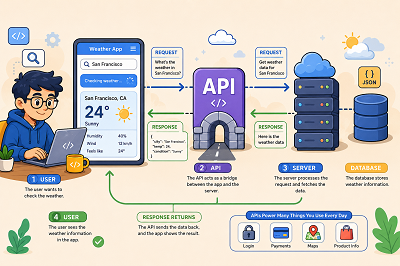
User → API → Server → API → User
The API carries the request to another system and returns the response.
How Does an API Work?
Imagine you open a weather app and search for the weather in Chennai.
The process may look like this:
- You search for Chennai.
- The app sends a request to a weather API.
- The API communicates with the weather server.
- The server finds the requested information.
- The API sends the data back to the app.
- The app displays the temperature and weather conditions.
All of this can happen within seconds.
Why Do Developers Use APIs?
APIs allow developers to use existing services instead of building every feature from the beginning.
For example, APIs can be used to add:
- Online payments
- Maps and locations
- Weather information
- Social media features
- Email services
- Login systems
- Product information
This can save development time and make applications more powerful.
What Is an API Request and Response?
When an application asks an API for information, it sends a request.
The API then returns a response.
For example:
Request: Give me the details of product 101.
Response: Product name, price, image, and availability.
The response is often provided in a data format such as JSON, which applications can easily read and process.
Common Types of APIs
There are several types of APIs, but beginners will often hear about REST APIs.
REST APIs are commonly used in websites and applications because they provide a simple way for systems to send and receive information over the web.
Other API technologies include SOAP and GraphQL.
Are APIs Secure?
APIs may use security methods such as API keys, access tokens, and authentication to control who can access their data.
Developers should never expose private API keys or sensitive information publicly.
APIs are an important part of modern web and software development. They allow different applications to communicate, share data, and use services provided by other systems.
Understanding the basic idea of request → processing → response is a great first step toward understanding how APIs work.
Difference Between Frontend and Backend Development
When visiting any website, you come across various buttons, images, menu bars, forms, and pages. However, there is also another component of the website that works silently in the background.
Both of these components are known as frontend and backend development. They play an equally significant role in developing websites and applications.
What Is Frontend Development?
The frontend development refers to those aspects of websites and web applications which are visible to the users.
This includes such elements as:
- Website layout
- Buttons and menu bars
- Animations and images
- Forms
- Colors and fonts
- Mobile responsive design
Most frontend developers use languages like HTML, CSS, and JavaScript.
In case of clicking an “Add to Cart” button at an online store, the button itself and its design is considered to be part of the frontend.
What Is Backend Development?
While the frontend is something users can see and work with, the backend development takes care of everything going on behind the scene.
Some elements of the backend development include:
- Website data
- Server
- Database
- Login
- Payments
Frontend vs Backend: The Main Difference
The easiest way to understand the difference is this:
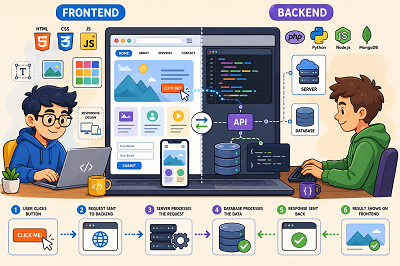
Frontend = What the user sees
Backend = What makes the website work
Imagine an online shopping website.
The product images, search bar, shopping cart button, and checkout page are part of the frontend.
The database storing products, customer accounts, orders, and payment information is part of the backend.
How Do Frontend and Backend Work Together?
Frontend and backend development are connected.
When a user performs an action on the frontend, a request may be sent to the backend.
For example:
User clicks “View Order” → Backend finds the order → Data is returned → Frontend displays the order
This communication allows websites to provide dynamic and interactive features.
What Is a Full-Stack Developer?
A full-stack developer works with both frontend and backend technologies.
They may create the website interface, connect it to a database, build server-side features, and make sure everything works together.
However, larger projects often have separate frontend and backend developers.
Which One Should You Learn?
Choose frontend development if you enjoy designing interfaces, working with layouts, and creating things users can see.
Choose backend development if you enjoy working with databases, logic, servers, and how applications work internally.
You can also learn both and become a full-stack developer.
Frontend and backend development have different responsibilities, but they work together to create a complete website. Understanding both sides is a great starting point for anyone interested in web development.
Is PHP Still a Good Choice for Web Development in 2026?
PHP has been one of the most popular programming languages for web development for nearly three decades. Even with newer technologies like Python, Node.js, and Go becoming increasingly popular, PHP continues to power millions of websites and web applications around the world.
This often raises an important question for developers, business owners, and anyone planning a new website: Is PHP still a good choice for web development in 2026?

The answer is yes. Over the years, PHP has evolved into a faster, more secure, and feature-rich programming language. Modern frameworks like Laravel, improved performance, and strong community support have helped PHP remain one of the leading choices for web development.
Whether you’re planning to launch a business website, an e-commerce store, a customer portal, or a custom web application, PHP continues to offer everything needed for successful web development.
Why Is PHP Still Relevant in 2026?
With so many modern programming languages available today, it’s easy to assume that PHP has become outdated. Technologies like Python, Node.js, and Go have gained popularity in recent years, leading many people to wonder whether PHP is still a good choice for web development.
In reality, PHP remains one of the most widely used server-side programming languages. Over the years, it has continued to evolve with improved performance, better security, and modern development features that make it suitable for today’s web applications. PHP has evolved significantly over the years. Each new release introduces better performance, stronger security, and new features that simplify modern web development. Frameworks such as Laravel and Symfony further enhance PHP by providing modern development tools, built-in security features, and scalable architecture. They help developers build secure, high-performance, and feature-rich web applications more efficiently.
PHP is still around because many people use it. A lot of websites and business applications and content management systems still use PHP. This is because PHP is something that works well and is easy to get help with. It is also not too expensive. Businesses like PHP because it can be used in different ways. Developers, like PHP because there are a lot of people using it so there is a lot of information available and there are many frameworks and tools that can be used with PHP.
PHP is also compatible with almost every web hosting provider, making deployment simple and affordable. Whether you’re developing a small business website, an e-commerce store, a customer portal, or a custom web application, PHP provides the performance and reliability needed for modern web development.
Why Businesses Still Choose PHP
- Fast website development
- Excellent performance
- Affordable development costs
- Strong security
- Easy maintenance
- Excellent hosting support
- Large developer community
- Mature frameworks
- Long-term stability
As web development continues to evolve, PHP has successfully adapted to changing technologies and business needs. Rather than becoming obsolete, it continues to improve with every new version, making it a dependable choice for projects of all sizes.
Major Advantages of PHP
1. Open Source and Cost-Effective
One of the most significant benefits of PHP is its open-source nature. There are no license costs associated with it, making it an economical option for startups, small companies, as well as big businesses. The majority of hosting service providers have PHP as an available language, which reduces costs. Companies may utilize the savings from not having to pay licensing fees for using additional features in their website design.
2. Excellent Performance
The modern versions of PHP are much faster and efficient than their older versions. Optimization of memory, speed of processing, and caching makes PHP capable of delivering high performance even at times of heavy traffic. A properly optimized PHP site is fast-loading and gives better experience to the users and results in higher customer satisfaction and higher ranking on search engines. PHP is good for both small business sites and large e-commerce platforms.
3. Large Developer Community
PHP has a vast group of developers who have been working on it for many years now. This makes it very easy for one to get tutorials, manuals, videos, and even solutions to common problems on the web. In case you ever encounter a problem while coding on PHP, then there will definitely be a solution to it. Another benefit is that it is easier to recruit skilled PHP developers for your business needs. Developers benefit from:
- Extensive documentation
- Step-by-step tutorials
- Open-source libraries
- Popular frameworks like Laravel and Symfony
- Community forums and support
- Ready-made development tools
4. Strong Security
Security is crucial to ensure the protection of customers’ data and business data stored on websites. Contemporary PHP has a lot of in-built security elements and allows developers to use safe coding practices which will enable them to protect applications from attacks such as SQL injections, XSS attacks, and CSRF attacks. Used along with reliable frameworks, consistent software updating, safe hosting, and safe coding practices, PHP ensures a high level of application security.
5. Wide Hosting Support
PHP is supported by almost all web hosting services, which ensures that deployment is easy and economical. Regardless of the type of hosting service chosen – be it shared hosting, VPS, cloud hosting, or dedicated hosting – PHP-based applications can be hosted on them without the need for expensive hardware and software resources.
6. Easy Database Integration
Almost all the current websites require databases for storing customer information, product information, order information, blog posts, and many other types of dynamic data. PHP is absolutely database-friendly, and it supports various databases including MySQL, PostgreSQL, MariaDB, and SQLite. In this regard, it becomes really easy to develop websites with such applications that include a database, such as customer authentication, content management system, online shopping system, booking system, and many others.
Popular PHP Frameworks
PHP has some good tools that make it easier for people who build websites and web applications to do their job. These tools give you things you can use; they help keep your code tidy, and they show you how to do things the right way. When you are picking a tool to use, you have to think about how big your project is, how hard it is, and what your business needs are. You have to choose the PHP framework for your project.
Laravel
Laravel is one of the most popular PHP frameworks available today. It is known for its clean syntax, built-in security features, and developer-friendly tools. Laravel helps developers build secure, scalable, and modern web applications while reducing development time.
It is commonly used for:
- Business websites
- Custom web applications
- E-commerce platforms
- Customer portals
- SaaS (Software as a Service) applications
Laravel also includes built-in features such as user authentication, routing, caching, and database management, making it a preferred choice for many developers.
Symfony
Symfony is a reliable PHP framework designed for large and complex web applications. It offers a flexible structure and reusable components that help developers build applications that are easy to maintain and expand over time.
Symfony is commonly used for:
- Enterprise web applications
- Large business portals
- CRM and ERP systems
- High-traffic websites
- Custom business solutions
Many well-known companies choose Symfony because of its stability, flexibility, and long-term support.
CodeIgniter
CodeIgniter is a small and user-friendly PHP framework. This framework has a basic structure and hence very useful for both beginners and those who develop projects in a short while due to minimal configuration needed.
CodeIgniter is suitable for:
- Small business websites
- Company portals
- Content management systems
- Educational websites
- Small and medium-sized web applications
Its speed, simplicity, and low server requirements make it a practical option for many web development projects.
PHP vs Python
PHP and Python are both popular programming languages, but they are designed for different types of projects.
PHP is what most people use to make websites. It is really good for making websites, for businesses, online stores and special systems to manage content. PHP is a choice because it works with most web hosting services and a lot of people know how to use PHP so businesses can count on it to work well.
Python is known for its simplicity and versatility. It is widely used for artificial intelligence, machine learning, automation, data analysis, and web development through frameworks such as Django and Flask.
PHP vs Node.js
PHP and Node.js are both popular technologies for web development, but they are designed for different types of applications.
PHP has been a trusted choice for building websites and web applications for many years. It is easy to deploy, widely supported by web hosting providers, and works well for business websites, e-commerce stores, content management systems (CMS), and custom web applications.
Node.js, on the other hand, is built on JavaScript and is well suited for applications that require real-time communication and high-speed data processing. It is commonly used for chat applications, live notifications, streaming platforms, and collaborative tools.
Choose PHP if you need:
- Business websites
- E-commerce stores
- Content Management Systems (CMS)
- Customer portals
- Corporate websites
- Blog and news websites
- Custom web applications
Choose Node.js if you need:
- Real-time chat applications
- Live collaboration tools
- Streaming platformsMultiplayer games
- Live tracking applications
- API-driven applications
- Real-time dashboards
Node.js and PHP are both great tools to work with, and the selection will depend upon the nature of the application. PHP is still a viable technology for most business sites and e-commerce solutions. But in case you need some sort of real-time functionality like live chatting, you should consider using Node.js.
Why PHP Remains a Smart Choice
PHP continues to be one of the most reliable and widely used programming languages for web development in 2026. With modern frameworks like Laravel and Symfony, excellent performance, strong security, and broad hosting support, it remains an excellent choice for business websites, e-commerce stores, and custom web applications. While Python and Node.js are better suited for specialized use cases such as AI or real-time applications, PHP continues to provide a practical, cost-effective, and future-ready solution for most web development projects.
Gemini CLI Brings Google AI Directly Into the Developer Terminal

AI tools have become essential in software development. Earlier, programmers used AI mainly for asking coding questions, understanding errors, or writing small code snippets. Today, AI is moving closer to the actual development environment.
Google’s Gemini CLI is one of the tools that shows this shift. It brings AI assistance directly into the command line, helping developers work faster without leaving their terminal.
For developers, the terminal is an important workspace. It is used to run projects, install packages, manage Git, test applications, fix errors, and handle many daily development tasks. Gemini CLI works inside this same environment, making AI support easier to access during the coding process.
Instead of switching between the terminal, browser, documentation, and other tools, developers can get help directly from the command-line interface. This makes the workflow smoother and helps developers stay focused on their work.
AI Support Inside the Developer Workflow
A common problem in software development is the need to stop work and search for solutions when something goes wrong.
For example, when a project shows a long error message, a developer may copy the error, open a browser, search for answers, read multiple pages, and then come back to the code. This process can take time and break concentration.
Gemini CLI helps reduce this problem by allowing developers to ask for help directly from the terminal. They can request explanations, get suggestions, understand errors, and continue working without moving away from their current workspace.
Beginners can use Gemini CLI to understand confusing command-line errors, learn how commands work, and get simple explanations. Experienced developers can use it to save time when working with large projects, unfamiliar codebases, or repeated development tasks.
How Gemini CLI Helps Developers
Gemini CLI can support developers in many common programming situations. It can help explain code, review files, suggest improvements, find possible issues, and provide guidance for fixing errors.
When a developer faces an error, Gemini CLI can help explain the possible reason behind it. Instead of only seeing a long technical message, the developer can get a clearer explanation of what may be happening and what should be checked next.
This is useful during debugging because some error messages can look confusing, especially in large projects with many files and dependencies. Gemini CLI can help developers understand the error step by step.
It can also help when working on a new project. Developers often need time to understand the structure of a codebase. Gemini CLI can help explain files, functions, and project flow, making it easier to understand how the application is built.
Useful Tasks Developers Can Handle With Gemini CLI
Gemini CLI can help developers with many daily coding tasks directly from the terminal.
It can explain code in simple language, which is useful when working with a new file or unfamiliar project. Developers can ask Gemini CLI to describe what a function does or how a part of the code works.
It can also help find possible mistakes in code. If a file has errors or confusing logic, Gemini CLI can review it and suggest what might need to be fixed.
Developers can use Gemini CLI to improve existing code by making it cleaner, easier to read, or better organized. It can also help create new code based on simple instructions.
Another useful task is explaining command-line errors. Instead of struggling with long error messages, developers can ask Gemini CLI to explain the issue in simple words and suggest the next step.
Gemini CLI can also help with test cases, project structure, and understanding unfamiliar code faster.
However, developers should not rely on it fully. Every suggestion should be checked and tested before being used in a real project. Gemini CLI can be used as a coding assistant, but the final decision should always come from the developer.
Benefits for Beginners
For beginners, the terminal can sometimes feel difficult. Error messages may look confusing, and even simple commands can be hard to understand in the early learning stage.
Gemini CLI can make this easier by giving simple explanations. A beginner can ask why an error happened, what a command does, or how to fix a basic issue.
This can make learning more comfortable because help is available in the same place where the work is happening.
Instead of searching through many pages, beginners can get a direct explanation and continue practicing. This can improve confidence and help them understand programming concepts faster.
Benefits for Experienced Developers
When working on a large project, developers may need to understand many files, functions, and dependencies. Reading everything manually can take time. Gemini CLI can help summarize code, explain parts of the project, and suggest where to look next.
It can also help when developers are working under deadlines. Quick explanations, code suggestions, and debugging help can save valuable time.
For teams, tools like Gemini CLI can support faster development, especially when developers need to understand unfamiliar sections of code or review changes more efficiently.
Gemini CLI and Modern Software Development
Gemini CLI is part of a larger change happening in software development. AI is no longer only a separate tool used outside the coding environment. It is becoming part of the tools developers already use every day.
This shift can make coding more efficient. Developers can ask for support while staying inside their workflow. They can get help with errors, code understanding, and improvements without constantly switching between different platforms.
However, AI tools should still be used carefully. They can provide useful support, but they may not always understand the full project requirement or business logic.
Important Limitations Developers Should Remember
Gemini CLI can be helpful, but it should not be treated as perfect.
AI-generated suggestions may sometimes be incomplete or incorrect. A code suggestion may look good but may not fully match the project’s requirement. That is why testing and review are always necessary.
Security is also an important factor. Developers need to be careful when dealing with private code, passwords, API keys, tokens, customer data, and confidential project files. Sensitive information should not be shared carelessly with any tool.
AI can support development, but responsibility still belongs to the human developer.
Best Practices for Using Gemini CLI
Developers can get better results from Gemini CLI by using it carefully.
It is better to start with small tasks. For example, developers can ask it to explain one error, review one function, or suggest improvements for one file. Smaller requests usually produce easier-to-check answers.
Every suggestion should be reviewed before applying it. AI-generated code should be tested properly, especially when used in live projects.
Developers should also avoid sharing sensitive information. Private credentials, API keys, passwords, and confidential files should always be protected.
Gemini CLI should be used as an assistant, not as a replacement for programming knowledge.
Why Gemini CLI Matters for Developers
Gemini CLI shows how AI tools are becoming part of the real development workflow. Instead of using AI separately in a browser, developers can get help directly inside the terminal where they already write commands, run projects, and fix errors.
It can help developers save time, understand code faster, explain errors, and get useful suggestions while working. This makes it helpful for both beginners and experienced developers.
However, Gemini CLI should be used as a support tool, not as a replacement for developers. Every suggestion should be reviewed, tested, and checked before using it in a real project.
As AI continues to grow in software development, tools like Gemini CLI can make coding faster, easier, and more productive while still keeping human knowledge and decision-making at the center.