



Shopify API & Integration Error Fix Services
Our Shopify API integration and Shopify integration services are designed to diagnose, repair, and stabilize all types of Shopify API issues and third-party integration failures quickly, safely, and permanently while ensuring uninterrupted store operations and accurate system integrations. As a trusted Shopify API expert team, we provide complete Shopify API troubleshooting, Shopify custom API integration, Shopify app integration, Shopify integration error fix, Shopify API error fix, Shopify API developer support, and Shopify app error fixing solutions for growing ecommerce businesses.
Why Shopify API & Integration Errors Are Critical
Shopify API integration failures and Shopify integration services issues are some of the most dangerous problems a store can face, even though they often happen behind the scenes. Unlike visible design problems or minor bugs, Shopify API error fix situations can go unnoticed until they cause serious disruptions in your store’s operations. Our Shopify API expert team specializes in Shopify API troubleshooting, Shopify custom API integration, Shopify app integration, Shopify integration error fix, Shopify API developer solutions, and Shopify app error fixing to prevent these problems:
1. Orders Stop Syncing Automatically
What Happens:
The Shopify API integration process involves the use of APIs to synchronize orders between Shopify and other external systems like your OMS, ERP, and your fulfillment companies. Neglecting Shopify API troubleshooting may cause order data synchronization issues, including:
- Orders being delayed or not shipped at all
- Customers not receiving purchases on time
- Negative reviews and customer complaints
Why It’s Critical:
- Lost revenue and customer trust
- Operational disruptions due to failed Shopify integration services
- Need for immediate Shopify API error fix and Shopify integration error fix
Our Shopify API expert team and Shopify API developer specialists ensure seamless Shopify app integration and Shopify custom API integration to restore order synchronization quickly.
2. Inventory Becomes Incorrect
What Happens:
Many stores depend on Shopify API integration and Shopify integration services for inventory synchronization. Failed Shopify API troubleshooting can cause:
- Overselling due to stock levels not updating correctly
- Out-of-stock products appearing available
- Inventory mismatches across Shopify, Amazon, eBay, or other platforms
Why It’s Critical:
- Financial losses
- Customer dissatisfaction
- Need for Shopify API error fix and Shopify app error fixing
Our Shopify API developer experts provide Shopify integration error fix and Shopify custom API integration services to stabilize inventory synchronization.
3. Payment & Transaction Data Fails
What Happens:
Shopify API integration communicates with payment gateways using APIs. Failed Shopify API troubleshooting may lead to:
- Missing transaction records in Shopify admin
- Payments processed but orders not created
- Discrepancies between Shopify and payment gateways
Why It’s Critical:
- Financial confusion
- Checkout trust issues
- Requirement for Shopify API expert intervention
Our Shopify integration services team delivers Shopify API error fix, Shopify integration error fix, and Shopify app integration support for payment systems.
4. Automation Completely Breaks
What Happens:
Many stores rely on Shopify app integration and Shopify custom API integration for automation, including:
- Abandoned cart recovery emails
- Subscription billing and renewals
- Shipping notifications and tracking updates
When Shopify API integration fails, automation stops silently.
Why It’s Critical:
- Missed sales
- Customer frustration
- Need for Shopify app error fixing and Shopify API troubleshooting
Our Shopify API developer team ensures stable Shopify integration services and automation recovery.
5. Data Loss & Business Confusion
What Happens:
Shopify API integration powers reports and dashboards. Failed Shopify API troubleshooting disrupts:
- Sales and inventory reports
- Performance dashboards
- Data-driven decision-making tools
Why It’s Critical:
- Poor decisions
- Scaling issues
- Requirement for Shopify API expert support
Our Shopify custom API integration and Shopify integration error fix services restore accurate reporting systems.
Inventory Or Orders Not Syncing?
Our Shopify API experts quickly identify and fix broken automation systems.
Common Shopify API & Integration Issues We Fix
Shopify store owners often face technical challenges related to Shopify API integration and Shopify integration services that can disrupt store operations and prevent smooth transactions. At Search Engine Genie, our Shopify API expert team handles both simple and complex Shopify API troubleshooting cases to ensure your Shopify store continues running seamlessly. Our Shopify API developer specialists provide Shopify API error fix, Shopify app integration, Shopify custom API integration, Shopify integration error fix, and Shopify app error fixing solutions for all types of ecommerce businesses. Here’s a breakdown of the most common Shopify API integration and Shopify integration services issues we fix.
1. Shopify API Errors
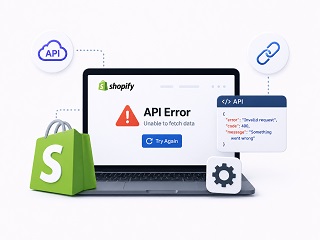
What We Fix:
- REST API errors that prevent data from being fetched or submitted correctly through Shopify API integration
- GraphQL API failures affecting queries and mutations during Shopify app integration
- Authentication token issues caused by expired or invalid credentials requiring Shopify API troubleshooting
- API permission errors that block access to Shopify resources and require Shopify API error fix support
- Deprecated API version conflicts no longer supported by Shopify custom API integration systems
- Rate limit errors that temporarily stop API calls and impact Shopify integration services
- Timeout and request failures during Shopify API integration communication
- Shopify app error fixing for failed API responses and broken automation workflows
- Shopify integration error fix support for unstable third-party API connections
- Shopify API developer assistance for custom API performance optimization
Why This is Essential:
Shopify API integration problems may interfere with important aspects like order processing, syncing of inventory, payment, and integration of Shopify apps. Whenever there is an API problem, Shopify integration services will not function properly, thus creating discrepancies, poor performance, inability to automate processes, and ultimately losing money. We offer expert solutions in Shopify API troubleshooting, Shopify API error fixing, custom integration of Shopify APIs, and app error fixing services for your shopify website.
2. Webhook Problems
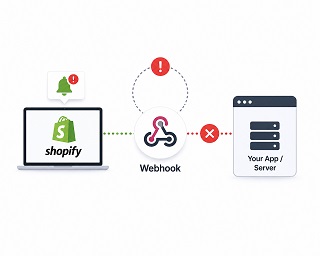
What We Fix:
- Webhooks not firing for key Shopify API integration events like orders, customers, or inventory updates
- Duplicate webhook triggers causing repeated or inconsistent Shopify app integration data
- Missing order, customer, or product notifications requiring Shopify API troubleshooting
- Incorrect webhook payload structures that third-party Shopify integration services cannot process
- Webhook security validation failures affecting Shopify custom API integration systems
- Shopify integration error fix for delayed webhook delivery issues
- Shopify app error fixing for broken event-driven automation systems
- Shopify API developer support for webhook retry and recovery mechanisms
- Shopify API error fix services for webhook timeout and delivery failures
Why It Is Important:
Webhooks provide a way for real-time data communication from the Shopify integration systems with other platforms such as CRMs, ERPs, accounting programs, shipping carriers, and automation solutions. When there is a problem with webhooks, Shopify integration systems become inconsistent, leading to delays in delivery, inaccuracies in reports, discrepancies in inventories, and problems with communication with customers. Our team of experts in Shopify API integration offers robust Shopify API troubleshooting, Shopify custom API integration stabilization, Shopify app integration repair, Shopify integration error fixing, and Shopify app error fixing.
3. Third-Party Integration Failures
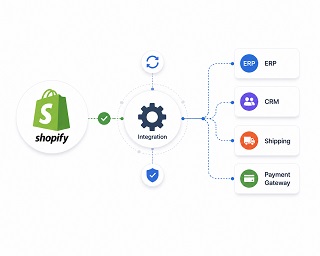
What We Fix:
- ERP and accounting software synchronization failures affecting Shopify integration services
- CRM integration issues impacting customer data synchronization during Shopify API integration
- Shipping provider API failures affecting rates, labels, and tracking updates
- Payment gateway communication errors with providers like PayPal, Stripe, and Authorize.Net
- Subscription app API issues requiring Shopify app error fixing support
- Marketplace integration failures with Amazon, eBay, Walmart, and other platforms
- Shopify API troubleshooting for unstable third-party connections
- Shopify integration error fix for delayed inventory synchronization
- Shopify custom API integration support for external software compatibility
- Shopify API developer solutions for advanced third-party automation workflows
Why It Is Important:
Shopify integration services provided by third parties are indispensable when it comes to dealing with the issues of inventory management, shipping, communication with customers, payments, and ecommerce automation processes. In case you encounter some difficulties with Shopify API integrations, your business will suffer from workflow instability, decreased effectiveness, and inevitable financial loss. With our Shopify API expert team at your service, you can receive fast Shopify API error fix services, Shopify app integration fixes, Shopify custom API integration assistance, and much more.
4. Custom App & Private App Issues
What We Fix:
- Broken custom app logic preventing proper Shopify app integration functionality
- Authorization and authentication failures in Shopify custom API integration systems
- Incorrect API endpoints causing failed Shopify API integration requests
- Data mapping issues between Shopify and custom third-party platforms
- Compatibility problems caused by Shopify API updates and version changes
- Shopify app error fixing for unstable custom workflows
- Shopify API troubleshooting for private app security and permissions
- Shopify integration error fix support for broken middleware communication
- Shopify API developer optimization for custom app performance
- Shopify API error fix services for unstable app synchronization processes
Why It is Important:
It is common practice for bespoke applications and bespoke Shopify integration tools to perform crucial functions like inventory management, automation processes, customer relationship management, ERP connectivity, and integration of Shopify apps. When something goes wrong with such systems, both the front-end and back-end aspects may fail at once. Our team of experienced Shopify API experts offers professional and efficient help for such situations in the form of Shopify custom integration API services, Shopify API fixes, integration services stabilization, and Shopify app fixing services.
Need Shopify API Troubleshooting?
Recover payment systems, webhook automation, and third-party integrations safely.
Start RecoveryWhy These Errors Often Go Unnoticed
Most Shopify API integration and Shopify integration service problems work in silence in the background and cannot be detected until they start affecting sales, shipping processes, and customer experience. Most people discover the problem when their operation becomes severely affected by these silent bugs that have already done some considerable damage. This is the reason why Shopify API debugging, Shopify API error resolution, Shopify integration error resolution, Shopify apps integration monitoring, Shopify custom API integration audits, and Shopify app error resolution are vital to have stable online shopping services.
1. The storefront is working great
What Occurs:Sometimes, even when there is an issue with Shopify API integration solutions or Shopify integration app APIs, it appears that all is well on the front end of the store. Everything works seamlessly, with shoppers able to navigate around the site, view products, add them to their shopping carts, and so forth. There are many problems with Shopify integration services that simply go unseen since everything looks good on the front end despite failures taking place on the back end.
The Problem with This: Essential operations, such as order fulfillment or synchronization, payment processes, and even inventory management, might be failing without anyone being aware of this problem until they look for the right Shopify API error fix. Only with professional assistance from Shopify API experts or Shopify API developers will this become apparent through the diagnostic process.
2. No Visible Error Messages Appear
What Happens: Many Shopify API integration failures do not generate on-screen warnings or alerts. Shopify API troubleshooting often reveals that errors occur silently in the background without interrupting the user interface. Shopify app integration failures, webhook issues, and Shopify custom API integration conflicts may continue unnoticed for days.
Why It’s a Problem: Silent failures delay detection until symptoms appear—such as missing orders, payment mismatches, inventory issues, or customer complaints. Without expert Shopify integration services, businesses may not recognize the need for Shopify API error fix or Shopify integration error fix support until revenue loss begins. A Shopify API expert and Shopify API developer can implement Shopify app error fixing systems and monitoring tools to detect these hidden issues earlier.
3. Data Fails Silently in the Background
What Happens:Inventory synchronization, order transmission, payment data, or customer information transfers may fail without affecting what customers see on the frontend. Shopify API integration and Shopify app integration failures commonly affect backend data processing silently.
Why is it an issue? This problem builds up over time due to the existence of overselling, delayed deliveries, erroneous reports, and confusion in operations. Professional Shopify API troubleshooting and Shopify custom API integration services are necessary for avoiding such issues. The Shopify API experts use a sophisticated approach for resolving Shopify API errors and integrating their fixes into the Shopify integration service. A professional Shopify API developer can resolve any issues in the future with Shopify application error fixes.
4. Issues Affect Only Specific Workflows
What Happens:If the Shopify APIs fail to integrate, it will happen to certain functionalities only, such as payment options, subscription, delivery, and fulfillment services, while other services within the same store operate fine. Shopify application API issues and custom Shopify API integration problems often occur to systems that work independently.
Why It’s a Problem:Because the store works partially, identifying the broken workflow takes longer, delaying Shopify API troubleshooting and increasing operational damage. Shopify integration services are essential for detecting which process requires Shopify API error fix or Shopify integration error fix support. A Shopify API expert and experienced Shopify API developer can isolate affected workflows and apply targeted Shopify app error fixing solutions quickly.
5. Problems Trigger Only After Updates or Traffic Spikes
What Happens:Shopify API integration issues may surface only after app updates, Shopify API changes, plugin installations, or high-traffic events like sales campaigns. Shopify app integration systems and Shopify custom API integration workflows can become unstable after API version changes.
Why It’s a Problem:Store owners often don’t immediately associate the issue with a recent update or traffic spike, slowing Shopify API troubleshooting and recovery efforts. Delayed Shopify API error fix processes may result in lost orders, inaccurate inventory, and failed customer communication. Expert Shopify integration services, Shopify integration error fix support, and Shopify app error fixing strategies help businesses recover quickly. A Shopify API expert and Shopify API developer can proactively optimize systems to reduce these risks.
6. Issues Are Discovered Only After Damage Is Done
What Happens:Most retailers become aware of failed Shopify API integrations when they experience low sales, order loss, inventory discrepancy, or dissatisfied customers. Most Shopify app integration problems, along with other Shopify custom API integration problems, tend to go undiscovered until major disruptions arise.
Why This Is Bad:It will result in loss of income, loss of customers, payment issues, and damage to reputation. Action should be taken right away to fix Shopify API issues, Shopify API errors, Shopify integration errors, and Shopify app errors. You need to contact a Shopify API professional and a Shopify API developer for getting rid of the issues of Shopify integration services.
Facing Shopify API Failures?
Fix broken integrations, webhook failures, and sync issues before they impact your store revenue.
Resolve API ErrorsOur Shopify API & Integration Fix Process
At Search Engine Genie, our Shopify API expert team follows a structured recovery process to diagnose and resolve Shopify API integration and Shopify integration services issues accurately. Our Shopify API troubleshooting approach focuses on secure Shopify custom API integration, stable Shopify app integration, reliable Shopify integration error fix solutions, and long-term Shopify API error fix support. Our experienced Shopify API developer specialists also provide advanced Shopify app error fixing services for seamless system communication.
Step 1: Integration & API Audit
What We Do:
- Review Shopify API integration systems, Shopify app integration workflows, and third-party Shopify integration services
- Analyze logs for Shopify API troubleshooting and Shopify API error fix detection
- Inspect webhook activity and API endpoints
- Validate authentication tokens, credentials, API permissions, and scopes
- Examine ERP, CRM, and payment gateway logs connected through Shopify custom API integration
- Use Shopify API developer tools to identify hidden failures and Shopify app error fixing requirements
Why It’s Important: A detailed Shopify API troubleshooting audit helps our Shopify API expert team identify the exact issue and apply the correct Shopify integration error fix instead of temporary workarounds.
Step 2: Root Cause Diagnosis
What We Do:
- Check deprecated Shopify API integration versions
- Identify expired API tokens and permission conflicts
- Detect Shopify app integration synchronization failures
- Investigate request failures, timeout errors, and payload issues
- Analyze API rate-limit violations affecting Shopify integration services
- Perform Shopify app error fixing diagnostics using Shopify API developer tools
Why It’s Important: Accurate Shopify API troubleshooting ensures a permanent Shopify API error fix and prevents recurring Shopify integration error fix issues within Shopify custom API integration systems.
Step 3: Precise API & Integration Fixes
What We Do:
- Re-authenticate broken Shopify API integration connections
- Upgrade Shopify custom API integration versions
- Repair webhook subscriptions and API request structures
- Fix Shopify app integration and custom app logic
- Re-sync failed or lost data securely
- Apply Shopify integration error fix strategies for stable communication
- Implement Shopify app error fixing solutions to improve reliability
Why It’s Important: Our Shopify API expert team applies Shopify API error fix solutions carefully to protect live store data and maintain uninterrupted Shopify integration services.
Step 4: Data Validation & Sync Recovery
What We Do:
- Verify Shopify API integration synchronization across all systems
- Confirm inventory and payment updates
- Validate customer and fulfillment data accuracy
- Test Shopify integration error fix implementations
- Monitor Shopify app integration and Shopify custom API integration performance
- Use Shopify API developer validation tools for accurate synchronization
Why It’s Important: Proper Shopify API troubleshooting and validation ensure operational accuracy and prevent hidden inconsistencies in Shopify integration services.
Step 5: Testing & Stabilization
What We Do:
- Perform live Shopify API integration testing
- Test webhooks and event delivery systems
- Verify multi-platform Shopify integration services synchronization
- Conduct API load and rate-limit testing
- Monitor alerts and Shopify app error fixing systems
- Use Shopify API developer monitoring tools for long-term stability
Why It’s Important: Extensive Shopify API troubleshooting ensures your Shopify API integration systems remain stable, scalable, and optimized for future traffic growth.
Why Choose Us for Shopify API & Integration Fixes
Fixing Shopify API integration and Shopify integration services issues requires deep technical expertize, platform-specific knowledge, and a careful approach. Search Engine Genie is trusted by businesses for advanced Shopify API troubleshooting, Shopify API error fix, Shopify custom API integration, Shopify app integration, Shopify integration error fix, Shopify app error fixing, and complete Shopify API developer support. Our Shopify API expert team focuses on delivering stable, secure, and scalable Shopify integration services for all types of ecommerce businesses.
1. Shopify-Focused Technical Experts
What This Means for You:
Our Shopify API expert team works exclusively with Shopify API integration systems, giving us in-depth knowledge of Shopify architecture, Shopify app integration workflows, Shopify custom API integration environments, and third-party Shopify integration services. Our Shopify API developer specialists understand how Shopify APIs connect with ERPs, CRMs, payment gateways, shipping systems, and automation tools, allowing us to perform accurate Shopify API troubleshooting and Shopify integration error fix processes.
Why It’s Important:
Since our area of expertise is Shopify API integration and Shopify app integration, we offer you fast Shopify API error-fixing services without the need for any guesswork. Our team of Shopify API experts quickly pinpoints your failures and offers solutions using the latest strategies of custom Shopify API integration.
2. Deep API & Integration Knowledge
Implications for Your Business:
The Shopify API developer team we work with is well versed in Shopify REST APIs, Shopify GraphQL APIs, Shopify webhooks, Shopify custom API integrations, Shopify app integrations, and even Shopify integration with third-party services. Our developers have a great understanding of the process of authentication, data synchronization, permission management, webhook handling, and advanced Shopify API troubleshooting.
Importance of the Above Information: Advanced Shopify API integration issues need advanced Shopify API troubleshooting and effective solutions for Shopify integration errors. Our skilled Shopify API expert team finds Shopify API integration issues very fast and provides an appropriate solution for your Shopify API error fixes. Moreover, our team is capable of providing Shopify app error fix services.
3. Safe, Non-Disruptive Fixes
What This Means for You:
We apply Shopify API integration fixes carefully to protect your live store, customer data, payment systems, and ongoing transactions. Our Shopify API developer specialists follow secure Shopify app integration and Shopify custom API integration practices to minimize operational risks during repairs.
Why It’s Important: Poorly executed Shopify API troubleshooting can break live operations and cause major business disruptions. Our Shopify API expert team delivers safe Shopify integration services, controlled Shopify integration error fix processes, and secure Shopify app error fixing methods to ensure business continuity while resolving issues quickly.
4. Fast Diagnosis & Resolution
What This Means for You:
In case any of your orders, inventory, fulfillment, automation, payments, or customer data is affected due to integration errors of the Shopify API, you can count on our Shopify API expert team to diagnose and fix the issue fast.
Why It’s Important:
Swift diagnosis and fixing of Shopify integration errors helps you to minimize loss of revenue and complaints of your customers. We use Shopify app integration diagnostics tools, Shopify custom API integration tracking software, and our Shopify app error fix system to ensure that we restore your Shopify integration service.
5. Long-Term Stability Focus
What This Means for You:
At times, a temporary fix may not be enough when dealing with Shopify API integration problems. That is why we focus on finding out the real reason behind the problem so that it does not reoccur again. Our Shopify API developer team designs a stable and reliable Shopify custom API integration solution for you.
Why It’s Important: With a long-term stability strategy in mind, you can save lots of time, effort, and money on the Shopify API troubleshooting and Shopify API error fix process.
6. Clear & Transparent Communication
What This Means for You:
Our Shopify API expert team clearly explains every Shopify API integration issue, Shopify API troubleshooting process, Shopify integration error fix step, and Shopify app error fixing solution. We keep you informed throughout the entire Shopify integration services process.
Why It’s Important: Clear communication builds trust and ensures confidence in the Shopify API error fix solution being implemented. Our Shopify API developer specialists help businesses understand Shopify custom API integration risks, Shopify app integration requirements, and long-term Shopify integration services best practices for future stability.
Our Shopify Services
Our Shopify services help store owners fix technical issues, improve speed, increase search visibility, and boost conversions. From Shopify SEO indexing fixes and performance optimization to theme customization, migration, and emergency store recovery - our experts deliver results-driven solutions.
Shopify Indexing Fix Services
Fix coverage, canonical, robots, sitemap & GSC issues.
Shopify Speed Optimization
Core Web Vitals, asset cleanup, lazy-load, app bloat removal.
Shopify Store Migration
Safe move from Woo/BigCommerce/Magento + redirects.
Shopify Conversion Rate Optimization
Improve UX, PDP/collection flows, cart & checkout funnels.
Shopify Payment Gateway & Shipping Setup
Configure gateways, rates, zones, taxes, and rules cleanly.
Shopify Theme Customization & Bug Fixes
Liquid edits, sections, layout fixes, and responsive cleanup.
Shopify Subscription & Recurring Orders
Recharge / Appstle setup, logic, styling & testing.
Shopify Broken Link & 404 Error Fixing
Redirect mapping, broken collections/products, cleanup.
Shopify Database Optimization
Speed up store by reducing heavy queries and app overhead.
Shopify Hosting & Server Optimization
CDN, caching strategy, DNS, image delivery improvements.
Shopify Store Recovery & Emergency Support
Broken theme, checkout issues, critical errors & rollback.
Shopify Checkout & Payment Error Fix
Fix gateway errors, order failures, tax/shipping issues.
Shopify Security Audit Service
Detect vulnerabilities, risky apps, and security gaps. Get a clear action plan.
Shopify API Integration Error Fix
Fix API sync issues, webhook errors, connection failures, and data mismatch problems.
Shopify Admin Access & Permission Fix
Restore admin access, fix staff permissions, collaborator issues, and login blocks.
Shopify Email Deliverability & SPF/DKIM Setup
Fix email deliverability issues, configure SPF, DKIM, and DMARC to prevent spam and improve inbox placement.
Shopify Tracking & Analytics Setup
Accurate setup of Google Analytics, GA4, Facebook Pixel, conversion tracking, and event tracking.
Shopify SEO Technical Fixes Service
Resolve technical SEO issues like indexing errors, site speed, structured data, and crawl problems.
Shopify App Installation & Conflict Resolution
Install, configure, and fix conflicts between Shopify apps that slow down or break your store.
Shopify AI Chatbot Setup Services
Transform your Shopify store with intelligent AI chatbot solutions that automate customer support, boost conversions, and deliver seamless shopping experiences 24/7.
Frequently Asked Questions
What is Shopify API integration error fixing?
Shopify API integration error fixing means identifying and repairing problems between Shopify and connected systems such as apps, payment gateways, CRMs, ERPs, shipping tools, and inventory platforms. It restores smooth data flow, prevents sync failures, and keeps store operations running correctly.
Why do Shopify API errors happen?
Shopify API errors usually happen because of expired tokens, wrong permissions, deprecated API versions, webhook failures, app conflicts, rate limits, or incorrect data requests. These issues can stop orders, inventory, payments, and customer data from syncing properly across connected business systems.
Can you fix Shopify webhook and sync issues?
Yes, we fix Shopify webhook and sync issues related to orders, inventory, customers, products, fulfillment, payments, and third-party tools. Our team checks webhook delivery, payload errors, failed API calls, and connection problems to restore accurate real-time communication between platforms.
Will fixing API issues affect my live Shopify store?
Our Shopify API fixes are handled carefully to avoid disrupting your live store, customer activity, orders, or payments. We review the issue, test changes safely, validate data flow, and apply fixes in a controlled way to protect business continuity and store performance.
Do you support custom Shopify app integration issues?
Yes, we support custom Shopify app integration issues including authentication failures, broken endpoints, data mapping errors, private app problems, API version conflicts, and custom workflow failures. We repair app logic, stabilize integrations, and improve long-term reliability for Shopify-connected systems.