



SEO Home  Shopify Store Recovery & Emergency Support
Shopify Store Recovery & Emergency Support Services
When your Shopify store down situation begins, every minute affects revenue, customer trust, and brand reputation. A broken storefront, failed checkout, blank page, app conflict, or sudden technical crash needs fast action from experts who understand urgent ecommerce recovery.
Our Shopify emergency support team provides complete Shopify store recovery, reliable Shopify technical support, and professional Shopify support services for critical issues that stop sales or damage customer experience.
Whether your Shopify store down problem comes from a theme update, app conflict, checkout failure, malicious script, API error, or human mistake, our specialists diagnose, fix, test, and stabilize your store quickly.
Emergency Shopify Store Recovery Help
Our Recovery Support Includes:
- Shopify emergency support
- Shopify store recovery
- Shopify store down troubleshooting
- Shopify technical support
- Shopify support services
We help bring your Shopify store back online safely.
Common Shopify Emergency Issues We Fix
1. Shopify Store Not Loading
- A blank page, white screen, or endless loading loop is a serious Shopify store down issue.
- Our Shopify emergency support fixes theme files, scripts, Liquid errors, and broken templates.
- We complete Shopify store recovery with careful testing across desktop and mobile.
2. Checkout Completely Broken
- Checkout failures stop revenue immediately and need urgent Shopify technical support.
- Our Shopify support services test payment, shipping, discounts, apps, cart, and confirmation flow.
- We restore checkout through safe Shopify store recovery methods.
3. App Conflicts & Script Errors
- App updates can trigger a Shopify store down problem by injecting conflicting JavaScript.
- Our Shopify emergency support isolates bad scripts and removes broken code.
- We provide Shopify technical support to restore theme and app compatibility.
4. 500, 502, 403 or 404 Errors
- Error pages block visitors and damage trust, so fast Shopify support services are essential.
- We diagnose routing, access, integration, and server communication issues.
- Our Shopify store recovery process restores correct page access and customer flow.
5. Store Broken After Theme Update
- A theme update can overwrite custom code and create a Shopify store down emergency.
- Our Shopify technical support repairs Liquid, CSS, JavaScript, and section issues.
- We use clean Shopify emergency support methods that protect design and SEO.
6. Hacked or Compromised Shopify Store
- Suspicious redirects, spam pages, unknown scripts, or admin access problems require professional Shopify support services.
- We remove harmful code, secure access, and perform Shopify store recovery.
- Our Shopify emergency support focuses on safe cleanup and long-term protection.
Why Shopify Stores Suddenly Break
A Shopify store down issue may come from theme changes, app conflicts, checkout scripts, API failures, security problems, or human error.
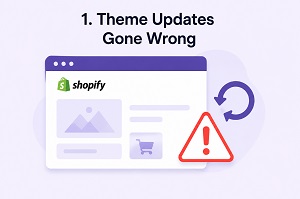
1. Theme Updates Gone Wrong
The themes in Shopify stores affect essential elements, such as product pages, shopping cart functions, navigation, mobile friendliness, and layout options. An improperly installed theme update may lead to a situation where the custom code will be overwritten; key elements will not work; apps will be disabled; and various performance problems will arise. All these factors contribute to a loss in sales, negative user experience, and an immediate requirement for Shopify store recovery assistance. Our expert team of Shopify store support specialists immediately identifies the potential conflict and corrects all errors, such as broken templates, missing functionality, and layout issues.
2. App Conflicts and Script Errors
Most Shopify websites depend on many applications when it comes to updating carts, checkout personalization, popups, recommendation systems, scripts, etc. In case there is more than one app trying to take charge of the function, conflicts arise leading to a website slowdown, malfunctioning of essential features, or checkout errors. Such cases may cost the store owner revenue and demand urgent Shopify store recovery services to fix the problem. The team at Shopify emergency support will analyze all apps that might be causing conflicts and safely remove the unnecessary and outdated code, as well as fixing any issues related to scripts without altering your store appearance.

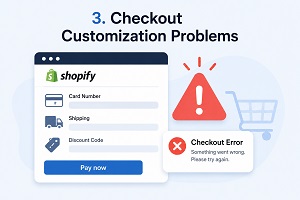
3. Checkout Customization Problems
Among the major concerns facing any Shopify store is checkout errors because it becomes impossible for customers to make purchases resulting in cart abandonment and instant loss of sales. Problems may arise as a result of payment gateway errors, incorrect shipping settings, discount app interference, checkout modifications and validation script malfunctions. In most cases, there is need for quick Shopify store recovery services to get the checkout process running smoothly and efficiently. Our professional Shopify technical support staff will investigate your checkout process, determine the cause of malfunction, and repair any critical errors without slowing down your store operations.
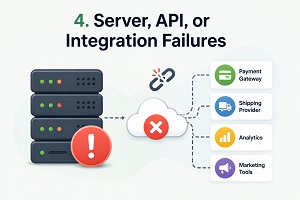
4. Server, API, or Integration Failures
Payment gateways, delivery systems, analytics systems, and marketing systems all require reliable data connectivity and integration with third-party services in order for a Shopify store to work properly. The problem is that when such integration fails, the store may run into problems with the checkout process, missed orders, inaccurate analytics, or even end up with their entire Shopify store down. Such problems have the potential to affect both customers' shopping experience and your income as well, which is why a speedy recovery service for Shopify stores becomes important. By analyzing API integrations, third-party apps, server connectivity, and automation, we diagnose failures that prevent you from running your business.
Our Shopify Emergency Recovery Process
Immediate Store Assessment:We do a thorough analysis of what may have caused the problem in the Shopify store such as themes, apps, checkout issues, script issues, DNS issues, integration issues, and changes made to the store recently. With our Shopify emergency support services, we conduct a speedy technical analysis in order to determine the cause and stop any more disruption. This will help us offer you reliable Shopify store recovery service using the safest and fastest process possible.
Root Cause Diagnosis: Shopify store recovery service should entail much more than just patching. Our technical support team conducts a thorough technical investigation into Liquid codes, JavaScript scripts, application integration, check-out processes, and other aspects of performance of your Shopify store. We can detect any mistakes, problems, and issues related to Liquid codes, broken scripts, and instability of your customizations that can potentially have a negative effect on sales. Our Shopify store recovery service helps improve the stability of your Shopify store as well as boost its speed and security.
Emergency Fix & Recovery:With our expertise, we can repair pages that have been harmed, products that have been deleted, cart functionalities that have stopped working, problems with checkouts, and various other components of your Shopify site. Our services of Shopify site recovery aim at restoring your store to its best condition by providing you with clean, safe solutions that will ensure that your design, search engine optimization performance, customer data, and the entire flow of the conversion process remains intact throughout the procedure.
Cleanup & Stabilization: Once we deal with the pressing problem, our Shopify technical support team then conducts a thorough cleanup and optimization of your store. This ensures that the shop becomes stable in the future, as we clear out any unnecessary code, optimize scripts, analyze the apps installed, and deal with other potential threats that can affect the performance of your Shopify store in the future. The main objective of our Shopify store recovery solution is to ensure maximum security, performance, and functionality of your store to prevent another Shopify store down scenario.
Testing & Verification: We thoroughly test page loading speed, cart functionality, checkout performance, payment processing, mobile responsiveness, and browser compatibility before completing any repair process. Our Shopify emergency support team ensures every feature works correctly across devices and customer journeys to prevent additional disruptions. As part of our Shopify store recovery service, we verify that fixes are stable, secure, and optimized for performance. This detailed testing process helps protect conversions, improve customer experience, and reduce the risk of future Shopify store down situations affecting your business operations and online sales performance.
Why Emergency Shopify Support Requires Experts
1. Incorrect Fixes Can Break More Features
Poor edits can damage product pages, cart functions, collection templates, checkout, or theme layout. Expert Shopify technical support prevents one repair from creating another failure.
2. Risk of Data Loss
Unplanned recovery work may affect products, images, variants, orders, or customer information. Professional Shopify store recovery protects important store data.
3. Potential SEO Damage
Broken URLs, missing metadata, slow loading, and damaged links can hurt rankings. Our Shopify support services preserve SEO structure while fixing urgent problems.
4. Shopify Platform Limits
Shopify has rules around checkout, apps, scripts, and technical behavior. Our Shopify emergency support follows safe methods that respect platform limits.
Our Shopify Services
Our Shopify services help store owners fix technical issues, improve speed, increase search visibility, and boost conversions. From Shopify SEO indexing fixes and performance optimization to theme customization, migration, and emergency store recovery - our experts deliver results-driven solutions.
Shopify Indexing Fix Services
Fix coverage, canonical, robots, sitemap & GSC issues.
Shopify Speed Optimization
Core Web Vitals, asset cleanup, lazy-load, app bloat removal.
Shopify Store Migration
Safe move from Woo/BigCommerce/Magento + redirects.
Shopify Conversion Rate Optimization
Improve UX, PDP/collection flows, cart & checkout funnels.
Shopify Payment Gateway & Shipping Setup
Configure gateways, rates, zones, taxes, and rules cleanly.
Shopify Theme Customization & Bug Fixes
Liquid edits, sections, layout fixes, and responsive cleanup.
Shopify Subscription & Recurring Orders
Recharge / Appstle setup, logic, styling & testing.
Shopify Broken Link & 404 Error Fixing
Redirect mapping, broken collections/products, cleanup.
Shopify Database Optimization
Speed up store by reducing heavy queries and app overhead.
Shopify Hosting & Server Optimization
CDN, caching strategy, DNS, image delivery improvements.
Shopify Store Recovery & Emergency Support
Broken theme, checkout issues, critical errors & rollback.
Shopify Checkout & Payment Error Fix
Fix gateway errors, order failures, tax/shipping issues.
Shopify Security Audit Service
Detect vulnerabilities, risky apps, and security gaps. Get a clear action plan.
Shopify API Integration Error Fix
Fix API sync issues, webhook errors, connection failures, and data mismatch problems.
Shopify Admin Access & Permission Fix
Restore admin access, fix staff permissions, collaborator issues, and login blocks.
Shopify Email Deliverability & SPF/DKIM Setup
Fix email deliverability issues, configure SPF, DKIM, and DMARC to prevent spam and improve inbox placement.
Shopify Tracking & Analytics Setup
Accurate setup of Google Analytics, GA4, Facebook Pixel, conversion tracking, and event tracking.
Shopify SEO Technical Fixes Service
Resolve technical SEO issues like indexing errors, site speed, structured data, and crawl problems.
Shopify App Installation & Conflict Resolution
Install, configure, and fix conflicts between Shopify apps that slow down or break your store.
Shopify AI Chatbot Setup Services
Transform your Shopify store with intelligent AI chatbot solutions that automate customer support, boost conversions, and deliver seamless shopping experiences 24/7.
Frequently Asked Questions
1. What should I do if my Shopify store is down?
In case your Shopify store is facing a malfunction issue that might be interfering with the transactions or even customer experience, reach out to emergency support by Shopify immediately. It is advised to avoid any arbitrary changes in themes, apps or codes since such actions might make things worse. Using a professional Shopify store recovery service will help resolve the issue effectively.
2. Do you fix broken Shopify checkout problems?
Yes. Our Shopify technical support team fixes broken checkout problems by inspecting payment gateways, shipping settings, app conflicts, discount errors, cart functionality, and checkout scripts. As part of our Shopify store recovery service, we identify the root cause, repair critical issues, and restore a secure, smooth checkout experience to prevent lost sales and customer frustration.
3. Can you fix problems caused by Shopify apps?
Yes. Our Shopify support services identify and fix problems caused by conflicting app scripts, broken embeds, slow-loading code, and compatibility issues that affect store performance. As part of our Shopify store recovery service, we safely remove unstable app behavior, optimize functionality, and restore smooth store operations to prevent downtime, checkout errors, and poor customer experience.
4. Is Shopify store recovery safe for SEO?
Yes. Our Shopify store recovery service is designed to protect SEO performance during emergency repairs. We carefully preserve page structure, metadata, internal links, URLs, site speed, and mobile responsiveness while fixing technical issues. Our Shopify technical support team ensures recovery work does not negatively impact search rankings, customer experience, or long-term organic traffic growth.
5. Do you provide ongoing Shopify support services?
Yes. Along with Shopify emergency support, we provide ongoing Shopify support services for store cleanup, performance monitoring, optimization, and issue prevention. Our Shopify store recovery service also includes regular maintenance, app management, security checks, and technical improvements to keep your store stable, secure, and running smoothly while reducing the risk of future downtime or performance issues.
Did Your Shopify Store Suddenly Stop Behaving?
Get Shopify emergency support, complete Shopify store recovery, expert Shopify technical support, and dependable Shopify support services when your Shopify store down issue needs urgent attention.