




Archive for May, 2011
AdWords Location Extensions – Important Changes To Clicks On Directions
Many use location extensions to automatically show your business address and other information in your ads on Google. These ads also show directions to your business location, along with your address and phone number. By clicking on the directions, potential customers can map the quickest route from their location to your business.
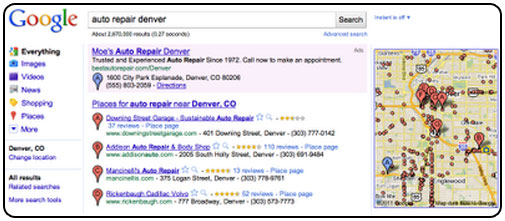
Location extensions with directions are helpful to users and lead to more interactions with your ads. In January, Google launched a report in AdWords to help you measure these useful interactions.
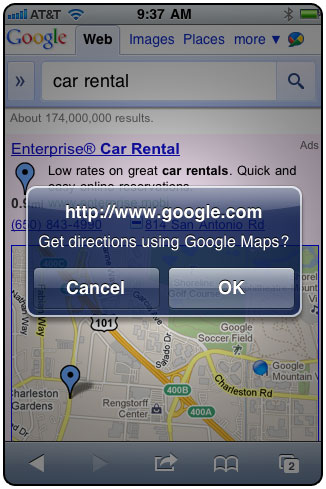
Over the next few weeks, you’ll see performance metrics for directions beside those for clicks and phone calls. Google will also begin to charge for clicks on directions in the same manner as clicks on your ad’s headline or phone number. If your campaign has a high number of these clicks, these specify that your customers are interacting with your ads to get directions to your business.
Google Now Shows Your Display URL Domain In Headline For Select Ads
In an AdWords ad, the display URL may be last, but it’s surely not least. In fact, the display URL can be an important deciding factor in whether a user clicks on your ad. Google will now automatically show your display URL domain in the headline for select top placement ads on Google. As a result, your brand will be featured more importantly in your ad, and you can use the text in the headline to highlight other information. Potential customers, on the other hand, will be able to more simply identify the site to which they’ll be taken after they click on your ad.


When shown in the headline, the display URL will be spaced by a vertical bar and will consist only the domain, not the “www.” prefix or any subdirectories .Your display URL will also continue to appear as normal below the description line. Of course, if the headline previously contains your domain, it won’t be displayed again. Finally, it’s possible for the display URL domain to appear in addition to a description line that is promoted to the headline, as long as the resulting headline is sixty-eight characters or less.
Google Releases AdWords Editor Version 9.0 With Many Features
Google has released AdWords Editor Version 9.0, with a number of new features designed to make changes across accounts more efficiently and manage new ad features, such as Ad Sitelinks and high-end mobile targeting, at scale. The features are:
AdWords Editor Version 9.0 features:
You can now Scalably manage Ad Sitelinks
Version 9.0 provides full support for Ad Sitelinks, with downloading and uploading to the account, making edits, checking changes, and importing and exporting.
Improved insert/revise Multiple and Import CSV tools
When entering new data using the insert or revise multiple tool, you can enter your data with the columns in any order, allocate the appropriate headers to each column, and select the choice to remember the order of your columns for your next import, and approve or cancel the changes in the account in one click.
Set high-end mobile targeting options
AdWords Editor now supports the facility to set campaigns to target high-end mobile devices (including Android, iPhone, iPad, and Palm) and carriers in Campaign Settings.
Better manage multiple accounts and MCCs
To help you better manage multiple accounts, AdWords Editor now offers kind and search for accounts, select and eliminate multiple accounts, and a new dropdown menu above the Account tree in AdWords Editor that displays recently accessed accounts, so you can quickly switch to any one of them.
In addition, when adding an MCC account to the Add New AdWords Account dialog, you can search within the list of accessible child accounts, display extra columns, and move up to a different level in the MCC account hierarchy.
Improved management of negative keywords:
More easily find and make bulk changes to negative keywords, placements, or audiences
To more easily locate and manage negative keywords, placements, or audiences in your account, the display of Negatives keywords in AdWords Editor is changed. The Negatives tab has been removed, and you can instead toggle between displaying negative or positive keywords, placements, or audiences by clicking the Positives or Negatives button on each item’s respective tab.
The Select Duplicates button is now available for negative keywords when in the Duplicate keywords view mode.
Google’s Instant Preview Now Includes Adwords Ads
Google has recently launched their Instant Preview feature to ads. Now you can see that nifty little magnifying glass appearing next to ads as well as organic search results.
In November 2010, Google launched instant previews for the search results. And now the Instant Previews icon will appear next to ads on Google.com too allowing users to preview the landing page, giving customers the facility to see if that page matches what they are actively searching for.
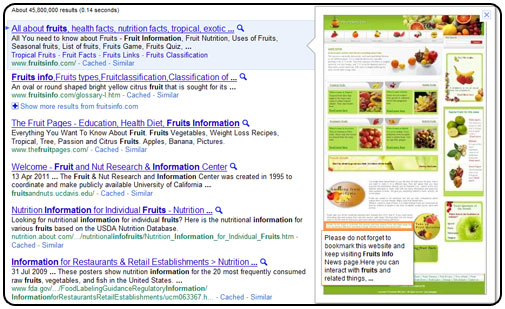
By allowing potential customers to preview your site before they land, Instant Previews helps you get even more highly-qualified traffic to your site. Even enhanced, Instant Preview clicks are free of charge — you’re only charged if a user clicks through to your actual landing page. Instant Previews are not taken into account when scheming Quality Score.
The “nosnippet” tag is not supported for Adwords and you can block AdsBot-Google to prevent Google from screening previews, but this will have an impact on Google ability to evaluate landing page quality.
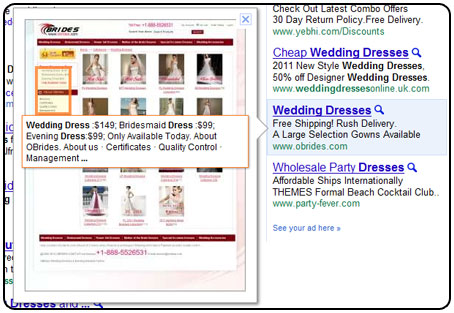
Instant Preview allows users to preview the ads they are about to click on to make sure that that content of the landing page matches what they are looking for. The aim of this attribute is to increase user satisfaction and provide more highly qualified traffic to sites.