




Archive for March, 2011
Language Targeting In Your Campaign
You may have noticed when creating a new AdWords campaign Google sometimes suggest targeting multiple languages based on the location that you’ve targeted. Here is the reason for the recommendation and the way it works in your campaign.
Refresher
The campaign that you are running will target the interface language that you have set as the language in which you’d like the Google interface to be displayed. A Spanish-speaker living in the United States, for instance, may want to perform searches on www.google.com but change the interface language setting to Spanish. Alternatively, an English-speaker living in Japan may want to perform searches on www.google.co.jp but see an English interface.
At present when your interface language matches the targeted language your ad appears. This means when user’s interface is in another language your ads won’t necessarily appear.
For example you target only the English language in your campaign and if you sell watches in the United States using the keyword watches, your ads won’t appear to bilingual users who search for watches but do so within a Spanish interface. Especially when targeting a geographic area with bilingual residents, targeting multiple interface languages can help your ad appear in front of as many potential customers as possible.
New improvement
Some words are common to more than one language and hence finding the language of the search from the query itself can sometimes be hard task. However, there are five languages in AdWords that can be distinctively identified by their characters: Greek, Hebrew, portions of Japanese, Korean, and Thai. Therefore, starting in late April, if you’re targeting any of these five languages, your ad will be qualified to show for all queries in that language that matches your keywords, regardless of the user’s interface language (your location targeting settings will still apply).
For example, if you have the keyword λουλούδια (Greek for flowers) in a campaign that targets the Greek language, your ad will be qualified to show whenever a user searches for λουλούδια, even if the user’s interface is in English.
This will be a good way to maximize the amount of traffic that your campaigns receive while targeting multiple interface languages.
Advanced Control Options Now To Target Your Ads
To reach our potential customers in our PPC campaign we used to target our ads in specific geographic locations such as countries, regions, and cities. Now you can prefer to target or exclude your ads based on the user’s physical location or the location of interest.
This new feature can be used when your advertising goals specifically call for more granular controls, because the use of advanced location options will limit your ad exposure.
Targeting method: Target using physical location
If you run a jewelry store in Flora and you want to advertise only to people located near your store. With the existing location targeting in AdWords, you can only specify the location you wish to target, Flora. However, your ad might be shown not only to people in Flora, but also to people elsewhere in the US whose searches include one of your keywords along with the word “Flora”.
If a Flora-based user searching for “Pennsylvania amish jewelry” will not see your ad. This is the case even if your campaign includes that exact keyword.

Exclusion method: Exclude by physical location and search intent
If you want to target sell properties in Chicago and don’t want to advertise to people who are based in Florida or interested in Florida properties, you can go in for restrictive exclusion method by choosing “exclude by physical location and search intent,” as shown below. This makes your ad visible to people based in Florida or to those who include a Florida location in their search queries.
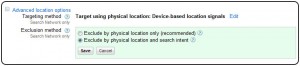
New default working of excluded locations:
If you happen to own a restaurant in Paris, you may want to advertise special deals only to people planning a visit to the city but not to those who live there. Previously, if you excluded Paris from location targeting in AdWords, your ads wouldn’t be shown to people in the city or to those searching for places in Paris. With the new default settings, your ads won’t be shown to people who are in the city, but people outside the city can see these ads if they specify “Paris” in their search queries.
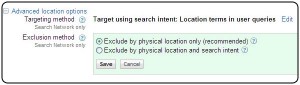
Negative Keywords Enabled In Product Listing Ads
Google Product Listing Ads and Product Targets, a new bidding and targeting technology feature that allows you to aim the products in your merchant center account into manageable groups, and to bid differently on those groups based on a number of attributes like brand and product type.
To help you get better with your performance with Product Listing Ads even further. Google has newly launched a new feature “negative keywords” to all U.S. advertisers.
Negative keywords for Product Listing Ads work in a similar way as they do with normal text-based search ads. Adding a negative keyword to your ad group or campaign means that your product listing ads won’t show for search queries containing that particular term.
“Using negative keywords, you can limit the chances that your ads will show on unrelated or low value queries. For e.g., if you sell fabrics, and not wool fabrics you can add the negative keyword [wool] to your Ad Group and your Product Listing Ads won’t show for any queries that contain the word [wool]”. The query for “fabrics” would trigger the ads, but a query for “wool fabrics” would not.
You can also run negative keywords across multiple campaigns using the negative keyword list feature.
New Feature To Display Ads Which Provides More Conversion
Google has launched of a new ad rotation setting in AdWords that allows you to optimize for conversions. Previously, we had two options:
- Optimize for clicks: Ads that are expected to provide more clicks are shown more often
- Rotate: Ads are shown more evenly
Now, with a third option, you can choose to show ads that are probable to provide more conversions more often. The more conversion ad is calculated by combining the clickthrough rate and conversion rate.
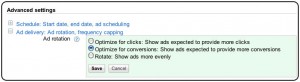
To use the new setting, you’ll need to have Conversion Tracking in your account, as Google uses this data from that tool to determine which ad is the most likely to receive conversions. When Google does not get enough data to make a decision, then it will show you the ad that is the most likely to receive clicks. If you have Conversion Tracking, the Optimize for conversions option will be available in the Ad delivery: Ad rotation, frequency capping section under advanced settings on the Settings tab of any campaign. Once enabled, it will relate to all ads that appear on Google.
Call Metrics With Extensive Features Now!
Back in November, Google announced call metrics, a new AdWords feature that allows you generate and measure phone calls directly from your ads.
Now this feature is extended to view details about individual calls. That is the new detailed call reports that show the specific metrics about each individual call that your campaign has received since call metrics was enabled, including:
- Call start time
- Call end time
- Call duration
- Call status (missed or received)
- Caller area code
To view detailed reports about each call, you’ll need to first enable the Dimensions tab in your version. Once you’ve enabled the Dimensions tab, click View and select Call metrics calls to see the detailed call report.
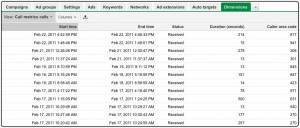
While detailed call reports let you dive in depth into the individual calls you’ve received, you’ll still be able to view aggregated call reports for every campaign on the Campaigns tab. These metrics comprise total number of calls, received calls, missed calls, total call duration, and average call duration. Call metrics is only accessible to a limited number of US advertisers.