




Programmers Reaction
See the reactions of an ordinary man and a programmer while in danger.
Ordinary Man

Programmer

Google introduced language option in Gmail
Do you want to send mails in tamil, hindi, malayalam or in Telugu?
Are you feel very difficult to convey your message in English?
Google now introduced language options in Gmail.
You can send mails in tamil, hindi, malayalam , Telugu and in English.
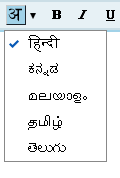
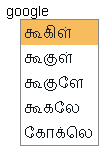
They provide suggestion for you while you are typing as they did in google suggest.
This will help you to select the exact word you want.
But they are having some drawbacks in it.
For some words, translation is wrong.
Here is a sample of error.
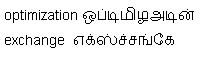
Even if the translation comes wrong after we hit space key, in there suggestions we cannot find the correct translation.
A sample error listing
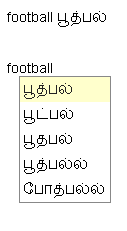
If google fixes these minor errors, Surely this becomes very useful to the gmail users.
Not having Translator in your mailbox!!!
Here is how to enable the translation.
1. Click the Settings link in Gmail.
2. On the General tab, select the checkbox next to ‘Enable Transliteration’.
3.If there is no ‘Transliteration’ option, Then click the Show all language options link first.
4.Select the language you would like your messages to be written from the drop-down menu.
5. Save all the changes you did.
Code Injection – How and Prevention
When software permits the input of user to contain code syntax, it may be possible for a hacker to craft the code in such a way that it will change the proposed control flow of the software. Such a modification possibly will show the way to arbitrary code execution.
An injection problem covers a wide range of issues in different ways. The most significant problem to note is that each and every injection problems share one thing in common — i.e., they permit for the injection of control plane data into the user-controlled data plane. This means that the execution of the process may be misused by transferring the code through genuine data channels, using no other mechanism. While buffer overflows, and many other flaws, engage the use of some further issue to gain execution, injection problems require only for the data to be parsed. SQL injection and format string vulnerabilities are the most typical instantiations of this kind of weakness.
This illustration try to write user messages to a message file and let users to view them.
PHP Example:
[php]
$InfoFile = "seo/codeinject.out";
If ($_GET ["action"] == "Message to write")
{
$name = $_GET ["name"];
$message = $_GET ["message"];
$handle = fopen ($InfoFile, "a+");
fwrite($handle, "<strong>$name</strong> says ‘$message’\n");
Fclose ($handle);
Echo "Message Saved Successfully! \n";
}
Else if ($_GET ["action"] == "ViewMessages")
{
Include ($InfoFile);
}
[/php]
While the programmer proposes for the InfoFile to only include data, an attacker can supply a message such as:
name=h4x0rmessage=%3C?php%20system(%22/bin/ls%20-l%22);?%3E
which will decode as given below:
within php tag type the command given below
system(“/bin/ls -l”);
The programmer thought they were just including the contents of a regular data file, but PHP parsed it and executed the code. Now, this code is executed any time people view messages.
How to overcome
Your code should run in a “jail” or similar sandbox atmospheres that impose firm limitations between the process and the operating system. This may efficiently put a ceiling on code executed by your software.(Ex) Unix chroot jail and AppArmor. On the whole, managed code must be in some protected area.
Imagine all input is malicious. Use good input validation strategy. Decline any input that does not strictly conform to specifications, or transform it into something that does. Use a blacklist to reject any unexpected inputs and detect potential attacks.
To diminish the chances of code injection, use strict whitelists that set boundary which constructs are allowed. If you are dynamically constructing code that invokes a function, then verifying that the input is alphanumeric might be insufficient. An attacker can reference a dangerous function that you did not intend to allow, such as system(), exec(), or exit().
Origin of orkut – Inspiring love story

A guy was traveling with his girlfriend in the train. Train meets with an accident. This guy searched his girlfriend everywhere but in vain. This guy grew up to become an IT technical architect. He hired many IT developers so that he can develop a software with them while will help him to find his girlfriend through the web. As thought, he was able to find her after losing millions of dollars and 3 long years. While, he was deciding to shut down his search operation, the CEO of Google met him and took over the application. The application was able to make a profit of 1billion dollar in the first year. This software made a whooping profit of 1 billion in its first year. The name of the software is known as orkut.
The name of the guy is orkut Buyukkokten. He gets a large amount from Google. He will become one of the richest men by 2009. Some more interesting facts about this guy are whenever a person opens an account in Orkut he gets $12 from google and when you add somebody in your friend’s list he gets $10. For even small things he gets paid. Google pays him as follow: $5 if you scrap someone and $4 when someone scraps you. For loading each photograph he gets $200. When you become someone’s fan he gets $2 and when someone becomes your fan he is paid $1.5. When you logout of orkut he is paid $1. He gets $0.5 each if you change your profile photograph or when you read your friend’s scrap-book or when you visit your friend’s friend list.
Definition of Open Source
The term “Open source” does not just represent right to use the source code. The distribution terms of open-source software has a necessity to meet the terms with the subsequent standards:
- Redeployment without charge
- Source Code
- Derived Works
- Reliability of the Author’s Source Code
- No inequity against Persons or Groups
- No favoritism against Fields of Endeavor
- Distribution of License
- License should Not Be precise to a Product
- License Must Not Restrict Other Software
- License Must Be Technology-Neutral
The certificate does not limit anyone from advertising or giving away the software as a module of a combined software distribution encloses programs from numerous different sources. The license does not entail a fee or other payment for such sale.
The program should consist of source code. It has to permit sharing of source code in compiled form. If some form of a product is not circulated with source code, there must be a fine revealed means of how to obtain the source code for a rational reproduction cost preferably, downloading via the Internet without charge. The format of source code must be like a programmer can be able to alter the program. Intermediate forms like output of a preprocessor or translator are not permitted.
The warrant must let them to make any modifications and derived works. It should permit them to be distributed the software under the similar conditions as the license of the original software.
The license possibly will confine source-code from being distributed in customized form only if the license agrees to distribute “patch files” with the source code for the intention of transforming the program at build time. The license must openly allow distribution of software built from modified source code. The license may need derived works to bring out different name or version number from the original software.
The license is required to distinguish beside any person or group of persons.
The license should not put a ceiling on making use of the program in a particular field of endeavor. For instance, it may not confine the program from being used in a trade, or from being used for genetic observations.
The rights enclosed to the program should be relevant to all to whom the program is rearranged with no need for implementation of an additional license by those parties.
The rights attached to the program should be unique. It should not depend on other program’s which is part of a particular software distribution.
The authorization should not put limitations on other software that is distributed in conjunction with the licensed software. For instance, the license should not claim that all other programs distributed on the similar medium ought to be open-source software.
No stipulation of the license may be predicated on any individual technology or style of interface.
How Google Saves People from Harmful Sites
If you do a Google search between 6:30 a.m. PST and 7:25 a.m. PST this morning, you probably saw this following message “This site may harm your computer” accompanied each and every search result. This was obviously an error, and Google were very sorry for the trouble caused to all their users.
What happened? Very merely, human error. Google flags search results with this message “This site may harm your computer” if the site is called to install malevolent software in the background or otherwise slyly. We do this to guard our users against visiting sites that could damage their systems. Google maintain a list of such sites through both physical and automated methods. Google work with a non-profit known as StopBadware.org to come up with criterion for maintaining this list, and to offer simple processes for webmasters to take their site from the list.
Google sporadically updates that list and released one such update to the site this morning. Unluckily (and here’s the human error), the URL of ‘/’ was incorrectly checked in as a value to the file and ‘/’ enlarges to all URLs. Opportunely, their on-call site reliability team found the problem rapidly and reverted the file. As we push these updates in a reeled and rolling fashion, the errors began appearing in this particular duration i.e. 6:27 a.m. and 6:40 a.m. and began disappearing amid 7:10 and 7:25 a.m., so the duration of the problem for any meticulous user was roughly about 40 minutes.
Google thanked their team for their quick work in finding this and they also apologized to all their users due to the inconvenience caused to them this morning and also to their site owners whose pages where incorrectly labeled. Google said that they will carefully interrogate this incident and put more robust file checks in place to avert it from taking place again.
Google Favicon
A favicon is a tiny icon that is usually accustomed to imitate the uniqueness of a web site. You can come across it in the address bar, in your browser’s tabs, in the bookmarks list or in some feed readers like Bloglines, dig, furl etc.
Google’s favicon is introduced in 2008. It is an edition of the lowercase “g” from its authorized logo. Google has a new favicon now. The new favicon is a fraction of a bigger set of icons developed for improved scalability on mobile devices.
Google’s favicon is hosted at google.com/favicon.ico.It is a 16×16 pixels image which is a usual size for favicons. . In this, the new icon is the depiction of a multi-colored lowercase “g”, highlighted with the colors of Google namely red, green, blue and yellow.Google swap the upper-case “G” in blue border, green and red borders with a lower-case purple “g” in a rounded corner rectangle.
India positioned fourth in the midst of top ten internet users
The escalating faith on the web build India stands fourth with the country being home for 81 million net users. The sum of internet users in the world is 134, 85, 72,040 by the end of 2007 and Asia is the core of about 568.7 million users.
The United States of America is on top of the chart with 220 million net users whereas China and Japan pursue with 210 million and 88.1 million users, in the same way. Next to India, Brazil set at the fifth rank with 53.1 million users. As stated by the statistics which was revealed by the Internet Governance Forum, United Kingdom stands as sixth uppermost internet usage center with 40.2 million citizens being accessible to the internet, followed by Germany with 39.1 million users, Republic of Korea with 35.5 million users, and Italy with 32 million users and France with 31.5 million users.
But if we consider broadband connection, India has no place in the top ten nations. But U.S. occupies first position with 73.2 million connections. The other countries who had bagged a position in the broadband chart are China with 66.4 million connections, followed by Japan with 28.28 million, Germany with 19.6 million, UK with15.6 million, France with 15.5 million, Republic of Korea with 14.7 million, Italy with 10.8 million, and Canada with nine million and Spain with eight million.
DNN has problems while executing SQL file
Are You facing a problem with DNN while you try to install a module?
Is DNN having problems in executing your file even it runs perfectly in Query Analyzer?
For example
If you have this line
set @var = @var+ 1.
DNN fails to execute it.
If you remove the blanks like
set @var=@var+1
DNN will truncates it to
set @var=@varSolution:
This problem is due to the format of the sqldataprovider you are trying to upload.
Check the format of sql script files.
DNN requires its sql script files to be in a unicode format.
1. Open sql script in Notepad;
2. Goto File > Save As
3. Save the file file over the existing sql script however specify the file type as Unicode.
DNN should now execute the script correctly.
Do not forget to replace the dbo. with {databaseOwner} and prefix table name with the {objectQualifier} tag
What is the difference between cgi and perl?
Most of the programmers were having confusion with .cgi and .pl.
Since the file with .cgi extension is using the perl code and it is running fine.
But the file with .pl extension which contains the perl code does not run.
Here is the answer for you
File extensions are generally meaningless. Windows preserves a map between programs and the file extensions which should be accustomed to open them. Apache, a web server which performs something similar like windows. CGI is an interface approved upon by rfc 3875 which is mainly used for passing information from web requests to executables. CGI has capable of bypassing data to several types of executable which can recognize it. Your .cgi files are possibly parsed for #! line which is responsible for mapping your exact .cgi file to be executed by Perl. Briefly, file extensions are virtually meaningless.
The extension simply notifies the server about how to handle it. cgi extensions tell it to run the script with whatsoever program is programmed at the top #! line. If the server is not notified to do the same with .pl files in that case it will not know what to do with it.
If you are lying on an apache server, adding up this line to the .htaccess file will make it parse .pl files through CGI
AddHandler cgi-script .pl