




Send an HTML Email Using PHP
PHP Mail Function:
The mail() function allows you to send emails directly from a script.
Syntax For E-mail:
mail($to,$subject,$message,$headers);
[php]
<?php
$to = "someone@example.com, someoneelse@example.com";
$subject = "HTML email ";
$message = "<table><tr><td>Congrats</tr></td></table>";
// Always set content-type when sending HTML email//Very Very Important headers</h4>
$headers = "MIME-Version: 1.0" . "\r\n";</h4>
$headers .= "Content-type:text/html;charset=UTF-8" . "\r\n";// More headers</h4>
$headers .= ‘From: <webmaster@example.com>’ . "\r\n";
$headers .= ‘Cc: mymd@example.com’ . "\r\n";
mail($to,$subject,$message,$headers);
?>
[/php]
PHP Sessions
Starting a PHP Session
- The session_start() function must appear BEFORE the <html> tag:
[php]
<?php session_start(); ?>
<html>
<body>
</body>
</html>
[/php]
- The above code is used to register the user session in server.
Destroying a Session
[php]
<?php
session_destroy();
?>
[/php]
- The above code is used to destroy the complete session from the server.
NOTE : The session is very very important to save the current user information on the server. Using UID(user id), The server saves the user information on the server.
Hide/Show using JavaScript
To hide the Div : style=”display:none”;
To visible the Div : style=”display:block”;
[php]
<html><head><script type="text/javascript">
function showdiv()
{
if(document.getElementById(‘child’).checked)
{
document.getElementById(‘adu’).style.display = "block";
}
else
{
document.getElementById(‘adu’).style.display = "none";
}
if(document.getElementById(‘adult’).checked)
{
document.getElementById(‘adu’).style.display = "none";
}
}
</script>
</head>
<table border="0">
<tbody>
<tr>
<td>Member Type</td>
<td>
<input id="adult" onclick="showdiv();" type="radio" name="member" value="Adult" />
<input id="child" onclick="showdiv();" type="radio" name="member" value="Child" /></td>
</tr>
<div id="adu" style="display:none">
<tr><td>Name</td><td><input type="text" value=""></td></tr>
</div>
</tbody>
</table>
</html>
[/php]
Output:
When you Click the Adult , you will not see the text box below.
When you click the child, the below text box will be visible.
| Member Type | Adult Child |
| Name | * |
How to Upload a image from HTML form using PHP?
[php]
<?php
if(isset($_REQUEST[‘sub’]))
{
$fileType = $_FILES[‘img’][‘type’];
$fileSize = $_FILES[‘img’][‘size’];
if($fileSize/1024 > ‘2048’)
{
echo ‘Filesize is not correct it should be equal to 2 MB or less than 2 MB.’;
exit();
} //FileSize Checking
if($fileType != ‘image/png’ && $fileType != ‘image/gif’ && $fileType != ‘image/jpg’ && $fileType != ‘image/jpeg’ )
{
echo ‘Sorry this file type is not supported we accept only. Jpeg, Gif, PNG’;
exit();
} //file type checking ends here.
$upFile = ‘uploads/’.date(‘Y_m_d_H_i_s’).$_FILES[‘img’][‘name’];
if(is_uploaded_file($_FILES[‘img’][‘tmp_name’])) {
if(!move_uploaded_file($_FILES[‘img’][‘tmp_name’], $upFile)) {
echo ‘Problem could not move file to destination.’;
exit;
}
} else {
echo ‘Problem: Possible file upload attack. Filename: ‘;
echo $_FILES[‘img’][‘name’];
exit;
}
$img= $upFile;
} //File upload ends here.
}
?>
<html>
<body>
<h3>File Upload:</h3>
Select a file to upload:
<form action="" enctype="multipart/form-data" method="post">
<input type="file" name="img" size="50" />
<input type="submit" name="sub" value="Upload File" />
</form>
</body>
</html>
[/php]
File Upload:
Select a file to upload:
How To Use Jquery Mutliselect Dropdown
I am using http://www.erichynds.com/jquery/jquery-ui-multiselect-widget/
Samples here
Initially it seemed tough to get it working as a beginner, but eventually I managed to successfully get it to work.
Step 1:
Download the Jquery Code Or You Can Include it From CDN (Content Delievery Network)
For multiple select drop-down, We need to include the following resource,
Download links are
After including the above files your code will look like:
[php]
<link rel="stylesheet" type="text/css" href="http://ajax.googleapis.com/ajax/libs/jqueryui/1/themes/ui-lightness/jquery-ui.css" />
<script type="text/javascript" src="http://ajax.googleapis.com/ajax/libs/jquery/1/jquery.js">
</script>
<script type="text/javascript" src="http://ajax.googleapis.com/ajax/libs/jqueryui/1/jquery-ui.min.js"></script>
<script type="text/javascript" src="../src/jquery.multiselect.js"></script>
[/php]
Step 2:
Use JavaScript Function to Trigger Multi-Select Event
[php]
<script>
$(document).ready(function(){
$("#check_list").multiselect();
});
</script>
[/php]
For customizing multi-select,We have to pass in a object with one or more options like header.height etc. For all available options Click Here
Step 3:
In <select> tag define multiple attribute for selecting multiple options and define name in array format as specified below.
Note that at the end of check_list in the <name>tag [] symbol is used,that denotes the array
[php]
<select name="check_list[]" id="check_list" multiple="multiple">
<option value="1"> Apple </option>
<option value="2"> Orange </option>
<option value="3"> Mango </option>
<option value="4"> Grapes </option>
<option value="5"> Strawberry </option>
</select>
[/php]
Step 4:
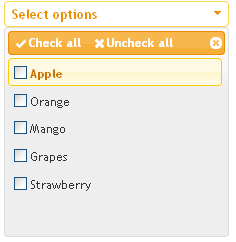
When you have embedded this multi-select dropdown in your form,
Output will be Displayed as
Step 5:
Onclicking submit button the value selected in drop-down is posted as an array.Let us assume we are using PHP to get this value.
[php]
if(!empty($_POST[‘check_list’])){ //Checking if check_list control is empty or not
foreach($_POST[‘check_list’] as $check){ //Looping through the array of values in foreach
print_r($check);//return the value of the variable
$test = implode(‘,’,$check);// implode tha array value to pass it in a query
}
}
[/php]
Your complete code will look like this
[html]
<html lang="en">
<head>
<meta http-equiv="Content-Type" content="text/html; charset=utf-8" />
<title>jQuery MultiSelect Dropdown</title>
<link rel="stylesheet" type="text/css" href="../jquery.multiselect.css" />
<link rel="stylesheet" type="text/css" href="http://ajax.googleapis.com/ajax/libs/jqueryui/1/themes/ui-lightness/jquery-ui.css" />
<script type="text/javascript" src="http://ajax.googleapis.com/ajax/libs/jquery/1/jquery.js">
</script>
<script type="text/javascript" src="http://ajax.googleapis.com/ajax/libs/jqueryui/1/jquery-ui.min.js"></script>
<script type="text/javascript" src="../src/jquery.multiselect.js"></script>
<script type="text/javascript">
$(document).ready(function(){
$("#check_list").multiselect();
});
</script>
</head>
<body id="test">
<form id="multiple" method="post" enctype="multipart/form-data">
<select title="Basic example" multiple="multiple" name="example-basic" size="5">
<option value="1">Apple</option>
<option value="2">Orange</option>
<option value="3">Mango</option>
<option value="4">Grapes</option>
<option value="5">Strawberry</option>
</select>
<input type="submit" name="submit" value="submit" />
</form>
<?php
if(isset($_POST[‘submit’])){
if(!empty($_POST[‘check_list’])){
foreach($_POST[‘check_list’] as $check){
print_r($check);
$test = implode(‘,’,$check);
}
}
$fruits = mysql_query("SELECT * FROM fruits WHERE fruit_id IN(".$test.")");
$fetch_fruits = mysql_fetch_array($fruits);
$name = $fetch_fruits[‘fruit_name’];
$desc = $fetch_fruits[‘desc’];
echo ‘<div>"’.$name.’"</div>’;
echo ‘<div>"’.$desc.’"</div>’;
}
?>
</body>
</html>
[/html]
For working example of Multi-select dropdown checkbox Click Here
Must know before reading this article
- PHP Basics
- HTML Basics
- Jquery
Tutorial to get values from database on selection of dropdown in PHP
PHP Fetch Tutorial
Fetching Data From Database on selection of dropdown value
Step 1:
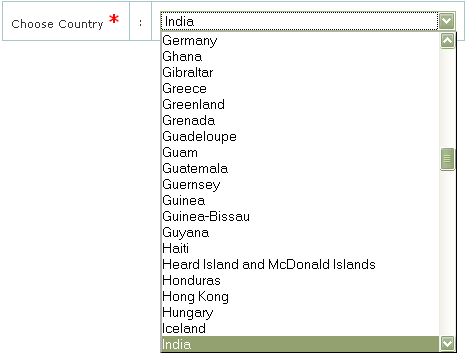
Get the list of countries from database and populate in drop-down.
[php]
$ctry_qry = mysql_query(“SELECT * FROM countries ORDER BY name;”);?>
//Calling Function
<select name="”ctry”"> <option value="”"">Select Country</option></select>
<select name="”ctry”"><option value="”<?PHP">”><!–?PHP echo $ctry[‘name’]; ?–></option></select>
[/php]
Consider that we choose India from the dropdown list.
Step:2
Add a simple javascript function which will run onchange
[javascript]
function reloaddata(ctryid) {
window.location.href="http://localhost/rotatetheglobe/admin/try.php?ctryid=" + ctryid;
}
[/javascript]
Step:3
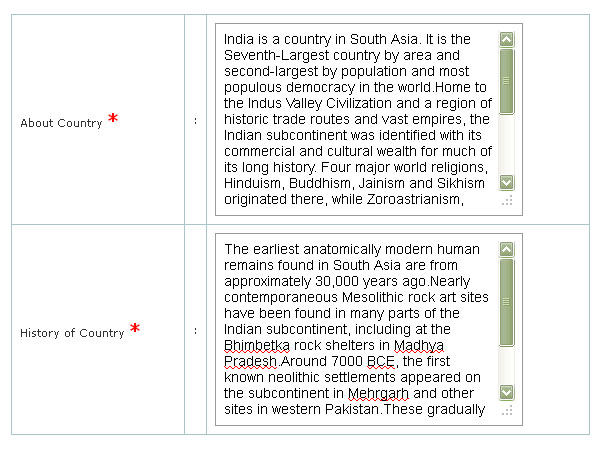
Reload the page in JS and pass the currently selected country id
Step:4
Get the country id from query string and fetch the required values from the database
[php]
<?PHP</pre>
<div><code>if</code><code>(isset(</code><code>$_REQUEST</code><code>[</code><code>’ctryid'</code><code>])) {</code></div>
<div><code>$ctryinfo_qry</code> <code>= mysql_query(</code><code>"SELECT * FROM country_info where ctry_root_id=’"</code><code>.</code><code>$_REQUEST</code><code>[‘ctryid</code><code>’]."'</code> <code>ORDER BY ctry_info_id ;");</code></div>
<div><code>?></code></div>
<pre>[/php]
Fetch array is used to fetch the respective row from record set . Using fetch array in while loop is used get a new row of MySQL information until the condition is TRUE.When there are no more rows the function will return FALSE causing the while loop to stop!
[php]
<textarea id="msgpost" name="ctry_about" rows="10" cols="50"> <?php echo $ctry_inf[‘ctry_about’];?></textarea>
<!–?php } ?–>
[/php]
CLICK HERE to view the complete output
Possible Errors to occur:
- JS Error
- Couldn’t get the value from the query string
- Page not found
Must Follow
- Make Sure the querystring variable and the $_REQUEST variable is same
- Make sure your onchange function is same name as that you call in your code.
Must know before reading this article
- PHP Basics
- HTML Basics
- DB Handling
Coming Up:
- How to configure a site to work in your local host when you are running windows
Code to get Title and Link in WordPress RSS Feed using PHP
You would often want to display the RSS feed of your blog in your personalized home page or your professional page. This can be achieved, if you have basic knowledge on PHP and HTML.
Just copy and paste the code below in the section where you want the feed to appear:
[php]
<?PHP
$con = file_get_contents(‘http://www.xxxxxx.com/blog/feed/’);/* Feed Url */
$title = getlinks("<title>", "</title>", $con); // gets Title and stored in array
$url = getlinks("<link>", "</link>", $con); // gets Url and stored in array
echo "<ul>";
for($i=0; $i < 6; $i++) {
echo ‘<li><a href="’.$url[$i].’" title="’.$title[$i].’" >’.urldecode($title[$i]).'</a></li>’;
}
echo "</ul>";
function getlinks($s1,$s2,$s) {
$myarray=array();
$s1 = strtolower($s1);
$s2 = strtolower($s2);
$L1 = strlen($s1);
$L2 = strlen($s2);
$scheck=strtolower($s);
do {
$pos1 = strpos($scheck,$s1);
if($pos1!==false) {
$pos2 = strpos(substr($scheck,$pos1+$L1),$s2);
if($pos2!==false) {
$myarray[]=substr($s,$pos1+$L1,$pos2);
$s=substr($s,$pos1+$L1+$pos2+$L2);
$scheck=strtolower($s);
}
}
}
while (($pos1!==false)and($pos2!==false));
return $myarray;
}
?>
[/php]
Creating Link Boxes in CSS
[html]
<html>
<head>
<style type="text/css">
a:link,a:visited
//Styles to be applied in link Box
{
display:block;
font-weight:bold;
color:#FFFFFF;
background-color:#98bf21;
width:120px;
text-align:center;
padding:4px;
text-decoration:none;
}
a:hover,a:active
{
background-color:#7A991A;
}
</style>
</head>
<body>
<a href="default.asp" target="_blank">This is a link</a>
</body>
</html>
[/html]
Output:
The link box will be created with the Specified Styles.
To set an background Image and repeat the image Horizontally using CSS
[html]
<html>
<head>
<style type="text/css">
body
{
background-image:urlC:\Users\systemuser\Pictures\flower.jpg’);
background-repeat:repeat-x;
}
</style>
</head>
<body>
<h1>Hai Friends!!</h1>
</body>
</html>
[/html]
Output:
The image in the given URL will be set as the Background with the Text “Hai Friends!!”.