




Coding Assistant
Which Is Better for Developers: GitHub Copilot or ChatGPT?
Artificial intelligence is transforming software development, and two of the most popular AI coding tools available today are GitHub Copilot and ChatGPT. Developers around the world are using these powerful AI assistants to write code faster, debug applications, learn new programming languages, and improve productivity. As AI-powered development tools continue to evolve, many programmers are asking the same question: Which is better for developers, GitHub Copilot or ChatGPT? While both tools leverage advanced artificial intelligence to assist with coding tasks, they serve different purposes and offer unique advantages depending on a developer’s workflow, project requirements, and technical expertize.
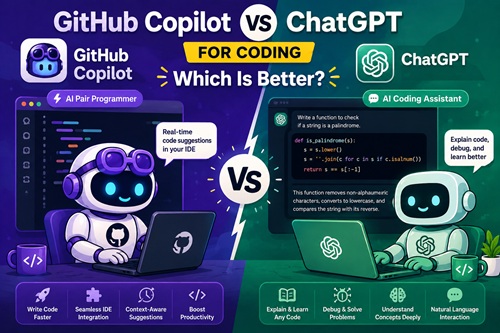
GitHub Copilot is specifically designed as an AI coding assistant that integrates directly into popular code editors such as Visual Studio Code, JetBrains IDEs, and Visual Studio. It excels at real-time code completion, automatically suggesting functions, classes, loops, and entire code blocks as developers type. For programmers working on software projects, web applications, APIs, mobile apps, or automation scripts, GitHub Copilot significantly speeds up the coding process by reducing repetitive tasks. It understands project context and can generate code based on existing files, making it one of the most powerful AI coding tools for developers. Developers looking for faster code generation, increased productivity, and seamless IDE integration often find GitHub Copilot to be an essential development companion.
On the other hand, ChatGPT for developers offers a broader range of capabilities beyond simple code completion. ChatGPT can explain complex programming concepts, generate code snippets, debug errors, review code, optimize performance, create technical documentation, and even teach new programming languages. Unlike GitHub Copilot, ChatGPT functions as an interactive AI assistant capable of understanding detailed prompts and providing in-depth explanations. Whether you’re learning Python, JavaScript, Java, C#, React, Node.js, or cloud technologies, ChatGPT can act as a virtual programming mentor. This makes it particularly valuable for beginners, students, and developers who frequently need help understanding code logic or solving technical challenges.
When comparing GitHub Copilot vs ChatGPT, the best choice often depends on the specific task. GitHub Copilot excels in day-to-day software development by providing instant code suggestions directly within the coding environment. It helps developers write code faster and maintain productivity without switching between applications. ChatGPT, however, shines when deeper problem-solving, debugging, architecture planning, code reviews, or learning assistance is required. Many professional developers use both tools together, relying on GitHub Copilot for code generation and ChatGPT for explanations, troubleshooting, and advanced development guidance.
From an SEO and technology perspective, AI-assisted programming is becoming one of the most significant trends in modern software engineering. Tools like GitHub Copilot and ChatGPT are changing how developers build applications, automate workflows, and solve coding problems. As artificial intelligence continues to improve, these platforms are expected to become even more powerful, helping teams reduce development time and improve code quality. Businesses investing in software development are increasingly adopting AI development tools, AI coding assistants, and developer productivity software to remain competitive in a rapidly evolving technology landscape.
Ultimately, there is no single winner in the GitHub Copilot vs ChatGPT comparison because both tools serve different purposes. If your primary goal is faster coding and real-time code completion, GitHub Copilot is often the better choice. If you need detailed programming assistance, debugging support, learning resources, and technical explanations, ChatGPT offers greater flexibility. For many developers, the most effective strategy is combining both platforms to maximize productivity, improve coding efficiency, and stay ahead in the future of AI-powered software development.