




API Development
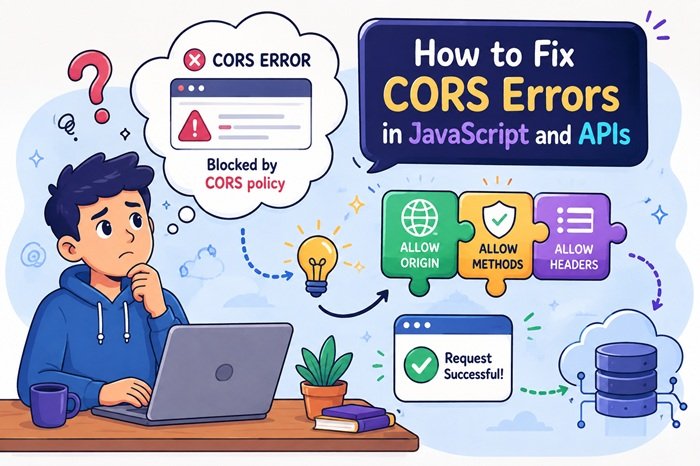
How to Fix CORS Errors in JavaScript and APIs
If you have ever connected a JavaScript application to an API, you may have encountered an error mentioning CORS policy, Access-Control-Allow-Origin, or a blocked cross-origin request.
CORS errors are among the most common problems developers face when frontend applications communicate with APIs hosted on a different domain, subdomain, port, or protocol.
The good news is that a CORS error is usually not a JavaScript bug. It is a browser security restriction that can normally be fixed by configuring the API server correctly.
In this guide, we will explain what CORS is, why CORS errors occur, and how to fix CORS problems in JavaScript, PHP, Node.js, and Express APIs.
What Is CORS and Why Does It Matter?
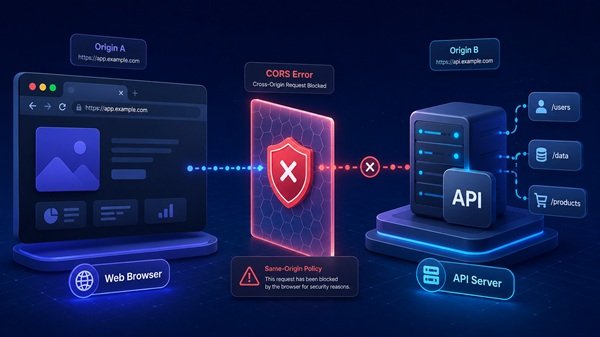
CORS stands for Cross-Origin Resource Sharing. It is a security feature used by web browsers to control how websites communicate with resources located on another domain, subdomain, protocol, or port.
For example, a website may be hosted on one domain while its API is hosted on another. From the browser’s perspective, these are two separate origins.
Before allowing the website to access data from that API, the browser checks whether the API server has given permission for the request.
If the server does not allow the requesting website, the browser blocks the response.
Although this can be frustrating during development, CORS plays an important role in protecting users from websites that attempt to access information from other services without permission.
Why Do CORS Errors Happen?
CORS errors normally appear when the frontend and backend are located on different origins and the server has not been configured to allow communication between them.
This often happens during development when the frontend and backend are running on different ports.
It can also happen when a website communicates with:
- An API hosted on a subdomain
- A third-party API
- A separate backend server
- A development server
- An external web service
Another common cause is incorrect server configuration.
The browser expects the API to return specific information explaining which websites are allowed to access it. If that information is missing or incorrect, the request can be blocked.
The important thing to remember is that a CORS error does not always mean there is something wrong with your JavaScript. In many cases, the real issue is on the API server.
How Can You Fix CORS Errors?
The first step is to identify which website is making the request and which server is receiving it.
The API server should then be configured to allow requests from the required website.
For public APIs, developers may sometimes allow access from many origins. However, private applications should normally specify which domains are trusted.
You should also check whether the API allows the HTTP methods your application needs. A simple request may work while another action fails because the server has not permitted that particular request type.
Headers also matter.
If your application uses authentication information, custom headers, or other additional request details, the server must be configured to accept them.
Instead of trying random changes on the frontend, it is usually better to inspect the server’s CORS configuration first.
What Are CORS Preflight Requests?
Sometimes a browser performs an additional check before sending the actual API request.
This is known as a preflight request.
The browser essentially asks the server whether the upcoming request is allowed. It checks things such as the request method, origin, and headers.
If the server responds correctly, the browser continues with the actual API request.
If the server does not respond properly, the browser stops the request.
This is why some developers find that simple API requests work while other requests fail.
When troubleshooting CORS, it is useful to open the browser’s developer tools and check the Network section. This can help you determine whether a preflight request is failing before the real request is even sent.
Common CORS Mistakes Developers Should Avoid
One of the most common mistakes is trying to solve CORS entirely from the frontend.
Because CORS permissions are generally controlled by the API server, changing JavaScript alone may not solve the problem.
Another mistake is allowing every website to access an API simply because it makes the error disappear.
While this may be acceptable for certain public resources, it can create unnecessary security risks for applications dealing with user accounts or private information.
Developers should also avoid ignoring authentication settings. Applications using cookies, login sessions, or authorization information may require additional CORS configuration.
Another frequent problem is mixing secure and insecure connections. A website running over HTTPS may have trouble communicating with an API using HTTP.
Checking these details early can make CORS troubleshooting much faster.
Final Thoughts
CORS errors may look intimidating, but they are usually easier to solve once you understand why the browser is blocking the request.
The main thing to remember is that CORS is a security mechanism, not simply a JavaScript error.
When a request fails, check the frontend origin, API configuration, allowed methods, authentication settings, and browser network information before making major changes to your application.
A properly configured API should clearly define which websites are allowed to access it.
Once the frontend and backend permissions match correctly, CORS errors usually disappear and the application can communicate with the API normally.