




How to fix/remove supplemental results from google,
Steveb of webmasterworld has an excellent posting on how to remove supplement results, I agree 100% with what he says and I recommend his posting to everyone who have supplement results in google and want to remove them, Supplement results are mostly caused when a page of a site once existed and later removed by the site owner of because of any other problem, Supplement results are also caused when a page which is crawled once had links to it then the links dropped off completely,
Here is his posting,
“Google’s ill-advised Supplemental index is polluting their search results in many ways, but the most obviously stupid one is in refusing to EVER forget a page that has been long deleted from a domain. There are other types of Supplementals in existence, but this post deals specifically with Supplemental listings for pages that have not existed for quite some time.
The current situation: Google refuses to recognize a 301 of a Supplemental listing. Google refuses to delete a Supplemental listing that is now a nonexistent 404 (not a custom 404 page, a literal nothing there) no matter if it is linked to from dozens of pages. In both the above situations, even if Google crawls through links every day for six months, it will not remove the Supplemental listing or obey a 301. Google refuses to obey its own URL removal tool for Supplementals. It only “hides” the supplementals for six months, and then returns them to the index.
As of the past couple days, I have succeeded (using the below tactics) to get some Supplementals removed from about 15% of the datacenters. On the other 85% they have returned to being Supplemental however.
Some folks have hundreds or thousands of this type of Supplemental, which would make this strategy nearly impossible, but if you have less than twenty or so…
1) Place a new, nearly blank page on old/supplemental URL.
2) Put no actual words on it (that it could ever rank for in the future). Only put “PageHasMoved” text plus link text like “MySiteMap” or “GoToNewPage” to appropriate pages on your site for a human should they stumble onto this page.
3) If you have twenty supplementals put links on all of them to all twenty of these new pages. In other words, interlink all the new pages so they all have quite a few links to them.
4) Create a new master “Removed” page which will serve as a permanent sitemap for your problem/supplemental URLs. Link to this page from your main page. (In a month or so you can get rid of the front page link, but continue to link to this Removed page from your site map or other pages, so Google will continually crawl it and be continually reminded that the Supplementals are gone.)
5) Also link from your main page (and others if you want) to some of the other Supplementals, so these new pages and the links on them get crawled daily (or as often as you get crawled).
6) If you are crawled daily, wait ten days.
7) After ten days the old Supplemental pages should show their new “PageHasMoved” caches. If you search for that text restricted to your domain, those pages will show in the results, BUT they will still ALSO continue to show for searches for the text on the ancient Supplemental caches.
8) Now put 301s on all the Supplemental URLs. Redirect them too either the page with the content that used to be on the Supplemental, or to some page you don’t care about ranking, like an “About Us” page.
9) Link to some or all of the 301ed Supplementals from your main page, your Removed page and perhaps a few others. In other words, make very sure Google sees these new 301s every day.
10) Wait about ten more days, longer if you aren’t crawled much. At that point the 15% datacenters should first show no cache for the 301ed pages, and then hours later the listings will be removed. The 85% datacenters will however simply revert to showing the old Supplemental caches and old Supplemental listings, as if nothing happened.
11) Acting on faith that the 15% datacenters will be what Google chooses in the long run, now use the URL removal tool to remove/hide the Supplementals from the 85% datacenters.
Will the above accomplish anything? Probably not. The 85% of the datacenters may just be reflecting the fact that Google will never under any circumstances allow a Supplemental to be permanently removed. However, the 15% do offer hope that Google might actually obey a 301 if brute forced.
Then, from now on, whenever you remove a page be sure to 301 the old URL to another one, even if just to an “About Us” page. Then add the old URL to your “Removed” page where it will regularly be seen and crawled. An extra safe step could be to first make the old page a “PageHasMoved” page before you redirect it, so if it ever does come back as a Supplemental, at least it will come back with no searchable keywords on the page.
Examples of 15% datacenter: 216.239.59.104 216.239.57.99 64.233.183.99 Examples of 85% datacenter: 216.239.39.104 64.233.161.99 64.233.161.105 “
Nichebot.com google rank checker not working any more for multiple phrase queries,
Nichebot.com hosts a google position checker which searches google’s top 1000 results to yield rankings, It seems nichebot.com/ranking rank checker is not working any more, Is it that google banned their IP or they are having internal coding errors, It is unfortunate that a good tool is not working any more, We hope they fix the error pretty soon,
Monograph of Google Analytics
Google has re-casted Urchin and launched Google Analytics, “It tells you everything you want to know about how your visitors found you and how they interact with your site. It does a great job to focus your marketing resources on campaigns and initiatives that deliver ROI. It automatically tags keyword destination URLs and improve your site to convert more visitors.”
The best thing is, it’s now free and seamlessly integrates with those running an Adwords
campaign.Google Analytics is the only product that can automatically provide AdWords ROI metrics, without you having to import cost data or add tracking information to keywords. Google Analytics tracks all of your non-AdWords initiatives as well.
The move could present a significant threat to rivals in the Web analytics sector, who may be forced to change their pricing strategies in response to Google’s free service. The service is currently available in 16 international languages.
Review of Google Sitemaps
Google Sitemaps are the services launched by Google ,mainly to optimize Googlebot Website crawling. It will help webmaster to get their new stuff crawled by Googlebot faster than before.
Google SiteMaps now opens the cannel for everybody, offering a method to exchange information on new and modified content in a timely manner. Both sides can benefit: Google saves a whole of a lot of machine time and bandwidth costs, site owners get their new content earlier on Google’s SERPs and reduce their server load by Googlebot no longer spidering archived content too frequently.
Any site owner can participate in the Google Sitemaps program – from those with a single page to companies with millions of ever-changing pages. You may be especially interested in using Google Sitemaps if you want Google to crawl more of the pages on your site and if you want to be able to tell Google when content on your site changes.
Use of the Google Sitemaps program is absolutely free. This collaborative crawling system will allow crawlers to optimize the usefulness of Google’s index for users by improving its coverage and freshness.
Google helps on content or page removal from google reader or a blog posting from blog search
Remove a blog from Blog Search
Only blogs with site feeds will be included in Blog Search. If you’d like to prevent your feed from being crawled, make use of a robots.txt file or meta tags (NOINDEX or NOFOLLOW), . Please note that if you have a feed that was previously included, the old posts will remain in the index even though new ones will not be added.
Remove a RSS or Atom feed
When users add your feed to their Google homepage or Google Reader, Google’s Feedfetcher attempts to obtain the content of the feed in order to display it. Since Feedfetcher requests come from explicit action by human users, Feedfetcher has been designed to ignore robots.txt guidelines. It’s not possible for Google to restrict access to a publicly available feed. If your feed is provided by a blog hosting service, you should work with them to restrict access to your feed.
Spammer finds himself banned from google,
A blog comment spammer who used automated blog comment submission program got himself banned from google, It seems the comment spammer who used the software was not aware that this technique can get himself banned,
Now its difficult for him to get reinclusion into google,
Beware of Blog Submission Software they will get your site banned,
Read what that spammer said in webmasterworld.com
“I was within the first 5 results in Google but nowhere in Yahoo. So, for the first time, I decided to use an automated link-building method.
It posted about 3,000 blog comments for me. And then, to my horror, I found that GOOGLE HAD BANNED MY SITE!
Apparently Google no longer condones automated comment posting on blogs that have enabled it.
So STAY AWAY FROM
Google’s new product google base,
google has introduced new product named google base, It was live only for a short while, it was then taken down probably for a later launch, We predict it will be an other great product from google,
This is what google says about google predict,
Google Base is Google’s database into which you can add all types of content. We’ll host your content and make it searchable online for free. Examples of items you can find in Google Base:• Description of your party planning service• Articles on current events from your website• Listing of your used car for sale• Database of protein structures
This what google says about their new product in official google blog,
You may have seen stories today reporting on a new product that we’re testing, and speculating about our plans. Here’s what’s really going on. We are testing a new way for content owners to submit their content to Google, which we hope will complement existing methods such as our web crawl and Google Sitemaps. We think it’s an exciting product, and we’ll let you know when there’s more news.
SEO blog team,
Google Toolbar Pagerank Dies – Page rank display in google toolbar dies
We speculated long time back why google’s toolbar was not updated frequently http://www.searchenginegenie.com/seo-blog/2004/09/toolbar-pagerank-is-dead-googles-page.html , Now it seems google will abandon toolbar pagerank all together very soon,
For the past 2 days google’s toolbar pagerank was greyed out, Usually grey pagerank display means the toolbar cannot fetch pagerank for that particular site from google server,
This is the case around the world, So is this the death of toolbar pagerank???, Lets wait for a few more days to know for sure,
We at Search Engine Genie dont care if google abandons toolbar pagerank, We dont measure a sites quality based on the pagerank of that site, Also we dont measure links based on pagerank,
SEO Blog Team,
Google’s new feature gives answer to your questions, –
Google blog says,
Just the facts, fast
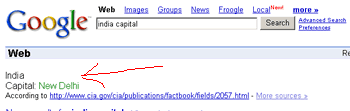
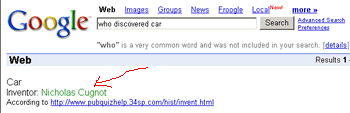
Have you ever needed a piece of info right now? Today we’re excited to introduce Google Q&A. We’ve pulled together facts from all over the Web to help give you the fastest possible access to the quick bits of information you need every day; just type a query into the search box, and you’ll get back the answer at the top of your search results. Q&A knows about a lot of areas: celebrities, countries of the world, the planets, the elements, electronics, movies, and anything else we’ve thought of so far (including enabling you to get answers on your mobile device). Try it out, and keep checking back. This is only the beginning.
Google Q and A gives great accurate answers, try some queries like Capital India
who discovered car
Google Adds Satellite Imagery to maps.google.com
Google now adds a cool feature the satellite image with their google maps,
Please check it out here, http://maps.google.com
Blogroll
Categories
- 2016 SEO trends predictions
- AI for eCommerce
- AI Search & SEO
- author rank
- Authority Trust
- Bing search engine
- blogger
- CDN & Caching.
- Content Strategy
- Core Web Vitals
- eCommerce Growth
- Experience SEO
- Fake popularity
- gbp-optimization
- Google Adsense
- Google Business Profile Optimization
- google fault
- google impact
- google Investigation
- google knowledge
- Google panda
- Google penguin
- Google Plus
- Google Search Console
- Google Search Updates
- Google webmaster tools
- google-business-profile
- google-maps-ranking
- Hummingbird algorithm
- infographics
- link building
- Local SEO
- local-seo
- Mattcutts Video Transcript
- Microsoft
- Mobile Performance Optimization
- Mobile SEO
- MSN Live Search
- Negative SEO
- On-Page SEO
- Page Speed Optimization
- pagerank
- Paid links
- Panda and penguin timeline
- Panda Update
- Panda Update #22
- Panda Update 25
- Panda update releases 2012
- Penguin Update
- Performance Optimization
- Sandbox Tool
- search engines
- SEO
- SEO Audits
- SEO Audits & Monitoring
- SEO cartoons comics
- seo predictions
- SEO Recovery & Fixes
- SEO Reporting & Analytics
- seo techniques
- SEO Tips & Strategies
- SEO tools
- SEO Trends 2013
- seo updates
- Server Optimization
- Shopify Optimization
- Shopify SEO
- Shopify Services
- Small Business Marketing
- social bookmarking
- Social Media
- SOPA Act
- Spam
- Technical SEO
- Uncategorized
- User Experience (UX)
- Webmaster News
- website
- Website Security
- Website Speed Optimization
- Yahoo