When you search on Google, the results page often shows more than a list of blue links. You may see images, videos, featured answers, local results, ratings, or other special elements.
These are commonly called SERP features.
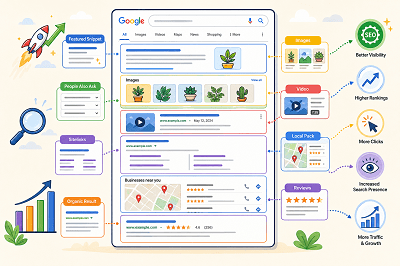
What Are SERP Features?
SERP stands for Search Engine Results Page. SERP features are special elements that appear alongside or instead of traditional search results.
Google changes the features it shows depending on the search query. For example, a local search may show local results, while an image-related search may display more images.
Common Types of SERP Features
Some common SERP features include:
- Featured snippets
- Rich results
- Images
- Videos
- Sitelinks
- Review information
- Local results
- People Also Ask results
Google also supports different visual search elements depending on the type of content and the user’s search.
What Is a Featured Snippet?
A featured snippet is a special result that displays a short answer or information from a webpage prominently in the search results.
Google automatically decides whether a page is suitable for a featured snippet. Website owners cannot manually mark a page as a featured snippet.
What Are Rich Results?
Rich results are search listings that can include additional visual information such as ratings, images, product details, event information, or other interactive elements.
Adding the correct structured data can help Google understand your page and make it eligible for certain rich results. However, adding structured data does not guarantee that a rich result will appear.
How Do SERP Features Affect SEO?
SERP features can make a search result more noticeable and give users more information before they click.
Appearing in a featured snippet, image result, video result, or rich result can give your website additional visibility on the search results page.
At the same time, SERP features also create more competition for attention because traditional organic results may appear alongside many other visual elements.
How Can You Improve Your Chances of Appearing?
Start by creating clear, useful content that directly answers what users are searching for. Use descriptive headings, relevant images, and well-structured pages.
Where appropriate, you can also add supported structured data to help Google better understand your content and make it eligible for richer search appearances.
SERP features have made Google search results much more visual and interactive. Understanding how they work can help you create content that is easier for search engines to understand and more noticeable to users.
Tags: Featured Snippets, Google Rankings, Google SERP, Local Pack, People Also Ask, Rich Results, Search Visibility, SERP Features
Google AI Mode is changing how local customers discover businesses, and it’s important to understand what that means before your calls and enquiries start dropping. In the classic version of local search, people typed “plumber near me” or “best dentist in Dubai” and then chose from the Local Pack (map results), websites, and reviews. With AI Mode, Google can summarize options, suggest businesses, and guide decisions faster-sometimes before a user even scrolls to the usual results. For local business owners, this isn’t the end of local SEO, but it is a shift: you need to make your business easier for Google’s AI to understand and easier for customers to trust at a glance.
In the AI Mode layout, you’ll often see two major areas: an AI-style overview at the top (summary, recommendations, and context) and the familiar Local Pack underneath. That AI overview may pull information from Business Profiles, websites, reviews, and other sources to create quick answers like “top-rated nearby,” “best for families,” or “open now.” This means your visibility is no longer only about ranking #1 in the map results-it’s also about whether your business details are strong enough to be “featured” in the AI summary. If your profile is incomplete, inconsistent, or outdated, Google’s AI has fewer reasons to include you.
To increase your chances of appearing in these AI-driven summaries, start with the fundamentals that the AI can read clearly. Your Google Business Profile should have the right categories, complete services, accurate hours, fresh photos, and consistent contact details. Your website should clearly explain what you offer, where you serve, and what makes you different, using simple headings and service pages that match real search intent. Reviews matter more than ever because AI summaries often reflect reputation signals-rating, recency, keywords in reviews, and how you respond. A business with clear services, strong review activity, and up-to-date information becomes an easy “yes” for the AI to recommend.
AI Mode also changes how customers make decisions. People will compare businesses faster because the AI overview can highlight key differences like pricing style, availability, specialties, or “popular for” use cases. That’s why your content must be direct and conversion-friendly: add pricing ranges (or “starting from”), include quick FAQs, and place strong CTAs like “Call now,” “WhatsApp us,” or “Book online.” If your website is slow or confusing on mobile, you’ll lose users who clicked from AI or Local Pack results. Improving speed (Core Web Vitals), compressing images, and making your contact options obvious can make the difference between “clicked” and “converted.”
If you want a simple plan to stay ahead of Google AI Mode, focus on three things: trust, clarity, and activity. Keep your GBP active with regular updates and photos, build a steady stream of reviews, and make sure your website is structured around services + city intent. Track what matters-calls, messages, direction requests, and form leads-so you can see whether AI-driven changes affect your enquiries.
Tags: ai-search, google-business-profile, google-maps-ranking, local-seo