




Google Rankings
What Is Search Intent and Why Is It Important for SEO?
Search intent is the reason behind a user’s search. It tells us what someone is actually trying to find when they type a query into Google.
A person searching for “how to improve website speed” wants information. Someone searching for “best SEO tools” may be comparing options. Another user searching for “SEO company near me” may already be ready to contact a service provider.
Understanding this difference helps businesses create content that matches what users actually want.
What Is Search Intent?
Search intent, also called user intent, is the goal behind a search query.
Google tries to understand whether a user wants to learn something, find a specific website, compare products or services, or take action.
This is why two similar keywords can show very different search results.
For SEO, choosing the right keyword is important, but understanding the intent behind that keyword is just as important.
Why Search Intent Matters for SEO
Search engines aim to show results that are most useful for the user.
If someone is looking for information but lands on a sales-focused page, they may leave quickly. In the same way, someone ready to buy may not want to read a long educational article.
When your content matches the user’s intent, it becomes more relevant and useful. This can improve engagement and help attract visitors who are genuinely interested in your content, product, or service.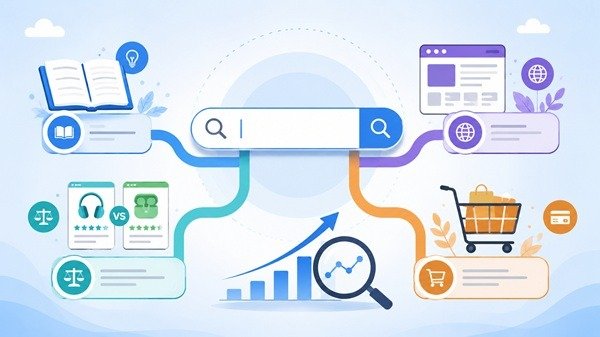
Types of Search Intent
Search intent is usually grouped into four main types.
Informational intent is when users want to learn something or find an answer.
Navigational intent is when users are looking for a particular website or brand.
Commercial intent is when users are researching and comparing options before making a decision.
Transactional intent is when users are ready to take action, such as buying a product, contacting a company, or signing up for a service.
Knowing the type of intent helps you decide what kind of page or content to create.
How to Understand Search Intent
One of the easiest ways to understand search intent is to look at the current Google results for your target keyword.
If most of the top results are blog posts, the intent is likely informational. If the results mostly show product or service pages, the intent may be commercial or transactional.
SERP features such as People Also Ask, featured snippets, shopping results, local listings, and videos can also give useful clues about what users are expecting.
How to Optimize Content for Search Intent
Start by understanding what the user wants before creating the content.
If the search is informational, provide a clear answer. If the user is comparing options, give helpful comparisons. If the intent is transactional, make it easy for the visitor to take the next step.
Your title, headings, and main content should all match the purpose of the search.
It is also useful to review older pages from time to time because search intent can change as user behavior and search results evolve.
Final Thoughts
Search intent helps you understand the meaning behind a keyword.
Instead of creating content only to target search terms, focus on giving users the type of information or solution they are actually looking for.
When your content matches search intent, it becomes more useful for visitors and more relevant for search engines.
What Are SERP Features and How Do They Affect SEO?
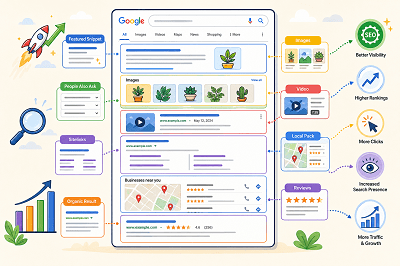
When you search on Google, the results page often shows more than a list of blue links. You may see images, videos, featured answers, local results, ratings, or other special elements.
These are commonly called SERP features.
What Are SERP Features?
SERP stands for Search Engine Results Page. SERP features are special elements that appear alongside or instead of traditional search results.
Google changes the features it shows depending on the search query. For example, a local search may show local results, while an image-related search may display more images.
Common Types of SERP Features
Some common SERP features include:
- Featured snippets
- Rich results
- Images
- Videos
- Sitelinks
- Review information
- Local results
- People Also Ask results
Google also supports different visual search elements depending on the type of content and the user’s search.
What Is a Featured Snippet?
A featured snippet is a special result that displays a short answer or information from a webpage prominently in the search results.
Google automatically decides whether a page is suitable for a featured snippet. Website owners cannot manually mark a page as a featured snippet.
What Are Rich Results?
Rich results are search listings that can include additional visual information such as ratings, images, product details, event information, or other interactive elements.
Adding the correct structured data can help Google understand your page and make it eligible for certain rich results. However, adding structured data does not guarantee that a rich result will appear.
How Do SERP Features Affect SEO?
SERP features can make a search result more noticeable and give users more information before they click.
Appearing in a featured snippet, image result, video result, or rich result can give your website additional visibility on the search results page.
At the same time, SERP features also create more competition for attention because traditional organic results may appear alongside many other visual elements.
How Can You Improve Your Chances of Appearing?
Start by creating clear, useful content that directly answers what users are searching for. Use descriptive headings, relevant images, and well-structured pages.
Where appropriate, you can also add supported structured data to help Google better understand your content and make it eligible for richer search appearances.
SERP features have made Google search results much more visual and interactive. Understanding how they work can help you create content that is easier for search engines to understand and more noticeable to users.
What Are Backlinks and Why Do They Matter for SEO?
Backlinks are an important part of SEO, but the idea behind them is actually very simple.
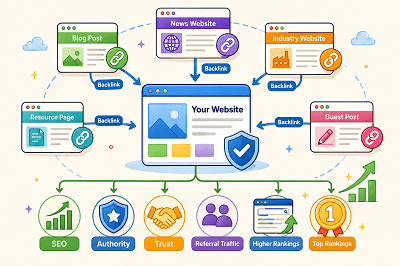
A backlink is a link from another website that points to your website.
For example, if another blog mentions your business and links to one of your pages, your website has received a backlink.
 What Is a Backlink?
Backlinks connect one website to another.
Imagine you publish a useful guide on your website. Another website finds that guide helpful and links to it in one of its articles.
That link becomes a backlink to your website.
Backlinks can send visitors directly to your site and can also help search engines discover your pages.
Why Do Backlinks Matter for SEO?
Backlinks can act as signals that other websites find your content useful or worth mentioning.
When reputable and relevant websites link to your pages, it can help strengthen your website’s authority and visibility in search results.
However, quality is more important than quantity.
One useful backlink from a trusted website can be more valuable than many links from low-quality or unrelated websites.
What Makes a Good Backlink?
A good backlink usually comes from a website that is relevant to your industry, trusted, and publishing useful content. The link should also appear naturally within the content instead of being forced. For example, if you run a digital marketing website, a backlink from a respected marketing or technology blog would usually be more valuable than a link from an unrelated website.
Are All Backlinks Good?
Not all backlinks are helpful. Some may come from spammy, low-quality, or unrelated websites, and these links may provide little value. Buying large numbers of backlinks or creating links only to manipulate rankings can also lead to SEO problems. A better approach is to focus on earning natural links from relevant and trustworthy websites.
How Can You Get Backlinks?
You can earn backlinks by creating useful content that other websites want to mention or share. This may include helpful guides, original research, industry articles, useful resources, or content that solves a common problem. You can also reach out to relevant websites or look for broken-link opportunities. The main goal is to create something valuable enough that another website has a genuine reason to link to it.
Backlinks vs Internal Links
Backlinks and internal links are different.
A backlink comes from another website to your website.
An internal link connects one page of your own website to another page on the same site.
Both are useful for SEO, but they serve different purposes.
Backlinks can help build your website’s authority, while internal links help users and search engines navigate your website.
Backlinks remain an important part of SEO because they can help search engines discover content and understand which pages other websites consider useful. Instead of chasing as many links as possible, focus on earning relevant, trustworthy, and natural backlinks by publishing genuinely useful content.
Why Your Website Traffic Is Dropping and How to Fix It
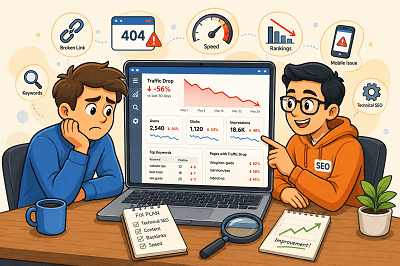
Seeing your website traffic suddenly fall can be worrying. But a traffic drop does not always mean your SEO has failed.
Rankings, technical issues, competitors, seasonal searches, and outdated content can all affect your visitor numbers. The key is finding out where the drop started and what caused it.
First, Find Out Where the Traffic Dropped
Before changing your website, check Google Search Console and Google Analytics.
Look for:
- Pages that lost the most visitors
- Keywords receiving fewer clicks
- Changes in impressions
- Traffic drops from specific devices or countries
Once you know where the decline happened, finding the cause becomes much easier.
Did Your Google Rankings Fall?
A ranking drop is one of the most common reasons for losing organic traffic.
Check whether your important pages and keywords have moved lower in Google. If they have, review the pages ranking above you and improve your content, headings, internal links, and overall usefulness.
Is Your Content Getting Old?
Content that performed well a year ago may no longer provide the best answer.
Update old statistics, replace outdated information, improve weak sections, and add useful new details. Sometimes refreshing an existing page is more valuable than publishing another similar article.
Are Technical Problems Hurting Your Site?
A broken page, indexing issue, server problem, or incorrect redirect can quietly reduce traffic.
Check important pages in Google Search Console and make sure Google can crawl and index them correctly. Also look for broken links and pages returning errors.
Have Your Competitors Improved?
Sometimes your traffic falls even when you haven’t changed anything.
Competitors may have published better content, improved their websites, or earned stronger backlinks. Compare the pages ranking above yours and look for areas where your page can offer something more useful.
Has Search Demand Changed?
Not every traffic decline is an SEO problem.
Some searches are seasonal. Others become less popular as customer interests change.
Compare traffic with the same period from the previous year before assuming something is wrong. Google Trends can also help you understand whether interest in a topic has changed.
Is Your Website Slow or Difficult to Use?
Slow pages and poor mobile experiences can frustrate visitors.
Make sure your website loads quickly, works properly on mobile devices, and makes important information easy to find.
Website traffic can drop for many reasons, so avoid making random SEO changes immediately. Start with your data, identify which pages or keywords lost traffic, and then investigate the cause. Once you understand what changed, you can focus on the improvements that matter most.
Why Is My Website Not Showing Up on Google? 7 Common SEO Problems
If your website does not show up on Google, there might be some reasons.
At times, it is because Google has not indexed your website. It may be the case that Google has indexed your website but your site is ranking very low.
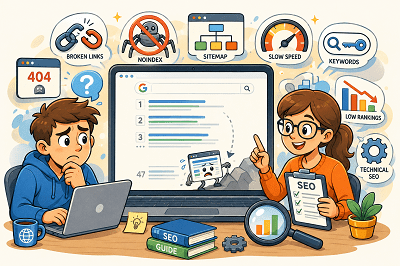
Here are the seven most common SEO issues:
1. Google Has Not Indexed Your Website
In order to show your web pages on Google, first, Google needs to crawl them.
Fix: Configure Google Search Console, submit your sitemap, and use URL Inspection tool.
2. Your Website Is Blocking Google
You have set noindex on your website or you have blocked your site by using a robots.txt file.
Fix: Make sure that you are not blocking Google in any way.
3. Your Website Has Technical SEO Issues
It may happen due to various technical issues such as broken links, server errors, incorrect redirects, and duplicate pages.
Fix: Do an SEO audit and correct any technical issues that might hinder crawling and indexing.
4. The Information Provided by Your Content Is Inadequate
Pages that have very little information can fail to rank.
Google loves content that is valuable, clear, and user-focused.
Fix: Make sure you create valuable content that clearly communicates your products, services, or topic.
5. You are Using the Wrong Keywords
Your site may fail to show up if you don’t target the terms used by people searching.
Fix: Make sure you use the right keywords within your title, headings, and body copy.
6. You Have Bad Internal Linking
Pages that have no or few internal links are less likely to be found by Google.
Fix: Make sure you link your pages and blog posts to each other for easy navigation by visitors and search engines.
7. Your Website Has a Low Rank
Your website might already be indexed but ranks below your competitors.
This is often due to the better content, backlinks, or SEO of competing sites.
Fix: Improve your website and its SEO over time.
Google Search Console can help you check whether your pages are indexed and identify possible SEO problems. If your website is not showing up on Google, start by checking indexing, then review your technical SEO, content, keywords, and internal links. Fixing these basic issues can help Google better understand your website and improve its chances of appearing in search results.
How to Recover From a Sudden Drop in Organic Traffic
A sudden drop in organic traffic can be one of the most frustrating experiences for a website owner. If you own a corporate website, online store, or blog, experiencing a drop in traffic can be frustrating and is often a cause for worry when considering rankings, lead generation, and other aspects of your online presence. Even though a fall in traffic might be disheartening initially, there are particular reasons behind it.
First of all, it is important to know that the organic traffic will almost never decrease for no apparent reason. There are updates to search engine algorithms, there are advancements in the websites of your competitors, there might arise certain technical problems, and so forth. In many cases, just a minor adjustment you make to your site might impact the work of the search engines in terms of crawling, indexing, and ranking. This is why it is critical to establish the time when the decrease took place.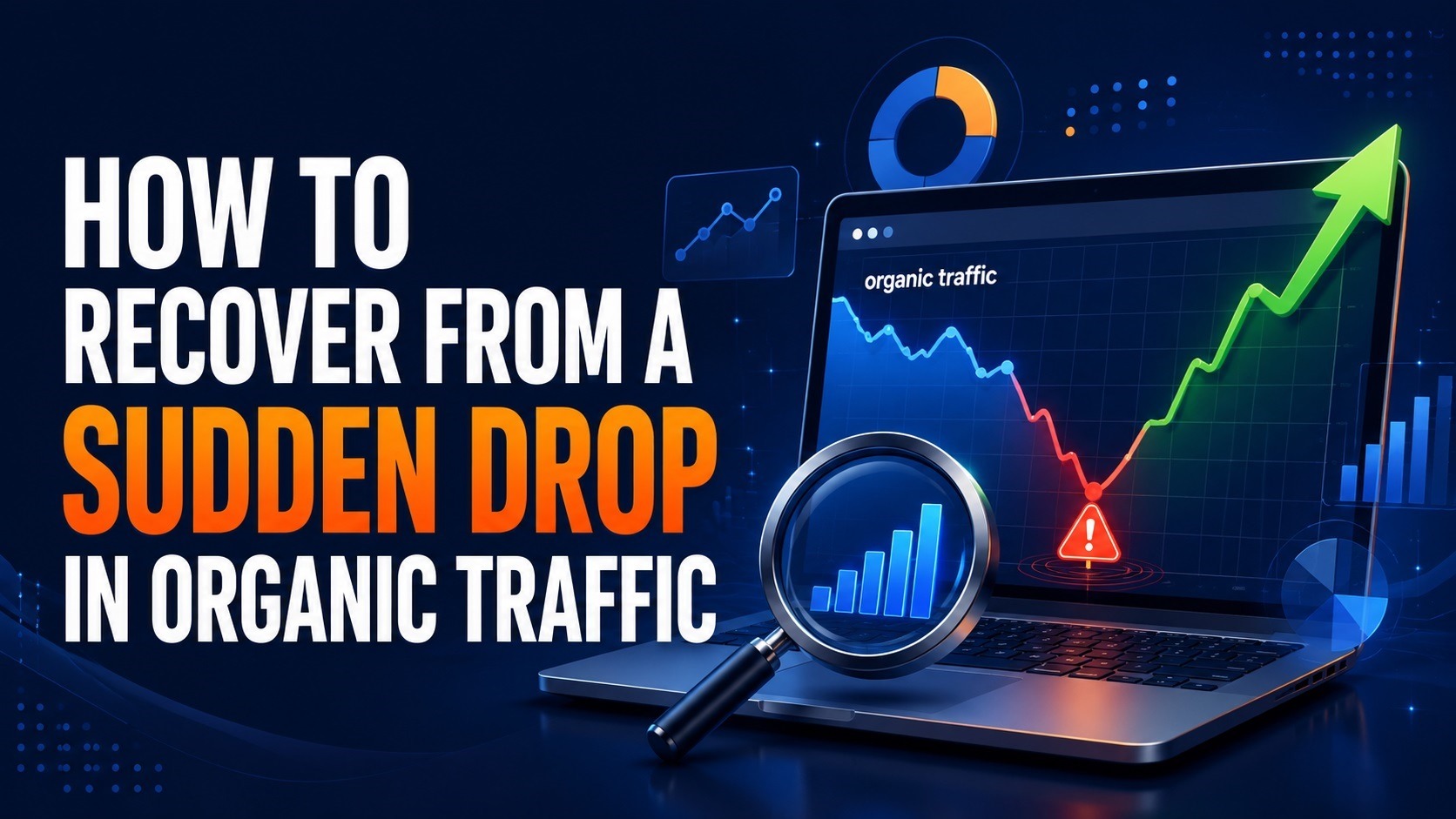
A possible reason for lower organic traffic could be a fall in the rankings of keywords. Pages that used to rank on the first page of Google may start getting lower rankings, causing lower clicks and lower visits. This can happen for several reasons, including increased competition, old content, or algorithm updates by Google. Keeping track of keyword ranks will give you a clear picture of the pages where you might have to work to increase rankings and traffic.
Problems related to technical SEO are another reason behind a fall in the number of visitors. Technical issues such as broken pages, indexing problems, crawl errors, and incorrect redirects can prevent search engines from accessing important pages on your website. Often, website owners don’t even know that there are technical problems until their traffic starts falling. Checking Google Search Console is very helpful for this.
The quality of the content is another essential factor that contributes significantly to keeping the website visible on search engine results. The idea behind this practice is to deliver the most relevant and useful information to the customers. Outdated content that does not satisfy the search criteria anymore will lead to falling rankings. Thus, it is necessary to update the existing content and address customer concerns.
Backlinks are another area that should be considered. Backlinks continue to play an important role in the rankings process, and any links lost from authoritative sites may impact your rankings. Tracking your backlinks will enable you to determine if any valuable links were lost or if competitors became more authoritative.
Website loading time and the user experience factor cannot be ignored as well. Poor loading speed, bad mobile compatibility, and Core Web Vitals may harm users and the website’s ranking. A speedy and responsive website stimulates interaction and allows for the faster crawling process by search engines. Website image optimization, removal of unnecessary scripts, and good hosting services may benefit SEO efforts.
The algorithm updates by Google can also affect the traffic you receive through organic searches. The search engines periodically make adjustments in their algorithms to provide better search results and lower the visibility of poor-quality pages. In case the fall in traffic was witnessed simultaneously with an update of the algorithm by Google, you should take time and analyze your website in detail. Make sure you are providing high-quality content and meeting other criteria to ensure better visibility and ranking even after the algorithm is updated.
Competitor monitoring is also crucial for you. Since ranking is very dynamic, and since your rivals could be producing superior quality content and gaining good backlinks, among others, then you need to compare yourself with them. This will help you to see where you are weak and how you can exploit those weaknesses to strengthen your content as well as improve your ranking.
If you have noticed a drop in organic traffic, know that you are not alone. Almost every website goes through ups and downs in search traffic at some point. The important thing here is how fast you find the reason behind the problem and react accordingly. By constantly monitoring your website, updating its content, and solving technical problems, you will definitely find your way back to being visible online.
Blogroll
Categories
- 2016 SEO trends predictions
- AI for eCommerce
- AI Search & SEO
- author rank
- Authority Trust
- Bing search engine
- blogger
- CDN & Caching.
- Content Strategy
- Core Web Vitals
- eCommerce Growth
- Experience SEO
- Fake popularity
- gbp-optimization
- Google Adsense
- Google Business Profile Optimization
- google fault
- google impact
- google Investigation
- google knowledge
- Google panda
- Google penguin
- Google Plus
- Google Search Console
- Google Search Updates
- Google webmaster tools
- google-business-profile
- google-maps-ranking
- Hummingbird algorithm
- infographics
- link building
- Local SEO
- local-seo
- Mattcutts Video Transcript
- Microsoft
- Mobile Performance Optimization
- Mobile SEO
- MSN Live Search
- Negative SEO
- On-Page SEO
- Page Speed Optimization
- pagerank
- Paid links
- Panda and penguin timeline
- Panda Update
- Panda Update #22
- Panda Update 25
- Panda update releases 2012
- Penguin Update
- Performance Optimization
- Sandbox Tool
- search engines
- SEO
- SEO Audits
- SEO Audits & Monitoring
- SEO cartoons comics
- seo predictions
- SEO Recovery & Fixes
- SEO Reporting & Analytics
- seo techniques
- SEO Tips & Strategies
- SEO tools
- SEO Trends 2013
- seo updates
- Server Optimization
- Shopify Optimization
- Shopify SEO
- Shopify Services
- Small Business Marketing
- social bookmarking
- Social Media
- SOPA Act
- Spam
- Technical SEO
- Uncategorized
- User Experience (UX)
- Webmaster News
- website
- Website Security
- Website Speed Optimization
- Yahoo