




Google testing or Adwords hacked ?
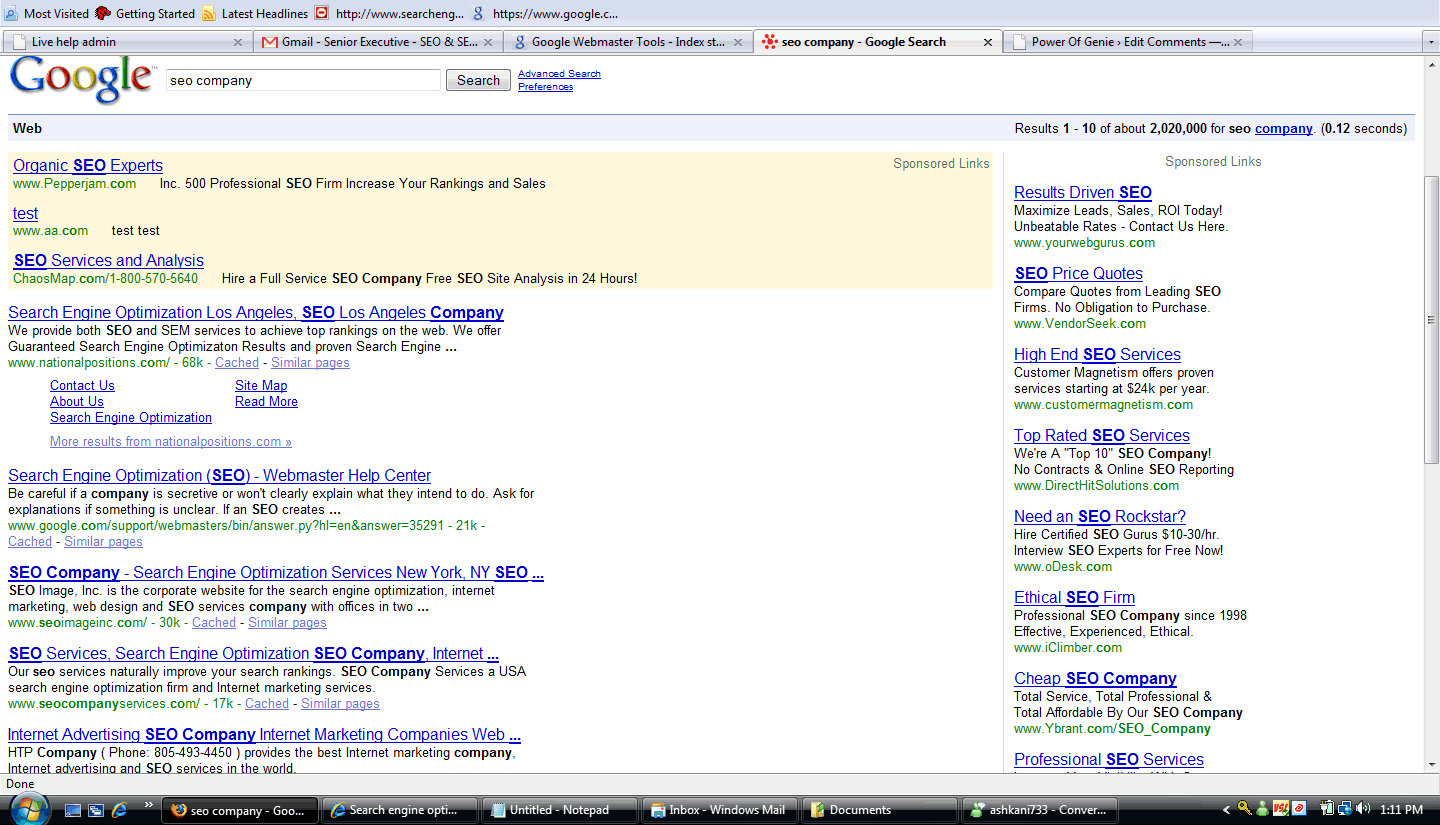
When i was recently doing some queries related to our site i saw a weird adwords result right on top of the page.
2nd result from the top had something which said test and the URL as aa.com i haven’t seen this before i wonder why Google is testing on live adwords results or whether the adwords results had been hacked. When i clicked on the results it actually went to aa.com so it mostly looks like some sort of testing.
Did anyone else notice it look at this screen shot:
Duplication problem with Google – how Google handle duplicates.
Official Google webmaster central blog has an interesting post on how Google handles duplicates.
Susan of webmaster central team state:
“When we detect duplicate content, such as through variations caused by URL parameters, we group the duplicate URLs into one cluster.
We select what we think is the “best” URL to represent the cluster in search results.
We then consolidate properties of the URLs in the cluster, such as link popularity, to the representative URL.
Here’s how this could affect you as a webmaster:
In step 2, Google’s idea of what the “best” URL is might not be the same as your idea. If you want to have control over whether www.example.com/skates.asp?color=black&brand=riedell or www.example.com/skates.asp?brand=riedell&color=black gets shown in our search results, you may want to take action to mitigate your duplication. One way of letting us know which URL you prefer is by including the preferred URL in your Sitemap.
In step 3, if we aren’t able to detect all the duplicates of a particular page, we won’t be able to consolidate all of their properties. This may dilute the strength of that content’s ranking signals by splitting them across multiple URLs.
In most cases Google does a good job of handling this type of duplication. However, you may also want to consider content that’s being duplicated across domains. In particular, deciding to build a site whose purpose inherently involves content duplication is something you should think twice about if your business model is going to rely on search traffic, unless you can add a lot of additional value for users. For example, we sometimes hear from Amazon.com affiliates who are having a hard time ranking for content that originates solely from Amazon. Is this because Google wants to stop them from trying to sell Everyone Poops? No; it’s because how the heck are they going to outrank Amazon if they’re providing the exact same listing? Amazon has a lot of online business authority (most likely more than a typical Amazon affiliate site does), and the average Google search user probably wants the original information on Amazon, unless the affiliate site has added a significant amount of additional value.
Lastly, consider the effect that duplication can have on your site’s bandwidth. Duplicated content can lead to inefficient crawling: when Googlebot discovers ten URLs on your site, it has to crawl each of those URLs before it knows whether they contain the same content (and thus before we can group them as described above). The more time and resources that Googlebot spends crawling duplicate content across multiple URLs, the less time it has to get to the rest of your content.
In summary: Having duplicate content can affect your site in a variety of ways; but unless you’ve been duplicating deliberately, it’s unlikely that one of those ways will be a penalty. This means that:
You typically don’t need to submit a reconsideration request when you’re cleaning up innocently duplicated content.
If you’re a webmaster of beginner-to-intermediate savviness, you probably don’t need to put too much energy into worrying about duplicate content, since most search engines have ways of handling it.
You can help your fellow webmasters by not perpetuating the myth of duplicate content penalties! The remedies for duplicate content are entirely within your control. Here are some good places to start.
“
How To Write Winning Meta Titles:write great titles to keep your the best converting one
How To Write Winning Meta Titles:
There are many tips to write good Meta titles. A Meta title is a title, or name of your page. The title is shown by the browser, usually at the top of your computer screen, and tells a reader what page they are on. Meta titles are “read” by search engine robots, and viewed by site visitors.
The metal title is very vital for helping the page rank high in search engine returns and should be written to cater to search engine robots – not to site visitors. Meta titles should make sense to the reader, but the wording should be related to keyword search popularity and relevance to the rest of the web page plus other meta data and content.
The four most awful mistakes you can make when creating a meta title for your page are:
Not creating any title at all;
Naming your page the identical/same names as your website;
Naming all your pages the same name, or something similar to each other; and
Naming the page without linking it to your content and other Meta data.
Be certain to use keyword selector tools and keyword density tools to help you write your Meta title.
Examples of “Bad” Meta Titles:
The following instance Meta titles are too vague and do not give either robots or site readers enough information:
Flowers
Examples of Good Meta Titles:
· Flowers – How to Plant Flowers
· Population Statistics – 2008 United Kingdom Population Statistics
· Dessert Recipes – Best pudding Recipes
· Tax Tips – tips on how to pay less amount of tax
The above Title tags accomplish three things:
· they assist robots understand what is most important about the content on the page by repeating part of the keyword phrases that would be found in article titles and content;
· They make logic to people reading them; and
· By using plurals when prudent, it allows more possible keyword searchers (both on singular and plural or major keywords).
How Long Should a Meta Title Be in Length?
Normally, a title should be long enough to be clear; short enough to avoid being “truncated.” Truncation happens when a title is very long. Search engine robots will only read so much character then move on. Different search engines read different numbers of characters but if you keep your titles less than 150 characters you will keep most vital search engine robots happy.
Tips on How to Create Meta Titles
When creating Meta titles:
Always replicate keyword phrases;
Do tie these phrases to your content and other meta data;
Do use plurals when doable;
Do bound the use of punctuation; and
Do use initial caps all through the title.
Official statement – what Google feels about hidden text
A nice writing by a Google employee on what they feel about hidden text with examples:
“In our “Popular Picks” thread, Burchman asked for some clarification on what Google considers to be hidden text, as our Webmaster Guidelines explicitly state that you should avoid hidden text or hidden links. We have a few examples of how text can be hidden in this Help Center article: http://www.google.com/support/webmasters/bin/answer.py?answer=66353
As I’ve noticed other users with similar questions in this group, such as “What if my navigation menu uses display:none to hide text until a button is rolled over?” I figured this would be a good topic to cover in “Popular Picks.” The reason we perceive hidden text as a problem is that it serves content to search engines which users don’t see, and presenting different content to search engines and users makes it more difficult to properly rank pages. If we detect that this text is intended to deceive search engines, there could be a negative effect on how your site is indexed and ranked in Google, including removal from our index.
Because such strong action may be taken on sites violating this guideline, it’s understandable that many webmasters have expressed concerns about the possibility of Google incorrectly detecting legitimate content as hidden text. When trying to figure out if a page may have hidden text that Google would consider malicious, start by thinking about why the guideline was written in the first place: Google wants to see what the user sees. If the text that Google sees is the same that a normal user is supposed to see, then you should be good to go. If Google is seeing text that is intentionally hidden from the user in an effort to manipulate search engine rankings, you have some work to do.
Let’s try this approach with a page you may have seen before: http://www.google.com/
In the top-left corner, you’ll see a line of text: “Web Images Video News Maps Gmail more.”
Google sees this text, and so do you, the user. So far, so good.
Next, let’s make sure nobody wrote “search engine search find crawl index rank” in white text on the white background, with the intention of ranking for those terms. Google would see that, but a normal user wouldn’t. Take off your “normal user” hat for a second and do a “Select All” on the page (by hitting CTRL-A on a PC, or COMMAND-A on a Mac, for instance). This will make any white on white text appear. As you can see, no hidden text.
But let’s try one more thing: Render the page again without CSS enabled. The Web Developer extension for Firefox lets you do this pretty easily. Without CSS, you’ll see several words we didn’t see before: “Blog Search Blogger Books Calendar Documents Finance Groups Labs Orkut Patents Photos Products Reader Scholar.”
You may have also noticed that these words appear in Google’s text- only cache of itself, which is a good indication of how Google “sees” a site. But before you blog about your discovery of hidden links on a PR 10 site =), take a look at the page again with CSS enabled. This time, click on the “more” link, and voilà, the no-longer-hidden text appears. This text is part of the page’s functionality, and it is meant for the user to read and use, not just for search engines to index. This text adds value for the user, which Google rewards, so Google would not hurt this site’s ranking or remove it from the index for that reason. Many sites use similar methods for navigational menus and other functional elements, so please rest assured that the existence of display:none on your site is not on its own a one-way ticket out of Google’s index.
When thinking about your own site, ask yourself if all of the text is there for the user. If the answer is “yes,” great job! If the answer is “no,” do your best to change it to a “yes,” and call on your webmaster community (this group!) for advice if you need it. CSS menus and white space without hidden text should not be a cause of concern when it comes to Google indexing and ranking; the only thing you should be concerned about is how they affect your visitors.
In the “Popular Picks” thread we asked for non-site specific questions, but now that this has been separated into its own thread, here’s your chance to ask about a site you are still unsure about. Please also let me know if you would like further clarification on particular aspects this topic. “Source: Google Groups
Is TPR penalty lifted for some sites
Some webmaster world members are noticing that the Toolbar Pagerank penalty is lifted for their sites. Google started imposing Toolbar Pagerank Penalties for sites that sell / buy links around January this year now it seems to be lifted for some sites. Though its being reported in forums we never noticed anything like that across our client sites. Probably its because we don’t sell or buy links for our clients due to our policy.
forum discussion here: http://www.webmasterworld.com/google/3729425.htm
Olympics and SEO – We will get you top 10 multiple rankings.

More information on 404 errors
Google webmaster central blog had been posting some interesting stuff on 404s for a while this time they had a posting on 404 errors on how they treat 410 errors. According to the official Google webmaster blog 410 errors are treated the same way as a 404 error. More from the webmaster blog:
How do you treat the response code 410 “Gone”?
Just like a 404.
Do you index content or follow links from a page with a 404 response code?
We aim to understand as much as possible about your site and its content. So while we wouldn’t want to show a hard 404 to users in search results, we may utilize a 404’s content or links if it’s detected as a signal to help us better understand your site. Keep in mind that if you want links crawled or content indexed, it’s far more beneficial to include them in a non-404 page.
What about 404s with a 10-second meta refresh?
Yahoo! currently utilizes this method on their 404s. They respond with a 404, but the 404 content also shows We feel this technique is fine because it reduces confusion by giving users 10 seconds to make a new selection, only offering the homepage after 10 seconds without the user’s input.
Should I 301-redirect misspelled 404s to the correct URL?
Redirecting/301-ing 404s is a good idea when it’s helpful to users (i.e. not confusing like soft 404s). For instance, if you notice that the Crawl Errors of Webmaster Tools shows a 404 for a misspelled version of your URL, feel free to 301 the misspelled version of the URL to the correct version. For example, if we saw this 404 in Crawl Errors:http://www.google.com/webmsters <-- typo for "webmasters" we may first correct the typo if it exists on our own site, then 301 the URL to the correct version (as the broken link may occur elsewhere on the web):http://www.google.com/webmastersHave you guys seen any good 404s?Yes, we have! (Confession: no one asked us this question, but few things are as fun to discuss as response codes. :) We’ve put together a list of some of our favorite 404 pages. If you have more 404-related questions, let us know, and thanks for joining us for 404 week!
How to start a multilingual site: Help from Google to make a google friendly multilingual site
This blog is all about of how to start a multilingual site & various pros in having a multilingual site. Multilingual site is a site where a person can have a site in different languages. But the first thing you’ll want to consider is if it makes sense for you to acquire country-specific top-level domains (TLD) for all the countries you plan to serve. This option is beneficial if you want to target the countries that each TLD is allied with, a method known as geo targeting. Geo targeting is different from language targeting. Geo targeting refers to the sites whose main target is in a particular region/location in the world & it allows you to lay down different geographic targets for different subdirectories or sub domains (e.g., /de/ for Germany). Where as language targeting is one which targets to reach all speakers of a particular language around the world & where you probably don’t want to limit yourself to a specific geographic location. In this case you don’t want to use the geographic target tool. Since its difficult to maintain & update multiple domains, its better to buy one non-country-specific domain, which hosts all the different versions of your website. In this case, there are two options which are recommended:
First option is to place the content of every language in a different sub domain. For our example, you would have en.example.com, de.example.com, and es.example.com.
Second option is to place the content of every language in a different subdirectory. This is easier to handle when updating & maintaining your site. For our example, you would have example.com/en/, example.com/de/, and example.com/es/.
There may arise a doubt for some that when same content is posted in different languages then will it result to a duplicate one?? Definitely not, but you should make sure that your site is well organized. And always avoid mixing languages on each page as this may confuse Googlebot as well as your users. It’s always good to have navigation & content in same language on each page. You can also know how many of your pages are recognized in a certain language by performing a language specific site search. Multilingual site is a benefit to the owner of the site & to the visitors of the site as they get information in their language. For example: when a person wants to know fashion designing institutions in London then he may type that query in search along with the language he needs the page to be displayed in. He feels so comfortable when he gets the information in the language he knows & understand.
Official post http://googlewebmastercentral.blogspot.com/2008/08/how-to-start-multilingual-site.html
Google bans webposition Gold position checker
Google has always been warning against automated position checkers which uses a lot of its resources. Now Google has taken a stronger hand and has blocked Webposition Gold software from performing automated ranking requests in Google. AUtomate rank requests creates a lot of junk queries and uses a lot of server resources of Google. Google has been issuing warning not to use webposition Gold but people continue to use it. Now Google has taken action and has blocked all web position gold queries. Web position Gold has an unique way of sending queries to Google and it seems google was able to detect it using their bot filter software.
We at Search engine Genie never use bulk keyword rank checkers. Our rank checkers are search engine friendly and allows only limited queries per day.
Another company wants a piece of Google pie – Mediaset
First we had Viacom then we had the Belgium newspaper group and now we have another company suing Google. Mediaset a media company is suing Google and Youtube for using copyrighted materials on their website.
According to reuters
“Mediaset, controlled by Prime Minister Silvio Berlusconi, joins others broadcasters seeking compensation from YouTube, a video-sharing website, for copyright infringement.
Mediaset filed suit in a Rome court, the company said in a statement on Wednesday. A YouTube spokeswoman said it did not see the need for the legal case.
“YouTube respects copyright holders and takes copyright issues very seriously,” the spokeswoman said in London. Google bought YouTube in 2006.
“There is no need for legal action … We prohibit users from uploading infringing material and we cooperate with all copyright holders to identify and promptly remove infringing content as soon as we are officially notified,” Google said in a separate statement.
Lawsuits and trials in Italian are often lengthy and it is forecast the outcome.
Mediaset said a sample analysis of YouTube at June 10 found “at least 4,643 videos and clips owned by us, equivalent to more than 325 hours of transmission without having rights”.
Mediaset said this was equal to the loss of 315,672 days of broadcasting by its three TV channels.”
Well i have always said a lawsuit against youtube.com is not the best idea since youtube is a public resource and cannot be threatened. We will loose the freedom of internet if Youtube looses its way by lawsuits.
Blogroll
Categories
- 2016 SEO trends predictions
- AI for eCommerce
- AI Search & SEO
- author rank
- Authority Trust
- Bing search engine
- blogger
- CDN & Caching.
- Content Strategy
- Core Web Vitals
- eCommerce Growth
- Experience SEO
- Fake popularity
- gbp-optimization
- Google Adsense
- Google Business Profile Optimization
- google fault
- google impact
- google Investigation
- google knowledge
- Google panda
- Google penguin
- Google Plus
- Google Search Console
- Google Search Updates
- Google webmaster tools
- google-business-profile
- google-maps-ranking
- Hummingbird algorithm
- infographics
- link building
- Local SEO
- local-seo
- Mattcutts Video Transcript
- Microsoft
- Mobile Performance Optimization
- Mobile SEO
- MSN Live Search
- Negative SEO
- On-Page SEO
- Page Speed Optimization
- pagerank
- Paid links
- Panda and penguin timeline
- Panda Update
- Panda Update #22
- Panda Update 25
- Panda update releases 2012
- Penguin Update
- Performance Optimization
- Sandbox Tool
- search engines
- SEO
- SEO Audits
- SEO Audits & Monitoring
- SEO cartoons comics
- seo predictions
- SEO Recovery & Fixes
- SEO Reporting & Analytics
- seo techniques
- SEO Tips & Strategies
- SEO tools
- SEO Trends 2013
- seo updates
- Server Optimization
- Shopify Optimization
- Shopify SEO
- Shopify Services
- Small Business Marketing
- social bookmarking
- Social Media
- SOPA Act
- Spam
- Technical SEO
- Uncategorized
- User Experience (UX)
- Webmaster News
- website
- Website Security
- Website Speed Optimization
- Yahoo