




Malware attack warning in firefox by Google
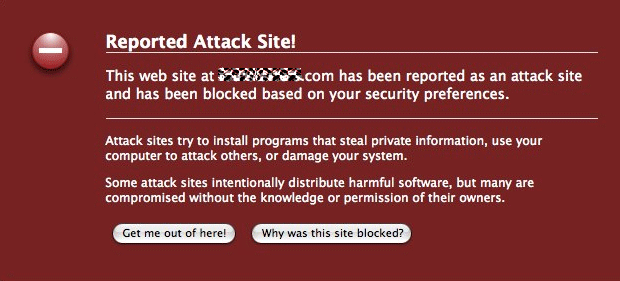
My platform is Mac, FF, with Addons; NoScript, MacAfee SiteAdvisor, and AdBlock Plus.
I was NOT using any Google site or feature, but tried to visit two sites I regularly go to +from a bookmarks page on my desktop+.
The first was a Formula One news site, the other a cycling enthusiast site, nothing dodgy at either usually.
However, a semi-opaque interstitial warning page covered my browser view warning me that the site I’m trying to visit may harm my computer, and according to my setting I am being warned, proceed or not?
Instead of visiting, I clicked on the “More info” link and was taken to a Google url (sorry I didn’t save the url) with data on the site’s malware problem, and last 90 days scanning results. It seems they had some harmful script inserted in their ads by a third party.
I removed those sites from my bookmarks page.
What concerns me, is that later I realized that I hadn’t used any Google feature to visit those sites, so how did G know I was going to them?
I didn’t go through G search, or a G bookmark. I went through a simple homemade bookmarks page on my desktop.
I have a Google account that I remain logged into most of the time. I use it for sitemaps, and the Google removal tool, G alerts, and of course G search.
However when I looked in my G account settings for anything remotely like, “Warn me if I ever try to visit a dodgy site”, and there’s nothing there remotely like that. I use the default “moderate” setting to stop filth showing in the serp.
So, how come G popped the interstitial, when I wasn’t using any G site feature I’m aware of? Too spooky.
All I can guess is that McAfee are collaborating with G on the Site Advisor feature, and extending it’s reach beyond the G serp? Or perhaps it is the NoScript addon people who G are collaborating with?
Normally when the McAfee addon warns you about a dodgy site it will point you to an info page on the McAfee domain, not the Google domain.
Anyone else seen this recently? Was it a test run, a slip-up, or old news?
Interestingly, I visited the same F1 site today using the same method, and got no warning interstitial, nor did the G serp listing of this site have any warning note. “
Google update september 2008 webmasterworld forum discussion.
There is an active forum discussion going on in webmaster world about recent changes in Google. If you want to continue with that discussion please join this thread
A member says
“
I think Google is weeding old or stagnant pages out of the index to make way for new pages, it is the only way they can keep up with the internet IMO. I recently did a search for a topic from 2002 and it was like going back into the stone ages in search. Everything now is what is happening today, not years ago. I don’t know what all your sites are about but even on the top sites it seems they weed the pages.
For example I ran a search for an electronics product from 2000, only 8 years ago. You can barely find traces of it in the sites I searched via Google. Now do the same search from a product from today, say the iphone. There is probably a billion pages on that. Now I am not saying they are doing things wrong, but with the millions of pages added every day to the internet they have to delete or else run out of space perhaps. I just wish they had the ability to search the archives easily for the topics or products that are “old”. Right now you can do that with Google news but not Google search.
Anyway my point is I think Google looks at a site and compares all the content, then keeps some of the most recent content in the results including the higher PR stuff and puts the older stuff in supplemental. That is only a guess but seems to be what is happening.
Since the older stuff I looked for was probably dropped into the deepest parts of these sites I couldn’t find it with Google anymore.
Maybe though this is the way the internet search will be, you use if for todays content only. If they had to archive all our sites I don’t think it is possible, not with all the pages being added.“
http://www.webmasterworld.com/google/3736037.htm
Official statement – what Google feels about hidden text
A nice writing by a Google employee on what they feel about hidden text with examples:
“In our “Popular Picks” thread, Burchman asked for some clarification on what Google considers to be hidden text, as our Webmaster Guidelines explicitly state that you should avoid hidden text or hidden links. We have a few examples of how text can be hidden in this Help Center article: http://www.google.com/support/webmasters/bin/answer.py?answer=66353
As I’ve noticed other users with similar questions in this group, such as “What if my navigation menu uses display:none to hide text until a button is rolled over?” I figured this would be a good topic to cover in “Popular Picks.” The reason we perceive hidden text as a problem is that it serves content to search engines which users don’t see, and presenting different content to search engines and users makes it more difficult to properly rank pages. If we detect that this text is intended to deceive search engines, there could be a negative effect on how your site is indexed and ranked in Google, including removal from our index.
Because such strong action may be taken on sites violating this guideline, it’s understandable that many webmasters have expressed concerns about the possibility of Google incorrectly detecting legitimate content as hidden text. When trying to figure out if a page may have hidden text that Google would consider malicious, start by thinking about why the guideline was written in the first place: Google wants to see what the user sees. If the text that Google sees is the same that a normal user is supposed to see, then you should be good to go. If Google is seeing text that is intentionally hidden from the user in an effort to manipulate search engine rankings, you have some work to do.
Let’s try this approach with a page you may have seen before: http://www.google.com/
In the top-left corner, you’ll see a line of text: “Web Images Video News Maps Gmail more.”
Google sees this text, and so do you, the user. So far, so good.
Next, let’s make sure nobody wrote “search engine search find crawl index rank” in white text on the white background, with the intention of ranking for those terms. Google would see that, but a normal user wouldn’t. Take off your “normal user” hat for a second and do a “Select All” on the page (by hitting CTRL-A on a PC, or COMMAND-A on a Mac, for instance). This will make any white on white text appear. As you can see, no hidden text.
But let’s try one more thing: Render the page again without CSS enabled. The Web Developer extension for Firefox lets you do this pretty easily. Without CSS, you’ll see several words we didn’t see before: “Blog Search Blogger Books Calendar Documents Finance Groups Labs Orkut Patents Photos Products Reader Scholar.”
You may have also noticed that these words appear in Google’s text- only cache of itself, which is a good indication of how Google “sees” a site. But before you blog about your discovery of hidden links on a PR 10 site =), take a look at the page again with CSS enabled. This time, click on the “more” link, and voilà, the no-longer-hidden text appears. This text is part of the page’s functionality, and it is meant for the user to read and use, not just for search engines to index. This text adds value for the user, which Google rewards, so Google would not hurt this site’s ranking or remove it from the index for that reason. Many sites use similar methods for navigational menus and other functional elements, so please rest assured that the existence of display:none on your site is not on its own a one-way ticket out of Google’s index.
When thinking about your own site, ask yourself if all of the text is there for the user. If the answer is “yes,” great job! If the answer is “no,” do your best to change it to a “yes,” and call on your webmaster community (this group!) for advice if you need it. CSS menus and white space without hidden text should not be a cause of concern when it comes to Google indexing and ranking; the only thing you should be concerned about is how they affect your visitors.
In the “Popular Picks” thread we asked for non-site specific questions, but now that this has been separated into its own thread, here’s your chance to ask about a site you are still unsure about. Please also let me know if you would like further clarification on particular aspects this topic. “Source: Google Groups
Is Google.com dropping country specific TLDs .
A webmaster world member has reported seeing Google drop country specific TLDs like transport.co.uk or mobilephones.co.in from their .com search.
He says
“I have noticed that Google.com isn’t showing .co.uk websites in it’s results as often as it used to, in fact .co.uk sites that I have always seen high up in the results seem to have disappeared completely from Google.com results whilst still featuring well in the Google.co.uk results.
Is Google systematically dropping .co.uk domains from it’s main SERPs seeing as Google.co.uk has taken off so well since it’s introduction?
I don’t think I have heard of this happening anywhere else on the web.. so thought I’d mention it 🙂 “
Well i haven’t see this happen atleast from where i see the results. if you notice it please comment in my blog
No Longer Have Badware – Badware reinclusion request
Badware is very harmful as the computer gets infected & for this purpose Google has recommended the following suggestions for people who are dealing with badware:
1) If you have badware, it usually means that your web server, your website, or a database used by your website has been compromised. Google has a nifty post on how to handle being hacked. You should be very careful when inspecting for malware on your site so as to avoid exposing your computer to infection.
2) Once everything is clear and dandy, you can follow the steps in our post about malware reviews via Webmaster Tools. Please note the screen shot on the previous post is outdated, and the new malware review form is on the Overview page and looks as shown below:
(Pic.)
3) Lastly, if you believe that your rankings were somehow affected by the malware, such as compromised content that violated the Webmaster Guidelines [i.e. hacked pages with hidden pharmacy text links], you should fill out a reconsideration request. To clarify, reconsideration requests are usually used for when you notice issues stemming from violations of our Webmaster Guidelines and are separate from malware requests.
If you have any additional queries, you can review their documentation or can post to the discussion group with the URL of your site. This updated feature in webmaster tools is very efficacious in discovering & fixing any malware related problems.
Source: Google Webmaster Central Blog
Your own website against you – nice writeup
A nice writeup by incredible bill of webmasterworld about lawyers using your own site information against you.
“ITFALLS OF SAVING YOUR SITE FOR POSTERITY
Search engines automatically cache your pages and something called the Internet Archive, or Wayback Machine, also comes along and makes a permanent copy of your site for “posterity”. The problem starts when you realize you may have content on your web site that could result in legal issues. You may act quickly to resolve those issues yet the problems still remain without your knowledge because you didn’t act as quickly as all the robots crawling your site.
Unfortunately, legal beagles love that your site was saved for “posterity” when gearing up to file a lawsuit so although you’ve already done the right thing by cleaning potentially harmful things off your site, the tireless automatons crawling the internet have made sure there’s plenty of evidence and the next thing you know, you’re about to get hung out to dry.
If you think the lawyers aren’t technically savvy, think again:
|
http://www.law.com/jsp/legaltechnology/pubArticleLT.jsp?id=1202422968612
Not only can they find your content, they do it under cloak without your knowing about it!
|
You can forget your rights, just throw them out the window, because the history of your website is already busy squealing on you without your knowledge or permission.
HOW DO YOU PROTECT YOUR SITE FROM HISTORICAL SNOOPING?
Obviously the simplest way is to keep your nose clean so nobody has a reason to be snooping in the first place.
However, this is the internet and you have to OPT-OUT of things to protect your rights.
Here’s a few preventative ways to stop your website from being archived and being used as a snitch:
USE NOARCHIVE
Make sure you include the NOARCHIVE meta tag in each web page so that there is no cache in any of the major search engines.
USE ROBOTS.TXT
Block all of the archive site spiders, such as used by the Internet Archive, in your site’s robots.txt file with an entry as follows:
|
The [url=http://crawler.archive.org/]Heritrix software[/url] used by the Internet Archive is Open Source which means there are more archives out there and possibly using deviations of Heritrix that ignore robots.txt and cloak their access to your site.
HELP FOR HOSTED BLOGGER ISSUES
If you’re running a blog hosted on a 3rd party service like Blogger or WordPress, your options may be limited to just embedding NOARCHIVE which the Internet Archive ignores, meaning anyone running stock Heritrix code would also ignore by default.
The only way you can exclude your site, [url=http://www.archive.org/about/exclude.php]according to their site[/url], is to contact them directly. Obviously an insufficient amount of businesses and sites in general are aware of the perils posed by the Internet Archive or they would honor the NOARCHIVE tag for those sites with limited access and no robots.txt just to avoid a flood of emails.
OTHER POTENTIAL RISKS
Snap.com has taken screen shots of every web page, then Ask started taking limited screenshots as well as a some new completely graphical search engines like SearchMe. Some screen shots have minimal resolution too tiny to read but others, like Snap and SearchMe, are big enough you can read, and these too are called evidence in a lawsuit. Even the tiniest thumbnail can still show a licensed trademark being used without permission.
Some of the social bookmarking sites that allow large chunks of content to be copied such as Kaboodle, Jeteye, Eurekster, some using tools like Heritrix (see above), to make small archive copies of specific content.
SUMMARY
Obviously there’s no way you can completely stop anyone from making copies of your site but it may pay by being diligent in keeping many of these technologies off your site that provide any form of archives.
This is just another form of insurance that could, in the end, save your business, your house, your car, your family… “
Is TPR penalty lifted for some sites
Some webmaster world members are noticing that the Toolbar Pagerank penalty is lifted for their sites. Google started imposing Toolbar Pagerank Penalties for sites that sell / buy links around January this year now it seems to be lifted for some sites. Though its being reported in forums we never noticed anything like that across our client sites. Probably its because we don’t sell or buy links for our clients due to our policy.
forum discussion here: http://www.webmasterworld.com/google/3729425.htm
Ways to check backlinks in Google,Yahoo,MSN and other search engines.
I have many question me how to check the backlinks or links coming into their site in various search engines. Well i already wrote an article based on that here. http://www.searchenginegenie.com/backlink-strategies.htm this article isey a bit old but works great still. Today the top 3 search engines are more friendly to webmasters and are willing to share a percentage of what they know about your backlinks.
1. Google: Traditionally Google used to show most of the backlinks to a site ( link: ) but way back in 2002 they broke that comment and started showing backlinks only with PR 4 and above. Then later in 2005 they broke that too and started showing very less sometimes less than 2% of backlinks a site really possesses. This is had been the case for more than 2 years. But in 20o6 started a massive webmaster communication programme. They opened up something called Google sitemaps ( now called Google webmaster central ) . Later they capitalized on that and due to massive support they got from webmasters and now the webmaster tools shows a lot of data very useful for webmasters. One of that is the backlinks to a site/page/from inner pages etc. To check the backlinks what Google shows you need to first verify your website to prove you are the owner. Now we can check backlinks if we login to Google webmaster tools here.
Once logged in and site verified:
We go to Dashboard >> Links and we can check backlinks what Google shows.
Remember even this is not accurate here google shows atleast 25% backlinks so you can count that what they are showing is somewhat correct.
Yahoo: Yahoo is the only search engine who never hesitated to share their backlink data. In yahoo we can just use link:http:// to check for a single page or linkdomain: to check for an entire site. There are lot of ways you can check backlinks in yahoo especially filtering out sites. Please check those stuff here.
http://www.searchenginegenie.com/backlink-strategies.htm
MSN: MSN was showing backlink in link: command before a year but they broke the command and stopped showing all backlinks. Now they opened up communication and started http://webmaster.live.com/ where you can verify your site like Google and check backlinks.
Its good to see search engines share more with webmasters in recent days i hope we see more from them in future.
vijay
Olympics and SEO – We will get you top 10 multiple rankings.

More information on 404 errors
Google webmaster central blog had been posting some interesting stuff on 404s for a while this time they had a posting on 404 errors on how they treat 410 errors. According to the official Google webmaster blog 410 errors are treated the same way as a 404 error. More from the webmaster blog:
How do you treat the response code 410 “Gone”?
Just like a 404.
Do you index content or follow links from a page with a 404 response code?
We aim to understand as much as possible about your site and its content. So while we wouldn’t want to show a hard 404 to users in search results, we may utilize a 404’s content or links if it’s detected as a signal to help us better understand your site. Keep in mind that if you want links crawled or content indexed, it’s far more beneficial to include them in a non-404 page.
What about 404s with a 10-second meta refresh?
Yahoo! currently utilizes this method on their 404s. They respond with a 404, but the 404 content also shows We feel this technique is fine because it reduces confusion by giving users 10 seconds to make a new selection, only offering the homepage after 10 seconds without the user’s input.
Should I 301-redirect misspelled 404s to the correct URL?
Redirecting/301-ing 404s is a good idea when it’s helpful to users (i.e. not confusing like soft 404s). For instance, if you notice that the Crawl Errors of Webmaster Tools shows a 404 for a misspelled version of your URL, feel free to 301 the misspelled version of the URL to the correct version. For example, if we saw this 404 in Crawl Errors:http://www.google.com/webmsters <-- typo for "webmasters" we may first correct the typo if it exists on our own site, then 301 the URL to the correct version (as the broken link may occur elsewhere on the web):http://www.google.com/webmastersHave you guys seen any good 404s?Yes, we have! (Confession: no one asked us this question, but few things are as fun to discuss as response codes. :) We’ve put together a list of some of our favorite 404 pages. If you have more 404-related questions, let us know, and thanks for joining us for 404 week!
Blogroll
Categories
- AI Search & SEO
- author rank
- Authority Trust
- Bing search engine
- blogger
- CDN & Caching.
- Content Strategy
- Core Web Vitals
- Experience SEO
- Fake popularity
- gbp-optimization
- Google Adsense
- Google Business Profile Optimization
- google fault
- google impact
- google Investigation
- google knowledge
- Google panda
- Google penguin
- Google Plus
- Google Search Console
- Google Search Updates
- Google webmaster tools
- google-business-profile
- google-maps-ranking
- Hummingbird algorithm
- infographics
- link building
- Local SEO
- local-seo
- Mattcutts Video Transcript
- Microsoft
- Mobile Performance Optimization
- Mobile SEO
- MSN Live Search
- Negative SEO
- On-Page SEO
- Page Speed Optimization
- pagerank
- Paid links
- Panda and penguin timeline
- Panda Update
- Panda Update #22
- Panda Update 25
- Panda update releases 2012
- Penguin Update
- Performance Optimization
- Sandbox Tool
- search engines
- SEO
- SEO Audits
- SEO Audits & Monitoring
- SEO cartoons comics
- seo predictions
- SEO Recovery & Fixes
- SEO Reporting & Analytics
- seo techniques
- SEO Tips & Strategies
- SEO tools
- SEO Trends 2013
- seo updates
- Server Optimization
- Small Business Marketing
- social bookmarking
- Social Media
- SOPA Act
- Spam
- Technical SEO
- Uncategorized
- User Experience (UX)
- Webmaster News
- website
- Website Security
- Website Speed Optimization
- Yahoo