




SEO tools updated 10-20-14
As you all know we at Search Engine Genie have the most comprehensive set of SEO tools.
https://www.searchenginegenie.com/seo-tools.htm
We like to take this opportunity to thank everyone who have used our tools on a regular basis. We will continue to keep our tools free for many years to come. We hate the policy of tools subscription. Please don’t fall for tool subscription scam. There are enough free tools available online that you can use for your SEO purpose.
Free tools help you limit the queries you send to Google. Automated paid tools send mass amount of queries to Google when can result in penalty for your site. Google has always said they will ban tools that send mass amount of queries to their search engines. For example web position gold a tool that scraps Google was literally banned for a very long time. Nowadays there are subscription based tools that has sprung up. Avoid using them long term because
1. Google knows what are the sites that are sending too many automated queries.
2. Mass automated tools will stop anytime soon. Google knows how to block them.
3. Results vary significantly because most of the time tools set results to 100 instead of 10 the way we do normal search.
I can list out many reasons to not shed out money on tools that are freely available online.
We at search engine genie do periodic checks our tools to make sure most of them work. Yes some tools stop working as the search engines evolve but we do our best to make most of them work.
Keep using our free SEO tools and don’t FALL for paid tools SCAM.
Penguin Update 3.0 live testing started
Long awaited Penguin 3.0 Update is livc. We are seeing significant moving across many sites we monitor. Till now what we are seeing is excellent movement for many sites affected. Not seeing any new penalties. Sites that did not do any spam link building for the past 1 year has survived and doing well. We at Search Engine Genie literally stopped link building work and do only overall website improvement.

So far it is good news for us but it takes lot more time before the whole testing process is done. Panda 4.1 took almost a month and still going on. I suspect Penguin update will go on for couple of weeks.
I hope this update brings good news for all our sites. So far so good for all our sites. We wish you all success with your sites.
Again there is no official word from Google but from our testing we are sure Penguin 3.0 is live now in search results and being tested across different data centers.
site-move tool updated in webmaster tools
Google recently launched site-move tool to help webmaster move from their site from one domain to another domain. Moving a site from one domain to another domain is the most tedious and risky process. Many webmasters make mistakes when moving domain names. Most of them odn’t know how to setup the right redirect. Some of them use meta refresh, javascript redirect, simple server side redirect ( 302 redirect ) etc. All these listed redirects are not good for search engines. When you are doing a move especially moves like domain to domain which is mostly permanent it is important we use a 301 redirect. 301 redirect tells the search engines that the site has moved permanently from one domain to the other.

If you want to do a safe move Google webmaster tools is helping you do it. Log-in to webmaster and go to this page
https://www.google.com/webmasters/tools/change-address
Google has given this list of simple checklist when moving site from one URL to other.
| 1 | Pick your new site from the list If you don’t see your site, add it now. You must specify only root-level domains with no trailing path (e.g. https://www.example.com/). | ||
| 2 | Confirm that 301-redirects work properly URLs from your old site should be redirected to your new site using permanent 301-redirect directives. | ||
| 3 | Check that verification methods are still present This step ensures your new and old sites are properly verified before the move, and will remain so afterwards. | ||
| 4 | Submit the change of address request Transition your site indexing from www.example.com to your new site. |
Clean your backlinks Google penguin almost here
It is time to clean up your back-links if you have already not done so. If you still have lot of unnatural links built by you or your SEO company it is time to clean them. You had 2 plus full year for it. Google’s penguin update was launched in Early 2012 and it is almost end of 2014 now.
We at Search Engine Genie stopped doing most of the link building strategies out there. We don’t do social bookmarking, link exchanges, article syndication, slide sharing and a lot more that search engines consider unnatural. We never buy links for our clients this has been our strategy since the day we launched in the year 2004. We feel buying links destroys the very method the internet works. It helps people manipulate their rankings with money. Money should never influence any sites rankings. Only quality and hard work should be rewarded.
If you want to follow about penguin update look at my friend’s blog http://penguinkills.com . It has ton of information about the upcoming penguin update. We should expect a penguin this weekend. Google is getting ready for some praises and bashing.
So what you think this update will target?
Supporting negative SEO petition
Recently I got an email from one of my friend saying he opened a negative SEO petition. Though I don’t 100% agree negative SEO has huge impact, i agree it exists and does some damage to competitors.
Please help spread the word and let Google know negative exists. Hopefully the upcoming penguin update addresses this issue.
Change.org negative SEO petition
Penguin 4.1 downs lyrics, games blogs and more
Latest Panda update is a huge step forward. We like Google because of these great updates. Google took down a lot of spam websites in recent update. It is not just spam websites that lost it’s rankings. Lot of blogs, free sites, lyric sites, game sites, directory listing sites etc were downed.
Two types of penalities were targeted.
1. Pure spam penalty
2. Thin content
Pure spam applies to sites that uses automatically generated gibberish, cloaking and scraping content from other websites.
Thin content sites are sites that has pages with very little or no contents. Google rarely penalize sites for duplicate or thin content. This is one of priority update from Google because it targeted low quality, thin, duplicate contents in a site.
Sites that might just replicate a big brand by selling their products are hit badly. I have seen sites seilling the same products across 100s of sites. Problem with these sites is that they have exact duplication product description, title price everything. Only the template design might be different everything else including the images of individual products will be similar. Google has pushed down these kind of sites low down their listings. It is not just these sites that are affected there are many more times which have just one line or 2 link contents that were taken down.
Google always takes excellent steps to improve search quality and we at Search Engine Genie appreciate this excellent effort from Google.
Some screenshots of sites taken down in the last 5 hours.
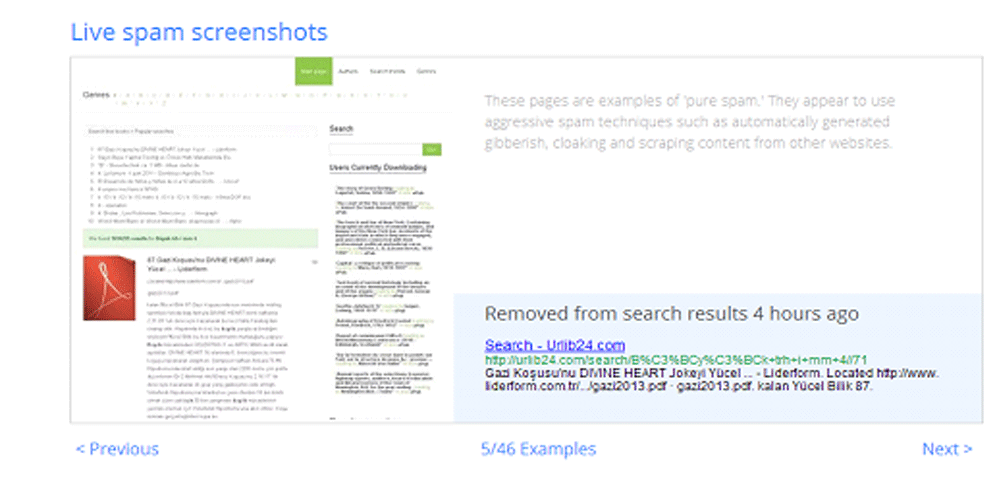
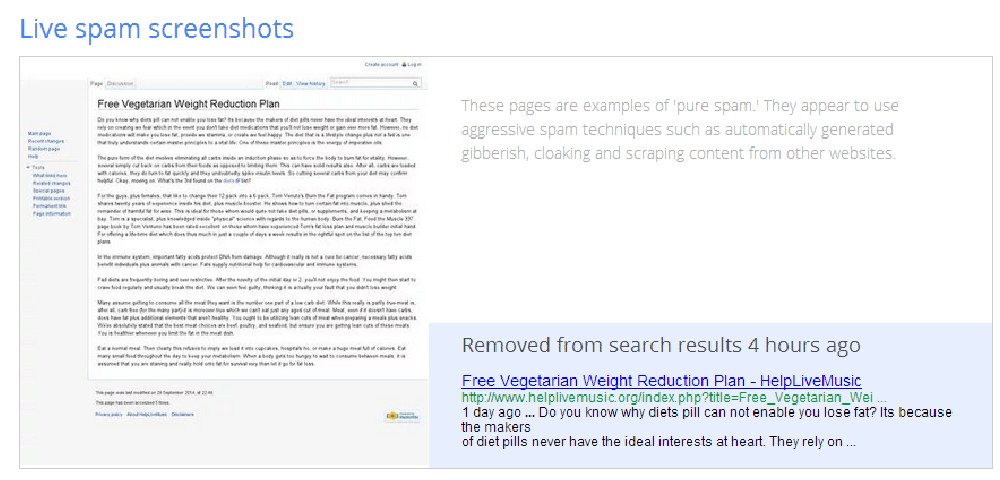
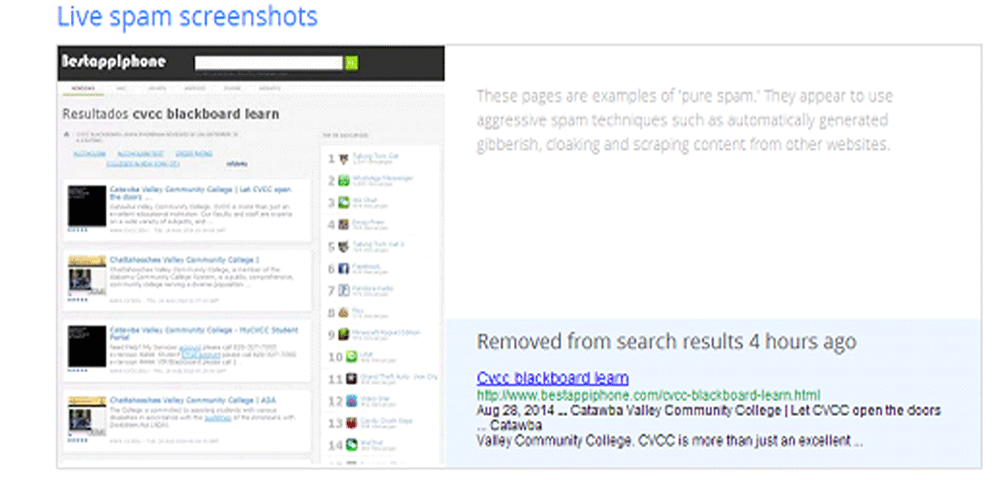
Search engines face more and more problems everyday with different types of spam. Now we have seen Panda update we want the much awaited penguin update. We know penguin update will be biggest update of the year from Google.
Latest panda update targets thin contents
Yesterday Google officially announced they rolled out the latest update in Panda. Both Private blog networks and sites with little or no contents were targeted. There are many sites run with very low quality contents and Panda has killed most of them before. This is the latest attack on those sites and there are discussion in various forums about this update. Many report loss in 100s of sites they own.

Panda update has always been the best update Google ever made to their algorithm. We support Panda update
SEO is common sense Not Rocket science
Is SEO a qualification. Many think so but no it is not a qualification. There is no degree required for this or does have any position related. I see in countries like India they call themselves SEO analyst, SEO senior expert etc. Those sounds really funny. Who gave these people these titles? Those who gave this name are just trying to scam people. There are no posts related to SEO. The maximum you can call yourself is Search engine optimizer. There are no better titles than this.

Same SEO is not rocket science it requires patience, dedication and lot of your time. If time is money for you then doing SEO is not your cup of tea. You need to find some good SEO companies so don’t have to use up your time. But if you have time in your hands then it is all Do It Yourself SEO. Don’t spend a penny if you have time there are lot of online materials to read and understand the way SEO works these days. If you spend 3 months you will read most of the details required for SEO. 6 months you can update yourself on past trends too. It is important to know the current situation and past so that you don’t make mistakes that was penalized by search engines before.
I stress again SEO is not rocket science anyone can do it. Anyone calling themselves SEO analyst or what ever crap don’t believe there are no terms like that. SEO is important but Search engine optimizers are not always important. fake watches copy rolex golden replica watch fake replica watches rolex for sale online
Adsense not affected moving to https
Barry of Seroundtable.com pointed out that he is facing problem with adsense revenue after moving from http to https. We recently moved to https but relatively new to adsense. We never wanted to stuff our sites with ads but penguin update made us do it. I moved to https because I don’t care about back links. Many webmasters are worried they might lose back link value if they move to https. The whole purpose or one of the most important purpose for Google to make this initiative is to make sure back links don’t play that vital role anymore. We have 100s of 1000s of natural links coming to our blogs, free tools and we are not worried of any unnatural links. Only people are having many un-natural links should be concerned with losing their back link power.

Our traffic has increased after moving to https and people trust us more now than how we were before. And NO our adsense revenue has not dropped a bit. Make by the CPC is a bit low but our revenue has been steady. From our site. Barry I think you need to look elsewhere for problems. I don’t the problem is with your https.
I recommend going for https. Now we recommend almost all our clients to move to https. It is not just for Google it also reduces hacking attempts because all data transfer is secure. I support this great Google’s initiative everything they did were for the welfare of internet except yes the killer update you know what I mean
Google has some specific instructions for webmasters who run adsense on their sites and planning to move their site to https
Sandbox tool questions ask in our forum
Every day we get questions from people asking us how to get out of Sandbox. Time and again we have stressed the point. Sandbox filter exists in Google and our tool tries to relate a keyword with your current keyword ranking. If there is a big difference where you are supposed to rank then our tool will alert that your site is in sandbox. We always give free advice for site owners have problem with Google sandbox filter.
If you have problem with your site being in sandbox ask in our Sandbox tool forum
I am personally giving advice in our SEO forum. If you have questions shoot me a PM or post in our forum and I will answer your questions promptly.
Remember not all sites are in sandbox. People have asked us questions why facebook.com is in sandbox for a particular keyword. Understand we don’t have time to run a tool with 100 factors integrated. If you query for “auto transport” and you want facebook to come in 1st page then you are insane. Our tool will say facebook.com is in sandbox for such weird searches. So please be clear and understand we provide free service. We ask you to post in our forum for free advice. We never charge a penny for the advice you are getting from us. We are one of the best resource for articles, tools etc out there. We are not moz.com to charge for something that is freely available online. A FREE advice is always free take it or leave it.
Blogroll
Categories
- 2016 SEO trends predictions
- AI for eCommerce
- AI Search & SEO
- author rank
- Authority Trust
- Bing search engine
- blogger
- CDN & Caching.
- Content Strategy
- Core Web Vitals
- eCommerce Growth
- Experience SEO
- Fake popularity
- gbp-optimization
- Google Adsense
- Google Business Profile Optimization
- google fault
- google impact
- google Investigation
- google knowledge
- Google panda
- Google penguin
- Google Plus
- Google Search Console
- Google Search Updates
- Google webmaster tools
- google-business-profile
- google-maps-ranking
- Hummingbird algorithm
- infographics
- link building
- Local SEO
- local-seo
- Mattcutts Video Transcript
- Microsoft
- Mobile Performance Optimization
- Mobile SEO
- MSN Live Search
- Negative SEO
- On-Page SEO
- Page Speed Optimization
- pagerank
- Paid links
- Panda and penguin timeline
- Panda Update
- Panda Update #22
- Panda Update 25
- Panda update releases 2012
- Penguin Update
- Performance Optimization
- Sandbox Tool
- search engines
- SEO
- SEO Audits
- SEO Audits & Monitoring
- SEO cartoons comics
- seo predictions
- SEO Recovery & Fixes
- SEO Reporting & Analytics
- seo techniques
- SEO Tips & Strategies
- SEO tools
- SEO Trends 2013
- seo updates
- Server Optimization
- Shopify Optimization
- Shopify SEO
- Shopify Services
- Small Business Marketing
- social bookmarking
- Social Media
- SOPA Act
- Spam
- Technical SEO
- Uncategorized
- User Experience (UX)
- Webmaster News
- website
- Website Security
- Website Speed Optimization
- Yahoo